Im relatively new to LaTeX and trying to create the table below, but so far I'm unsuccessful. Any help will be appreciated.

Asked
Active
Viewed 218 times
1

Przemysław Scherwentke
- 37,268

Peter
- 19
1 Answers
1
Two options: the first one produces the table as you posted it. In the second option I suppressed the vertical rules and the colors and used the features from the booktabs package (using siunitx the table could be further improved):
\documentclass{article}
\usepackage{booktabs}
\usepackage[table]{xcolor}

\begin{document}

\begingroup
\renewcommand\arraystretch{1.3}
\noindent\begin{tabular}{|>{\columncolor{gray!30}}l*{4}{|l}|}
\hline
& \multicolumn{4}{l|}{\cellcolor{gray!30}\bfseries Interest rates} \\
\cline{2-5}
\bfseries Stock & &  \bfseries Decline & \bfseries Increase & \bfseries Unit \\
\bfseries Price & & & & \bfseries Frequency \\
\cline{2-5}
& \bfseries Decline & 200 & 950 & 1150 \\
\cline{2-5}
& \bfseries Increase & 800 & 50 & 850 \\
\cline{2-5}
& & 1000 & 1000 & 2000 \\
\hline
\end{tabular}
\endgroup\par\bigskip

\noindent\begin{tabular}{*{5}{l}}
\toprule
& \multicolumn{4}{l}{\bfseries Interest rates} \\
\cmidrule(l){2-2}\cmidrule(lr){3-3}\cmidrule(lr){4-4}\cmidrule(r){5-5}
\bfseries Stock & &  \bfseries Decline & \bfseries Increase & \bfseries Unit \\
\bfseries Price & & & & \bfseries Frequency \\
\cmidrule{2-5}
& \bfseries Decline & 200 & 950 & 1150 \\
& \bfseries Increase & 800 & 50 & 850 \\
& & 1000 & 1000 & 2000 \\
\bottomrule
\end{tabular}

\end{document}
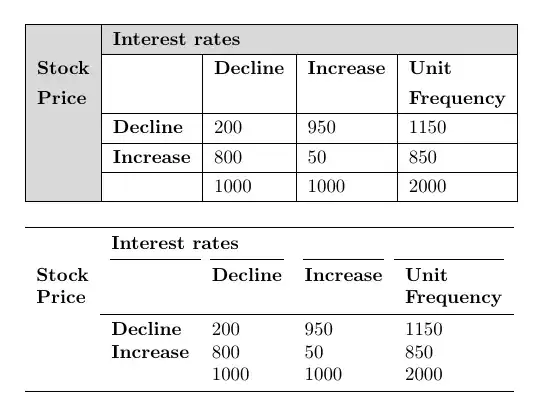
The \noindents and the group for the first table won't be necessary if the tables are inside a table environment.

Gonzalo Medina
- 505,128
-
\begin{center}
\begin{tabular}{c c c c}
\hline Stock Price/Interest Rate & Decline & Increase & Unit frequency\ \hline \hline Decline & 200 & 950 & 1150\ Increase & 800 & 50 & 850\ & 1000 & 1000 & 2000\ \hline \end{tabular} \end{center} This is what I have done so far. It is just the labelling of the rows and columns I a quite unsure of. Thanks for the quick responses, you are all a life saver to me. – Peter Aug 04 '14 at 14:12
\documentclass{...}and ending with\end{document}. – Aug 04 '14 at 13:27\multirow{}and\multicolumn{}commands to create table cells which span multiple rows or colums. It also provides information on colouring table cells. – Bart Aug 04 '14 at 14:03