Nice work on your solution! Someone may come along with a better way to do this, but I've taken your code, added the page numbers, and solved the page height problem. I also added a conditional for the last page, to check if it was already printed as part of the last double-page spread.
For my example, I used the biblatex manual which should be available with any TeX distribution, since I didn't have your magazine file.
For the page numbers: I used \llap{<number>} and \rlap{<number>} to place the page number over the included pdfs, without using any additional space. If you wanted to do any additional styling (colors, sizing, font shape, potentially boxes, etc.) this could all be added inside the \Xlap arguments. If you plan to do this, I'd suggest defining a macro, so the style can be defined in one place and used in all the various \llap and \rlap commands.
For the page height problem: Any float is not allowed to break across a page, and hence cannot exceed \textheight. But there is no reason the graphics need to be inside a float. I used \captionof{figure}{A Flatplan} (from the capt-of package) to include the caption without the figure environment.
For the last page: If the last page is odd (as is the case with the biblatex manual), your solution would print it twice: once as the right half of the final double-page spread, and another time as a page on its own. I added a conditional expression to only output the final single page if the last page is not odd (AKA even).
Complete Code:
\documentclass{article}
\usepackage[a4paper,margin=2cm]{geometry}
\usepackage{graphicx}
\usepackage{multido}
\usepackage{capt-of} % added for caption without float

\def\filename{biblatex.pdf}
\def\scale{.05}

\pdfximage{\filename}

\newcount\N  % counter for the last doublepage spread
\N=\pdflastximagepages\relax
\advance\N by -1\relax
\divide\N by 2\relax

\begin{document}
    \centering
%    \hspace{\dimexpr(8.5in*\scale)/2\relax}
    \fbox{\includegraphics[scale=\scale,page=1]{\filename}\llap{1}}
    \multido{\ileft=2+2,\iright=3+2}{\the\N}{%
        \fbox{%
            \rlap{\ileft}\includegraphics[scale=\scale,page=\ileft]{\filename}
            \includegraphics[scale=\scale,page=\iright]{\filename}\llap{\iright}%
        }
    }
    \ifodd\the\pdflastximagepages\else% only output the last page if not already included with a spread
         \fbox{\rlap{\the\pdflastximagepages}\includegraphics[scale=\scale,page=\the\pdflastximagepages]{\filename}}
    \fi
    \captionof{figure}{A Flatplan}
\end{document}
Output:


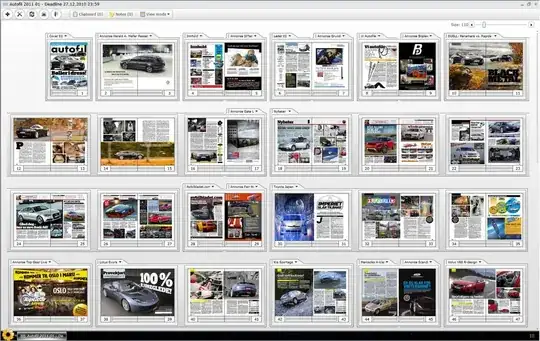


 .
. 
tikz.graphicscan use external images. (And the code is better according totikz's documentation.) Why not just use atabular? – cfr Aug 05 '14 at 01:11pdfpagesdid not work out...) I posted a possible solution as an answer down below, that can surly be improved. I hope this illustrates my problem a bit better. – daniel Aug 06 '14 at 12:17