9

Is it possible in LaTeX to divide the following list of items into two columns:

\documentclass[12pt,letterpaper]{article}

\usepackage{enumitem}

\begin{document}

\section*{Section 01}
\begin{itemize}[noitemsep,nolistsep]
    \item item 1
    \item item 2
    \item item 3
    \item item 4
    \item item 5
\end{itemize}

\end{document}

Here is the output:

enter image description here

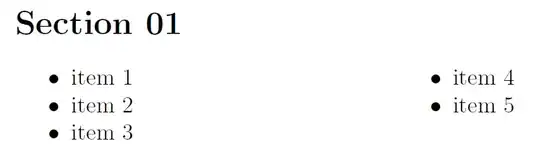
I would like to have items 1, item 2, item 3 in the left column while item 5 and item 6 on the right one. Would this possible using LaTeX? I am actually looking for something like the following image:

enter image description here

2 Answers2

8

You can use multicol package.

\documentclass[12pt,letterpaper]{article}

\usepackage{enumitem,multicol}

\begin{document}

\section*{Section 01}
\begin{itemize}[noitemsep,nolistsep]
\begin{multicols}{2}
    \item item 1
    \item item 2
    \item item 3
    \item item 4
    \item item 5
\end{multicols}
\end{itemize}

\end{document}

enter image description here

  • Thank Kumar. Can I have your thoughts on how I can adjust the location where the column is divided? I mean can I move the border of the cell to the left and right? – shashashamti2008 Aug 05 '14 at 00:41
  • @A2009 You mean where the column is broken and next column gets started? –  Aug 05 '14 at 00:45
  • What if i wanna use enumerate instead? – Fadwa Nov 20 '15 at 15:14
  • @Misaki: Use the same strategy. If you want numbers to increase horizontally use tasks package instead of enumerate. –  Nov 27 '15 at 15:07
5

The following solution worked for me. However, I am not sure if it is the best solution.

\documentclass[12pt,letterpaper]{article}

\usepackage{enumitem}
\usepackage{multicol}

\begin{document}

\section*{Section 01}

\begin{multicols}{2}
    \begin{itemize}[noitemsep,nolistsep]
        \item item 1
        \item item 2
        \item item 3
        \item item 4
        \item item 5
    \end{itemize}
\end{multicols}
\end{document}

Here is the output:

enter image description here