11

In the following code I can't make the right parenthesis to have arbitrary colors.

\documentclass{article}
\usepackage{amsmath}
\usepackage{xcolor}
\begin{document}
\begin{equation}
\left(\frac{44}{55}{\color{blue}\right)}
\end{equation}
\end{document}

As soon as I add color around \right) (or \left() I get an error: ! Missing } inserted.

Is there a work around for this? (I prefer not to touch other parts of the equation).

alfC
  • 14,350
  • related: http://tex.stackexchange.com/questions/103325/colored-underbraces-for-annotating-equations – jub0bs Aug 07 '14 at 09:32
  • Just for you to know why it didn't work: you enclose \right) in the group without \left(. – m0nhawk Aug 07 '14 at 09:35
  • 1
    related: http://tex.stackexchange.com/questions/125795/defining-a-macro-for-real-colored-delimiters – TheVal Aug 07 '14 at 17:08

3 Answers3

13

It's really easier: \left and \right form a group, so setting the color immediately before \right will do.

\documentclass{article}
\usepackage{amsmath}
\usepackage{xcolor}
\begin{document}
\begin{equation}
\left(\frac{44}{55}\color{red}\right)+2
\end{equation}
\end{document}
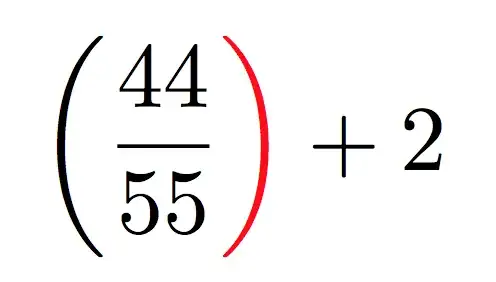
enter image description here

For coloring also the left delimiter, you can save the color before changing it:

\documentclass{article}
\usepackage{amsmath}
\usepackage{xcolor}
\begin{document}
\begin{equation}
\begingroup
\colorlet{savedleftcolor}{.}
\color{blue}\left(\color{savedleftcolor}
  \frac{44}{55}\color{red}\right)
\endgroup
+2
\end{equation}
\end{document}

enter image description here

A generalized version:

\documentclass{article}
\usepackage{amsmath}
\usepackage{xcolor}

\newcommand{\cleft}[2][.]{%
  \begingroup\colorlet{savedleftcolor}{.}%
  \color{#1}\left#2\color{savedleftcolor}%
}
\newcommand{\cright}[2][.]{%
  \color{#1}\right#2\endgroup
}


\begin{document}
\begin{equation}
\cleft[blue](\frac{44}{55}\cright[red])
+
\cleft[red](\frac{44}{55}\cright)
\end{equation}
\end{document}

Note that \cleft{[} is needed for having the bracket, if no color is specified, or \cleft\lbrack.

Don't try closing \cleft with \right or \left with \cright.

enter image description here

egreg
  • 1,121,712
5

How to do things so complicatedly when there is a simple alternative?

\documentclass{article}
\usepackage{amsmath}
\usepackage{xcolor}
\begin{document}
\begin{equation}
\left(\frac{44}{55}\color{blue}\right)\color{black}        
\end{equation}
\end{document}
wipet
  • 74,238
  • Shouldn't the last just be \normalcolor? – daleif Aug 07 '14 at 06:26
  • May be Yes. I'am not specialist of (x)color packages and any others LaTeX packages:) – wipet Aug 07 '14 at 06:32
  • There should be way to remember the colour before it gets changed, then the code could be modified to behave exactly as if the colour command was grouped. And +1 for a genuine idea! :) – yo' Aug 07 '14 at 06:42
  • 2
    Yes. \colorlet{outcolor}{.} to remember current color and \color{outcolor} to restore it. See for example my answer http://tex.stackexchange.com/questions/46701/how-to-color-just-the-vec-symbol/186226#186226 This is more complicated case because the kerning problem have to be solved there. This problem isn't here during typesetting only parenthesis. – wipet Aug 07 '14 at 07:50
  • 1
    Resetting \color{black} is not needed. – egreg Aug 07 '14 at 09:17
4

Ugly, but works.

\documentclass{article}
\usepackage{amsmath}
\usepackage{xcolor}
\begin{document}
  \begin{equation}
    \left(\frac{44}{55}\right.{\color{blue}\left.\mkern-7mu\vphantom{\frac{44}{55}}\right)}
  \end{equation}
\end{document}

enter image description here

  • Could you maybe explain how you arrived at the \mkern-7mu spacing adjustment? Mainly by "occular regression", or by a somewhat more explicit method? – Mico Aug 07 '14 at 05:13
  • @Mico eye balling! ;) –  Aug 07 '14 at 05:14