4

I obeserve a strange behaviour when trying to get text vertically centered in tabularx cells. According to a suggestion, I tried \renewcommand{\tabularxcolumn}[1]{m{#1}} which works so far as it goes. But I have three columns, only two of which appear to be affected. Here is my MWE

\documentclass{article}
\usepackage{tabularx,colortbl,xcolor}
\usepackage[utf8]{inputenc}
\begin{document}
\renewcommand{\tabularxcolumn}[1]{m{#1}}
   \begin{center}
      \begin{tabularx}{\textwidth}{|c|X|X|}
         \hline
         Chomsky-Typ & Name der Sprachfamilie & Automaten \\
         \hline\hline\hline
         0 & \cellcolor{lightgray!20}rekursiv aufzählbar & \cellcolor{lightgray!20}(N)DTM \\[1em]
         \hline
         \cellcolor{lightgray!20}1 & \cellcolor{lightgray!20}kontext-sensitiv & NLBA \\[1em]
         \hline
         \cellcolor{lightgray!20}3 & regulär & \cellcolor{lightgray!20}(N)DEA \\[1em]
         \hline
         hu & ha & he \\[1em]
         \hline
      \end{tabularx}
   \end{center}
\end{document}

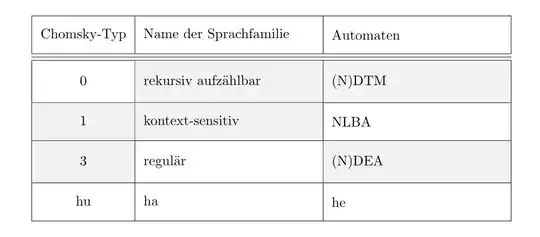
Here is the output. As you see, the right X coulumn is unaffected.

I am at a loss. What am I missing?

oarfish
  • 1,419

2 Answers2

3

This is due to the extra space of \\[1em] being effectively added to the text within the last cell in the row, thus preventing that cell from being centered - see here.

Thus in order to get your content centered and be able to specify row height, you need to add another, empty, column to your table, like so:

\documentclass{article}
\usepackage{tabularx,colortbl,xcolor}
\usepackage[utf8]{inputenc}
\begin{document}
\newlength\origtabcolsep
\origtabcolsep=\tabcolsep
\tabcolsep=0pt
\renewcommand{\tabularxcolumn}[1]{m{#1}}
\newcolumntype{e}{>{\hsize=0pt}X}
\newcolumntype{x}{>{\hskip\origtabcolsep}X<{\hskip\origtabcolsep}}
\newcolumntype{C}{>{\hskip\origtabcolsep}c<{\hskip\origtabcolsep}}
   \begin{center}
      \begin{tabularx}{\textwidth}{|C|x|xe|}
         \hline
         Chomsky-Typ & Name der Sprachfamilie & Automaten &\\
         \hline\hline\hline
         0 & \cellcolor{lightgray!20}rekursiv aufzählbar & \cellcolor{lightgray!20}(N)DTM &\\[1em]
         \hline
         \cellcolor{lightgray!20}1 & \cellcolor{lightgray!20}kontext-sensitiv & NLBA &\\[1em]
         \hline
         \cellcolor{lightgray!20}3 & regulär & \cellcolor{lightgray!20}(N)DEA & \\[1em]
         \hline
         hu & ha & he &\\[1em]
         \hline
      \end{tabularx}
   \end{center}
\tabcolsep=\origtabcolsep
\end{document}

output table

The specification of the empty column was inspired by this. Edit: I fixed the white space at the right hand side of the table by introducing new column types allowing to set \tabcolsep to 0pt temporarily.

greyshade
  • 3,576
0

I suggest another approach: with the cellspace package, define a minimal vertical spacing between the top of a cell and the above cell, and similarly aminimal spacing between the bottom of a cell and the top of the below cell. There remains to prefix the column specifier with S. It works by default with the l, r, c specifier, and with the X type if you dclare so in preamble. Here is an example (values to be adjusted to your taste):

\documentclass{article}
\usepackage{tabularx,colortbl,xcolor}
\usepackage[utf8]{inputenc}
\renewcommand{\tabularxcolumn}[1]{m{#1}}

\usepackage{cellspace}
\setlength\cellspacetoplimit{10pt}
\setlength\cellspacebottomlimit{10pt}
\addparagraphcolumntypes{{X}}


\begin{document}

   \begin{center}
      \begin{tabularx}{\textwidth}{|c|X|S{X}|}
         \hline
         Chomsky-Typ & Name der Sprachfamilie & Automaten    \\
         \hline\hline\hline
         0 & \cellcolor{lightgray!20}rekursiv aufzählbar & \cellcolor{lightgray!20}(N)DTM  \\
         \hline
         \cellcolor{lightgray!20}1 & \cellcolor{lightgray!20}kontext-sensitiv & NLBA \\
         \hline
         \cellcolor{lightgray!20}3 & regulär & \cellcolor{lightgray!20}(N)DEA \\
         \hline
         hu & ha & he \\
         \hline
      \end{tabularx}
   \end{center}

\end{document} 

enter image description here

Bernard
  • 271,350
  • 1
    that seems a good solution - any way to prevent it from also affecting the header row? or to have rows of different/arbitrary height? – greyshade Aug 09 '14 at 16:16
  • I wonder that too. The intent is to have the header row have a different height. – oarfish Aug 09 '14 at 20:34
  • Use \multicolumn{1}{l|}{Automate} to neutralize the effect of the S prefix (and possibly add \set length{\extrarowheight}{xxx pt}) to not have a too great contrast in heights. – Bernard Aug 09 '14 at 20:51
  • @greyshade: no, cellspace does not allow to change the minimal vertical spacings. But you can increase row heights by inserting invisible rules with predefined height and depth in a cell. – Bernard Aug 09 '14 at 20:55