2

I wanted to create a page, where I put some information in the left and some on the right side at the bottom of the page. The bottom lines of the minipages are supposed to be aligned as kind of an "optical line". While fiddling around with tables, nested tables and minipages, I finally got stuck in a strange layout behaviour of LaTeX:

I noticed that the bottom lines are aligned properly if and only if the last row of the tables in the minipages are 1 line high. Otherwise they will be aligned to their bottom line. So what (in a hacky way) helps me is to introduce an empty row in both (independent!) tabular environments.

Here is an example:

\documentclass{article}
\usepackage[a4paper]{geometry}
\usepackage{tabularx}
\usepackage{lipsum}

\begin{document}
        \begin{minipage}[b]{0.49\textwidth}
            \begin{flushleft}
                \begin{tabular}[b]{@{}ll@{}}
                    \textbf{Some Caption A} & Some value B\\
                    \textbf{Some Caption B} & Another Value C\\
                    ~ & ~
                \end{tabular}
            \end{flushleft}
        \end{minipage}
        \begin{minipage}[b]{0.49\textwidth}
            \begin{flushright}
                \begin{tabular}[b]{@{}ll@{}}
                    \textbf{Some Caption C} & B\\
                    \textbf{Some Caption D} & C\\
                    \textbf{Some Caption E} & \begin{tabular}[t]{@{}l@{}}
                            E line number 1 \\
                            E line number 2 \\
                            E line number 3
                        \end{tabular} \\
                    ~ & ~
                \end{tabular}
            \end{flushright}
        \end{minipage}
\end{document}

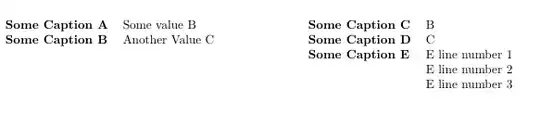
This code yields the expected result: Rows aligned correctly

If I remove the ~ & ~ lines in the code, I get this: Misaligned bottom rows

What am I doing wrong here and how can I avoid it? Thanks in advance for your help.

Edit In order to avoid further confusion about the point of my questions I changed the example a bit.

Edit II: In order to be even more precise, I changed the pictures and removed some abstraction...

junix
  • 121
  • Well, if you want to create your own title page, you can use the titlepage environment and inside you can use commands such as \hfill, \vfill, \hspace, \vspace, etc. that can be useful for get what you want. I never tried to create tables inside, maybe you can. – Aradnix Aug 23 '14 at 07:33
  • @Aradnix Thank you for your opinion. Actually I know how to create a title page. The question was aiming at the misalignment of the tables... – junix Aug 23 '14 at 08:16
  • just curious ... why is the tabular in the second minipage set with a [t] option? if you use a [b] option there, you can get rid of the extra double backslashes and ~ & ~ and the two will align on the bottom, which is what i think you want. (but i'm not sure i can give a comprehensible explanation; it just "feels" right to me that the alignments should be the same in both "columns".) – barbara beeton Aug 23 '14 at 15:09
  • @Sveinung sorry, didn't get your point can you explain this a bit further? – junix Aug 23 '14 at 19:40
  • @barbarabeeton I hope you noticed, that was a "sub" tabular. It's set with [t] because I wanted to make sure the stuff aligns to the top WITHIN a cell. However, the outermost tabulars are both set with [b]. If I would set the inner one with b, the 'caption' (left column on the right tabular minipage) would be set to the lower border...? – junix Aug 23 '14 at 19:44
  • ah, yes, i do see that now. (the test i'm looking at has three iterations of the aligned material, so they're easy to compare. i failed to notice the change in alignment of the stub on the last, because the bottoms are so nicely aligned. but it gives me a good testbed to try something else.) – barbara beeton Aug 23 '14 at 20:06
  • Is there a reason for not just putting this in a single tabular rather than being split across two minipages? – Werner Nov 29 '14 at 00:22
  • @Werner Yes, I wanted to be able to enable and remove some of the lines in the table depending on a variable's content. Having a single table wouldn't help me there... – junix Nov 29 '14 at 09:19

4 Answers4

1

It seems that you have discovered one of TeX and LaTeX ‘features’. See Frank Mittelbach’s answer to a similar question regarding the m-column.

I have found two additional ‘solutions’, so we end up with three:

  1. Use an empty line as you have done
  2. Use a \strut
  3. Use \leavevmode

Your MWE with alternativs:

\documentclass{article}
\usepackage[a4paper]{geometry}
\usepackage{tabularx}
\usepackage{lipsum}

\begin{document}
    \begin{minipage}[b]{0.49\textwidth}
        \begin{flushleft}
            \begin{tabular}[b]{@{}ll@{}}
                A & B\\
                A & My line number 0
                \leavevmode
                %\strut 
                %~ & ~
            \end{tabular}
        \end{flushleft}
    \end{minipage}
    \begin{minipage}[b]{0.49\textwidth}
        \begin{flushright}
            \begin{tabular}[b]{@{}ll@{}}
                A & B\\
                A & C\\
                A & \begin{tabular}[t]{@{}l@{}}
                        My line number 1 \\
                        My line number 2 \\
                        My line number 3
                    \end{tabular} \\
               \leavevmode
               %\strut
                % ~ & ~
            \end{tabular}
        \end{flushright}
    \end{minipage}

\end{document}

If you compile the document commenting and commenting out each of the three alternatives, you will see that the result is similar in all three cases, at least on my system.

Since the problem is, if I understand Mittelbach correctly, that an invisible strut is ‘hidden’ within a group, it seems that putting in a \strut after the last line is the most ‘correct’ solution. In seem to me that you you have to correct the alignment manually.

I am not a Texpert, so may be I am wrong.

Sveinung
  • 20,355
0

Now, from your code my first idea was that the error with your tables is that you was using the whole \textwidth in the cell, where you should use only an fraction, but later I see that is not true.

I see if you don't adjust the width of your cells, the text inside will be displayed in a very long line as you can see. So, if you want to use minipages with nested tables inside, you must calculate the width of your columns before.

From your MWE:

\documentclass{article} \usepackage[a4paper]{geometry} \usepackage{tabularx} \usepackage{lipsum}

\begin{document}    
        \begin{minipage}[t]{0.49\textwidth}
            \begin{flushleft}
                \begin{tabular}[]{@{}lp{0.245\textwidth}@{}}
                    A & B\\
                    A & \lipsum\\
                    ~ & ~
                \end{tabular}
            \end{flushleft}
        \end{minipage}    
        \begin{minipage}[b]{0.49\textwidth}
            \begin{flushright}
                \begin{tabular}[b]{@{}ll@{}}
                    A & B\\
                    A & C\\
                    A & \begin{tabular}[t]{@{}p{0.245\textwidth}@{}}
                            \lipsum[1] \\
                            \lipsum[2] \\
                            \lipsum[3]
                        \end{tabular} \\
                    ~ & ~
                \end{tabular}
            \end{flushright}
        \end{minipage}    
\end{document}

Notice that instead of define the column where you insert \lipsum as l y used the definition: p{length} where lenght could be expressed with numerical values in all the units LaTeX supports or in this case with a fraction of the text width. I used for the example 0.245 that give us a very narrow columns, but works. Now you can play and fit it to your needs.

Aradnix
  • 3,735
  • 2
  • 20
  • 43
  • Sorry, but that does not answer the main point of my question. I revised it slightly to be more accurate. – junix Aug 23 '14 at 08:17
  • @junix Uhm... Then I fear I have not understood what you want. Could you show more precisely what you want to achieve? Perhaps a description that involves the final design you want instead of using \lipsum could serve. – Aradnix Aug 23 '14 at 15:29
  • I changed the code and altered the pictures. Do you now understand better what I mean? – junix Aug 23 '14 at 19:53
0

You could have broken the lines neare \lipsum[3]

My Code:

\documentclass{article}
\usepackage[a4paper]{geometry}
\usepackage{tabularx}
\usepackage{lipsum}
\usepackage{fix-cm}
\begin{document}
    \begin{minipage}[b]{0.4\textwidth}
        \begin{flushleft}
            \begin{tabular}[t]{@{}ll@{}}
                A & B\\
                A & \lipsum\\
                ~ & ~

            \end{tabular}
        \end{flushleft}
    \end{minipage}
    \begin{minipage}[b]{0.4\textwidth}
        \begin{flushleft}
            \begin{tabular}[b]{@{}ll@{}}
                A & B\\
                A & C\\
                A & \begin{tabular}[b]{@{}l@{}}
                        \lipsum[1] \\
                        \lipsum[2] \\
                        \lipsum[3]\\
                    \end{tabular} \\
                ~ & ~

            \end{tabular}
        \end{flushleft}
    \end{minipage}

\end{document} I hope this is you want.

enter image description here

Sveinung
  • 20,355
murugan
  • 1,669
  • No, what I want is the first picture. But I only achieve this by adding an empty row. I don't care about the broken lines in this example. In order to support this, I revised my example slightly. – junix Aug 23 '14 at 08:18
  • I revised my example again to show it even clearer – junix Aug 23 '14 at 19:54
0

You want to align two rows of first minipage with three rows of second minipage. The logic is correct. Since you have opted for bottom option the first minipage's two rows are aligned with the last two rows of second minipage. Since third row of second minipage contains another three rows it appears to be incorrect. So you have added ~&~ as the last row in both minipages.

If you use top option the result would be

enter image description here

If you use bottom option and without ~&~ on both minipage the result would be

bottom without

if you use bottom option and with ~&~ on first minipage the result would be

withemptyfirst

if you use bottom option with ~&~ on second minipage ony the result would be

withempty2

it is not correct

When you use bottom option with ~&~ on both minipages

emptyonboth

though aligned as per wish it is not correct. This is my opinion.

murugan
  • 1,669
  • Actually I was expecting the two minipages to be set to bottom no matter what content they have. So for me this kind of "content dependend" setting that I experience is strange and incorrect. However. You think there is no way except the stupid empty lines to achieve the wished effect? – junix Aug 24 '14 at 07:43