1

I'd like to have the smaller rectangle on the right put as the magnifypoint.

Explanation:

  • The magnified part on the right essentially shows a magnification of the contents on the left, except not quite.

  • It's the same object, just a different photo (taken by myself) from another angle with another position of the camera. Thus, it's a new piece of content that I'd like to have displayed.

So I need something to draw the fancy rectangles/or whatever shape I choose and lines between some, yet unspecified, parts in the left and right tikzpictures. Note: In the end, I'd like to have multiple tikzpictures in the right minipage.

Picture
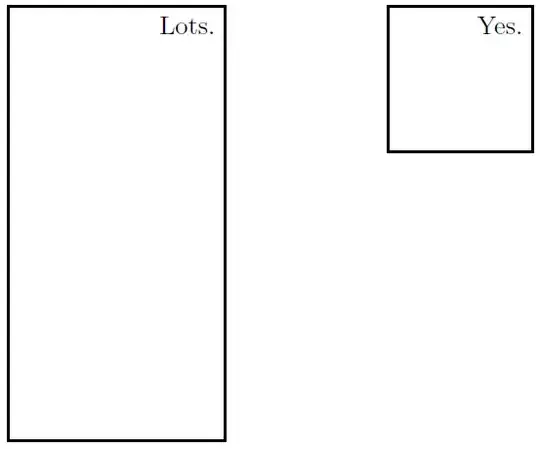
enter image description here

MWE

\documentclass[
a4paper
]
{scrartcl}

\usepackage[T1]{fontenc}
\usepackage[utf8]{inputenc}
\usepackage{lmodern}

\usepackage{
tikz,
}

\begin{document}
\begin{minipage}[t][][b]{0.48\linewidth}
\centering
\begin{tikzpicture}[font=\small]
\draw[thick] (0,0) rectangle (3,6) node[below left] {Lots.};
\end{tikzpicture}
\end{minipage}
\hfill
\begin{minipage}[t][][b]{0.48\linewidth}
\begin{tikzpicture}[font=\small, label=above:bla]
\draw[thick] (0,0) rectangle (2,2) node[below left] {Yes.};
\end{tikzpicture}
\end{minipage}
\end{document}
jub0bs
  • 58,916
henry
  • 6,594
  • why not spy-function ? – percusse Aug 30 '14 at 15:28
  • @percusse Hm, I haven't figured out yet how I could insert a random image in the magnification part instead of actually showing the magnified part of the "spied on" content. – henry Aug 30 '14 at 15:30
  • Ah, now I've read the question again. So essential question then connecting two images on the same page one of which is on the margin, is that close? – percusse Aug 30 '14 at 15:34
  • @percusse Yup. But I figured it out, except it's not possible to link between two seperate tikzpicture-environment. This is bad because of the subcaptions I'd like to use. :/ Anyway, this is the command: \spy [black, width=1cm, height=2cm] on (1,1) in node [right] at (2,-0.5) {\includegraphics[width=1cm]{[insert picture file name here]}};. – henry Aug 30 '14 at 15:42
  • @percusse So what I meant, was, the spy-function of course works in principle. But I would like to have the subcaptions for the little magnified graphics on the right, so I can't use the spy-function. I still would like to learn of some method to get the spy-look though, with the rectangle and lines between the elements. – henry Aug 30 '14 at 16:01
  • Using hyperref you can link to a standalone (separate file) and open a new window to display it. – John Kormylo Aug 30 '14 at 20:29

2 Answers2

1

So from what I understand you want to draw a box somewhere in the left picture and connect it to the right picture like this?

Connected pictures

You probably won't get away without drawing the spy-looking things yourself, but it's easier than you might think. The key is to add the two keys at the right places: remember picture shares node names between all pictures that use this key and overlay allows you to draw on top of things without worrying about the bounding box of the tikzpicture.

\documentclass{scrartcl}

\usepackage{mwe} % for \includegraphics{image}

\usepackage{tikz}
\usetikzlibrary{calc}

% Use relative coordinates to draw on image. See http://tex.stackexchange.com/a/9561/12440
\tikzset{relative coordinates/.style={
    shift=(#1.south west),
    x={($(#1.south east)-(#1.south west)$)},
    y={($(#1.north west)-(#1.south west)$)}
}}
\makeatletter
\newcommand{\Xlength}{\pgf@xx} % Give a usable name to the length of the "x unit vector".
\makeatother

\begin{document}
\begin{minipage}[t][][b]{0.48\linewidth}
\centering
\begin{tikzpicture}[font=\small, remember picture]
\node[inner sep=0] (large image) {\includegraphics[width=0.66\linewidth]{image}};
\end{tikzpicture}
\end{minipage}
\hfill
\begin{minipage}[t][][b]{0.48\linewidth}
\begin{tikzpicture}[remember picture]
    \node[inner sep=0] (small image 1) {\includegraphics[width=0.5\linewidth]{image}};
\end{tikzpicture}

Some caption for image 1\\[0.5em]

\begin{tikzpicture}[remember picture]
    \node[inner sep=0] (small image 2) {\includegraphics[width=0.5\linewidth]{image}};
\end{tikzpicture}

Some caption for image 2\\[0.5em]

\begin{tikzpicture}[overlay, remember picture, relative coordinates=large image]
    \node[circle,draw,inner sep=0, minimum size=0.11\Xlength] at (0.51,0.49) {}
        edge (small image 1.west);
    \node[draw,inner sep=0, minimum size=0.05\Xlength] at (0.72,0.44) {}
        edge (small image 2.west);
\end{tikzpicture}
\end{minipage}

\end{document}

As a bonus feature, the markers even scale when the larger picture is resized. ;-)

enter image description here

Fritz
  • 6,273
  • 31
  • 55
0

Here is the document with the small image.

\documentclass{article}
\usepackage{graphicx}
\usepackage{mwe}% for image
\usepackage[hidelinks]{hyperref}
\begin{document}
\lipsum[1]

\medskip\noindent%
\href[pdfnewwindow=true]{target.pdf}{\includegraphics[width=1in]{image}}

\lipsum[2]
\end{document}

The following was used to create target.pdf

\documentclass{standalone}
\usepackage{graphicx}
\usepackage{mwe}% for image
\usepackage{hyperref}
\hypersetup{pdftoolbar=false,pdfwindowui=false,pdfpagemode=UseNone,pdffitwindow=true}

\begin{document}
\begin{tabular}{c}
\includegraphics{image}\\[.25in]
I thought I would add some text here.
\end{tabular}
\end{document}

Now if I could just figure out how to avoid having to hit the "Restore Down" button.

John Kormylo
  • 79,712
  • 3
  • 50
  • 120