I'm using eso-pic to annotate this letter, using scrlttr2, courtesy of
an earlier answer by daleif to the question "Writing TeX file name at the top of the processed document for article class".
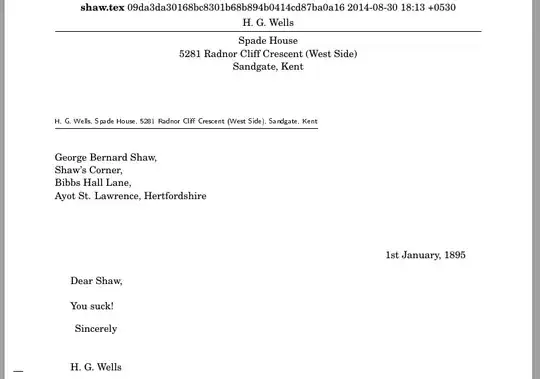
As you can see, there is a little problem with overlapping text. What is the simplest way to fix this?
The annotation is generated by Mercurial and represents the last commit timestamp (see Embedding Mercurial version control information in a TeX document), but I'm hard-wiring it in, because this question doesn't have anything to do with Mercurial.
\documentclass[foldmarks=true,foldmarks=blmtP,fromalign=false,version=last]{scrlttr2}
\usepackage{fouriernc}
% Add code to annotate file with file name and hash of last hg cset to change the file.
\usepackage{eso-pic,picture}
\AddToShipoutPictureBG*{
  % change reference point to page upper left
  \AtPageUpperLeft{
    \put(\oddsidemargin+1in+0.5\textwidth,-1cm){%
      \makebox[0pt][c]{\textbf{shaw.tex} 09da3da30168bc8301b68b894b0414cd87ba0a16 2014-08-30 18:13 +0530 } }
  }
}
\usepackage[T1]{fontenc}
\begin{document}
\setkomavar{fromname}{H. G. Wells}
\setkomavar{fromaddress}{Spade House\\ 5281 Radnor Cliff Crescent (West Side)\\ Sandgate, Kent}

\def\today{1st January, 1895}
\begin{letter}{
    George Bernard Shaw,\\
    Shaw's Corner,\\
    Bibbs Hall Lane,\\
    Ayot St. Lawrence, Hertfordshire\\}

\opening{Dear Shaw,}

You suck!

\closing{Sincerely}
\end{letter}
\end{document}
UPDATE:
Thanks to Steven for his helpful response.
I remember the last time I asked about annotating a LaTeX file, per What are the ways to position things absolutely on the page? for example, someone made the distinction about writing on top of the TeX without regard to what was already there (which means it might overwrite stuff), or putting it in a "provided" slot, say at the top of the page. I don't remember the details. Does anyone have a link to something about this?



everypageroutines, the "current" position is\hoffset+\PageLeftMarginfrom the left side of the paper, and\voffset+\PageTopMarginfrom the top of the paper. Thus, to position absolutely on the page, I subtract these dimensions from the x and y positions (taking me to the upper left paper corner), respectively, and then add in the user specified offset distances. The\smashis so that it does not affect subsequent page text. The y-position is handled with a\raiseboxand x-position with a\hspace*. I don't knoweso-picto help there. – Steven B. Segletes Sep 01 '14 at 19:18eso-picanswer. – Steven B. Segletes Sep 01 '14 at 19:21