Is this what you looking for?
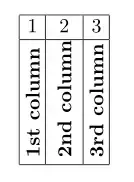
\documentclass{article}
\usepackage{graphicx}
\newcommand*\rot{\rotatebox{90}}
\begin{document}
    \begin{table}[!ht]
      \centering
        \begin{tabular}{|@{\hskip3pt}c@{\hskip3pt}| c |@{\hskip3pt}c@{\hskip3pt}|}
            \hline
            1 & 2  &  3\ \hline
            \rot{\textbf{1st column}} & \rot{\textbf{2nd column}} & \rot{\textbf{3rd column}} \ \hline
        \end{tabular}
    \end{table}
\end{document}
The @{} in place of insertion set \tabcolsep distance to zero. If you like to have in this place different space between adjacent columns, than you can locally determine it with @{<distance>} where you select <width> according to your wish.
Addendum
Today, when the tabularray package (version 2021P) is available, one may consider the following solution:
\documentclass{article}
\usepackage{rotating}
\usepackage{makecell}
\usepackage{tabularray}
\begin{document}
    \begin{table}[!ht]
    \centering
    \setlength\rotheadsize{6em}
\begin{tblr}{hlines, vlines,
             colspec = {ccc},
%             colsep = 6pt, % <--- default tabcolsep
             row{2}  = {cmd=\rotcell,font=\bfseries, rowsep=0pt}
            }
1           & 2             & 3             \
1st column  & 2nd column    & 3rd column    \
\end{tblr}
\qquad
\begin{tblr}{hlines, vlines,
             colspec = {ccc},
             colsep  = 2pt, % <--- tabcolsep
             row{2}  = {cmd=\rotcell,font=\bfseries, rowsep=0pt}
            }
1           & 2             & 3             \
1st column  & 2nd column    & 3rd column    \
\end{tblr}
\qquad
\begin{tblr}{hlines, vlines,
             colspec = {ccc},
             colsep  = 0pt, % <--- tabcolsep
             row{2}  = {cmd=\rotcell,font=\bfseries, rowsep=0pt}
            }
1           & 2             & 3             \
1st column  & 2nd column    & 3rd column    \
\end{tblr}
    \end{table}
\end{document}


\setlength\tabcolsep{x pt}. The default value is 6 pt (which makes a total of 12pt between two consecutive cells). – Bernard Sep 14 '14 at 11:12