I am using MuseScore 1.3 on Ubuntu 14.04 to write my scores. Then I save them as LilyPond files, and include them in my tex document using \lilypondfile, like this:
\documentclass[a4paper]{article}

\begin{document}

Larger examples can be put into a separate file, and introduced with \verb+\lilypondfile+.

\lilypondfile[quote,noindent]{scores/Exercise_1.05.ly}

\end{document}
Then, to compile, I do:
$ lilypond-book --pdf solfeo.lytex
$ xelatex solfeo.tex
However, the width of the inserted score doesn't fit into the document, and it extends beyond the limits of the page.
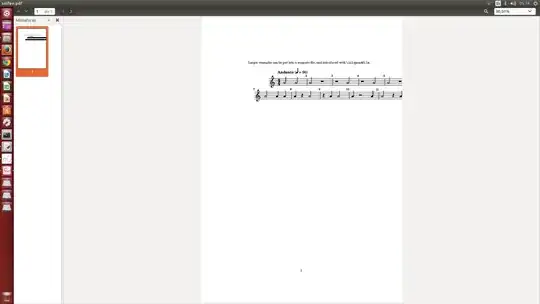
Also, lilypond-book seems to be ignoring the settings I am passing to it in \lilypondfile[quote,noindent]{scores/Exercise_1.05.ly}. If I understood well, quote prints the notes before the score and noindent removes the indentation of the first line. Neither it is quoting the notes nor is it removing the indentation.
I'm new to Lilypond and I have tried to change the margins of the document in MuseScore, and I tried some tex commands too, but I can't find the way to make it fit. If I compile the ly file with lilypond the PDF looks perfect (but in that case I only get the score). Its only when I embed a ly file into a lytex file that the score extends beyond the margins. Would appreciate your suggestions or corrections. ¿What am I doing wrong? Thanks!
P.D. Here is the ly code generated by MuseScore:
%=============================================
%   created by MuseScore Version: 1.3
%=============================================

\version "2.12.0"


#(set-default-paper-size "a4")

\paper {
  line-width    = 190\mm
  left-margin   = 10\mm
  top-margin    = 10\mm
  bottom-margin = 20\mm
  %%indent = 0 \mm
  %%set to ##t if your score is less than one page:
  ragged-last-bottom = ##t
  ragged-bottom = ##f
  %% in orchestral scores you probably want the two bold slashes
  %% separating the systems: so uncomment the following line:
  %% system-separator-markup = \slashSeparator
  }

\header {
    }

AvoiceAA = \relative c'{
    \set Staff.instrumentName = #""
    \set Staff.shortInstrumentName = #""
    \clef treble
    %staffkeysig
    \key c \major
    %barkeysig:
    \key c \major
    %bartimesig:
    \time 4/4
    \tempo "Andante" 4 = 96  a'2 a      | % 1
    a r      | % 2
    r a      | % 3
    r a      | % 4
    a r      | % 5
    a a      | % 6
    a a4 a      | % 7
    a r a2      | % 8
    r4 a a2      | % 9
    a4 r2 a4      | % 10
    a2 r4 a \bar "|."     | % 11
    a2 r \bar "|."
}% end of last bar in partorvoice


\score {
    <<
        \context Staff = ApartA <<
            \context Voice = AvoiceAA \AvoiceAA
        >>


      \set Score.skipBars = ##t
      %%\set Score.melismaBusyProperties = #'()
      \override Score.BarNumber #'break-visibility = #end-of-line-invisible
     %%every bar is numbered.!!!
      %% remove previous line to get barnumbers only at beginning of system.
       #(set-accidental-style 'modern-cautionary)
      \set Score.markFormatter = #format-mark-box-letters %%boxed rehearsal-marks
       \override Score.TimeSignature #'style = #'() %%makes timesigs always numerical
      %% remove previous line to get cut-time/alla breve or common time
      \set Score.pedalSustainStyle = #'mixed
       %% make spanners comprise the note it end on, so that there is no doubt that this note is included.
       \override Score.TrillSpanner #'(bound-details right padding) = #-2
      \override Score.TextSpanner #'(bound-details right padding) = #-1
      %% Lilypond's normal textspanners are too weak:
      \override Score.TextSpanner #'dash-period = #1
      \override Score.TextSpanner #'dash-fraction = #0.5
      %% lilypond chordname font, like mscore jazzfont, is both far too big and extremely ugly (olagunde@start.no):
      \override Score.ChordName #'font-family = #'roman
      \override Score.ChordName #'font-size =#0
      %% In my experience the normal thing in printed scores is maj7 and not the triangle. (olagunde):
      \set Score.majorSevenSymbol = \markup {maj7}
  >>

  %% Boosey and Hawkes, and Peters, have barlines spanning all staff-groups in a score,
  %% Eulenburg and Philharmonia, like Lilypond, have no barlines between staffgroups.
  %% If you want the Eulenburg/Lilypond style, comment out the following line:
  \layout {\context {\Score \consists Span_bar_engraver}}
}%% end of score-block

#(set-global-staff-size 20)
Update 1
I'm pasting the output of the compilation of lilypond-book, although I'm not sure how useful it will be for you, since it it in Spanish:
$ lilypond-book --pdf solfeo.lytex

lilypond-book (GNU LilyPond) 2.18.2
Reading solfeo.lytex...
Running `pdflatex' on file `/tmp/tmpN3IGhy.tex' to detect default page settings.

Dissecting...
Writing snippets...
Processing...
Running lilypond...
GNU LilyPond 2.18.2
Procesando «snippet-map-3001632500490555250.ly»
Analizando...
Procesando «solfeo.lytex»
Analizando...
Renombrando la entrada a: «scores/Exercise_1.05.ly»
Interpretando la música...[8]
Preprocesando los objetos gráficos...
Calculando los saltos de línea...
Dibujando los sistemas...
Salida de la página hacia «ba/lily-399811ac.eps»...
Convirtiendo en «ba/lily-399811ac.pdf»...
Salida de la página hacia «ba/lily-399811ac-1.eps»...
Salida de la página hacia «ba/lily-399811ac-2.eps»...
Convirtiendo en «ba/lily-399811ac-1.pdf»...
Convirtiendo en «ba/lily-399811ac-2.pdf»...
Escribiendo «ba/lily-399811ac-systems.texi»...
Escribiendo «ba/lily-399811ac-systems.tex»...
Escribiendo «ba/lily-399811ac-systems.count»...
Enhorabuena. La compilación se ha completado satisfactoriamente.
Linking files...
Compiling /media/admin/DATOS/Dropbox/code/solfeo-book/out/solfeo.tex...
Writing `/media/admin/DATOS/Dropbox/code/solfeo-book/out/solfeo.tex'...
I hope this helps
Update 2
I have tried another approach. I have exported from MuseScore to MusicXML instead. Then I have used:
musicxml2ly Exercise_1.05.xml -o Exercise_1.05_.ly
to convert the .xml file into an .ly file, and compiled again. Still the width is not fitting the screen =( I have run out of ideas.


latexare needed to sort out positioning issues. When the document is processed, auxiliary information is written out to be included in the next run. This sometimes takes time to stabilize. – Sean Allred Sep 22 '14 at 13:20quote,noindent), so I don't know what else to do :-( – Xirux Nefer Sep 22 '14 at 13:26lilypond-book? If you use the EPS backend oflilypondyou can produce a cropped PDF image that is exactly the width you specify (ideally your LaTeX\textwidth, I imagine), and then include the PDF using\includegraphics. I have found this to be the simplest way. – musarithmia Sep 22 '14 at 15:40\includegraphicsor\includepdf, it will include them in a separate page as a block, but sometimes I want them to be inline. – Xirux Nefer Sep 22 '14 at 15:55