I recommend to create a new macro with a different name instead of changing the behaviour of \section* and thus redefining \section. A separate macro would be a cleaner solution.
The main LaTeX command for sectioning is \@startsection. It is documented in source2e.pdf, just type texdoc source2e at the command prompt. You would find it in 61.2 Sectioning.
So, let's create a macro, use \@startsection with a \centering in the formatting argument:
\documentclass{book}
\makeatletter
\newcommand\@csection{\@startsection {section}{1}{\z@}%
  {-3.5ex \@plus -1ex \@minus -.2ex}%
  {2.3ex \@plus.2ex}%
  {\normalfont\Large\bfseries\centering}}
\newcommand{\csection}[1]{%
  \@csection*{#1}%
  \addcontentsline{toc}{section}{#1}%
}
\makeatother
\begin{document}
\tableofcontents
\chapter{First chapter}
\section{First section}
some text
\csection{A centered section}
more filler text.
\end{document}
Since \@startsection contains the @ character, I had to use \makeatletter ... \makeatother. I defined an internal macro \@csection that does the sectioning. The final user command \csection calls this but additionally adds the entry to the table of contents.
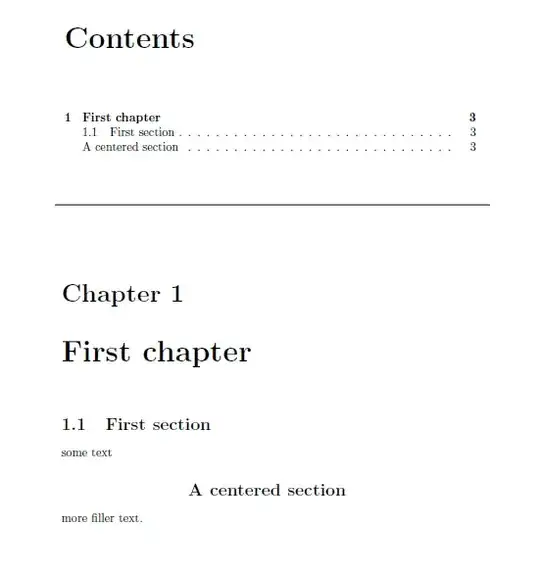
\csection does what you asked for: it creates an unnumbered section-level heading with toc entry. Note, it doesn't support an optional argument, since this hadn't been a requirement.
If you need more customization, also regarding other sectioning commands, I recommend to use the titlesec package. It offers a very good interface for sectioning customization.
Output:


layoutandtoc... – Bran the Blessed Aug 19 '10 at 11:45layoutthough because half the questions here could be tagged that. – Caramdir Aug 19 '10 at 12:12layoutdoes not make sense. – Bran the Blessed Aug 19 '10 at 12:18