20

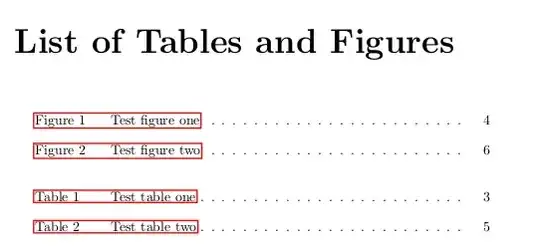
I need to prefix each entry in list of tables and figures with appropriate text - table or figure for each. Also I need to remove chapter numbers from list, because tables are numbered consequently through the whole report.

I managed to do everyting I need with this simple commands:

\renewcommand{\thetable}{\arabic{table}}
\renewcommand{\thefigure}{\arabic{figure}}

\makeatletter
\providecommand\phantomsection{}% for hyperref

\newcommand\listoftablesandfigures{%
    \chapter*{List of Tables and Figures}%
    \phantomsection
%\addcontentsline{toc}{chapter}{List of Illustrations}%
%\section*{Figures}%
%\phantomsection
%\addcontentsline{toc}{section}{\protect\numberline{}Figures}%
\@starttoc{lof}%
\bigskip
%\section*{Tables}%
%\phantomsection
%\addcontentsline{toc}{section}{\protect\numberline{}Tables}%
\@starttoc{lot}}
\makeatother

Now only one thing remains: to be consistent with text in list of tables and figures.

lockstep
  • 250,273

2 Answers2

17

You can use the chngcntr package to change the counter for figures and the one for the tables, and the tocloft package to add the words "Table" and "Figure" to the list of tables and figures. A little example:

\documentclass{report}
\usepackage{chngcntr}  
\usepackage{tocloft}
\usepackage{hyperref}

\counterwithout{figure}{chapter}
\counterwithout{table}{chapter}

\renewcommand{\cftfigpresnum}{Figure\ }
\renewcommand{\cfttabpresnum}{Table\ }

\newlength{\mylenf}
\settowidth{\mylenf}{\cftfigpresnum}
\setlength{\cftfignumwidth}{\dimexpr\mylenf+1.5em}
\setlength{\cfttabnumwidth}{\dimexpr\mylenf+1.5em}


\makeatletter
\newcommand\listoftablesandfigures{%
    \chapter*{List of Tables and Figures}%
    \phantomsection
\@starttoc{lof}%
\bigskip
\@starttoc{lot}}
\makeatother

\begin{document}
\listoftablesandfigures

\chapter{Test one}
\section{Test one one}

\begin{table}
  \caption{Test table one}
\end{table}

\begin{figure}
  \caption{Test figure one}
\end{figure}

\chapter{Test two}
\section{Test two two}

\begin{table}
  \caption{Test table two}
\end{table}

\begin{figure}
  \caption{Test figure two}
\end{figure}

\end{document}

Only the combined list of the resulting document is shown:

Werner
  • 603,163
Gonzalo Medina
  • 505,128
  • Perfect, almost exactly what I needed. I think that spacing between number and title of table/figure is too big, but that is no problem for me at the moment, however, if You can tell me, how to change that, to be the same as the spacing in table of contents I would be very grateful – Johnny_Bit Jun 09 '11 at 18:49
  • 1
    @Johnny_Bit: see my edited answer. – Gonzalo Medina Jun 09 '11 at 19:06
  • How can I preserve the figure numbering as Figure 1.1 and do the same in List of Tables, instead of Figure 1, Figure 2 and so on? – pseudomonas May 05 '13 at 16:57
  • @user1556826 don't use the lines \counterwithout{figure}{chapter} \counterwithout{table}{chapter} – Gonzalo Medina May 05 '13 at 19:30
  • @GonzaloMedina Your answer is perfect! Now, how can I add a hyphen between the words "Figure 1" and "Test figure 1"? – DiegoMath Jun 30 '14 at 15:19
8

Just use these commands instead of \listoftables and \listoffigures:

for figures:

{%
    \let\oldnumberline\numberline%
    \renewcommand{\numberline}{\figurename~\oldnumberline}%
    \listoffigures%
}

for tables:

{%
    \let\oldnumberline\numberline%
    \renewcommand{\numberline}{\tablename~\oldnumberline}%
    \listoftables%
}

No need to use any packages and make things complicated.

Hadij
  • 360