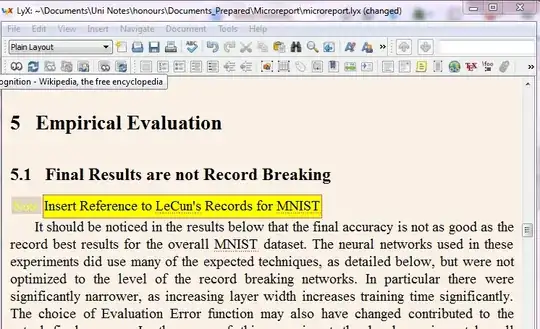
As far as the yellow LyX notes are completely lost in the generated LaTeX source (i.e, the .tex file), your goal seem impossible without touching the LyX's guts or deal with the original .lyx file. An easier starting point could be use the black comments for this purpose.
With this approach, you only have to transform a \begin{comment} note \end{comment} of the verbatim package in a \pdfcomment{note} of the pdfcomment package.
How-to:
1) Go to Document > Configuration... > LaTex preamble
2) Paste the following lines:
% Change comments in PDF notes
\usepackage{pdfcomment}
\usepackage{environ}
\RenewEnviron{comment}{\pdfcomment{\BODY}}
3) Go to Insert > Note > Comment) and write some text.
This left a comment environment in the .tex file. Example of the ouput in LyX:

(you will see "Comment" instead of "Comentario" in a english OS, obviously...)
3) Go to File > Export > PDF(pdflatex)
4) Open the PDF open in Acrobat Reader:

LyX-generated LaTeX source:
%% LyX 2.0.5.1 created this file.  For more info, see http://www.lyx.org/.
%% Do not edit unless you really know what you are doing.
\documentclass[english]{article}
\usepackage[T1]{fontenc}
\usepackage[latin9]{inputenc}
\usepackage{verbatim}

\makeatletter
%%%%%%%%%%%%%%%%%%%%%%%%%%%%%% User specified LaTeX commands.
%add this in Lyx Preamble
\usepackage{pdfcomment}
\usepackage{environ}
\RenewEnviron{comment}{\pdfcomment{\BODY}}

\makeatother

\usepackage{babel}
\begin{document}
Plain text %
\begin{comment}
This is a note (comment)
\end{comment}

\end{document}
Minimal working example in plain LaTeX
\documentclass{article}
\usepackage{verbatim}
\usepackage{pdfcomment}
\usepackage{environ}
\RenewEnviron{comment}{\pdfcomment{\BODY}}
\begin{document}
Plain text
\begin{comment}
This is a note (comment)
\end{comment}
\end{document}