I was wondering how I can justify the text without making it indenting with \justifying.
I'm using
\usepackage[parfill]{parskip}
Secondary question:
Any way how to increase the parskip distance, by the way?
Thanks!
I was wondering how I can justify the text without making it indenting with \justifying.
I'm using
\usepackage[parfill]{parskip}
Secondary question:
Any way how to increase the parskip distance, by the way?
Thanks!

Text is justified to both margins by default. To control the indentation of the first line and spaces between paragraphs you need only set respectively \parindent and \parskip lenghts, without any package.
An example with some exaggerated values to see clearly the result:
\documentclass{article}
\usepackage{lipsum} % for example dummy text
\setlength{\parskip}{2cm}
\setlength{\parindent}{5em}
\begin{document}
\lipsum[1-3]
\end{document}
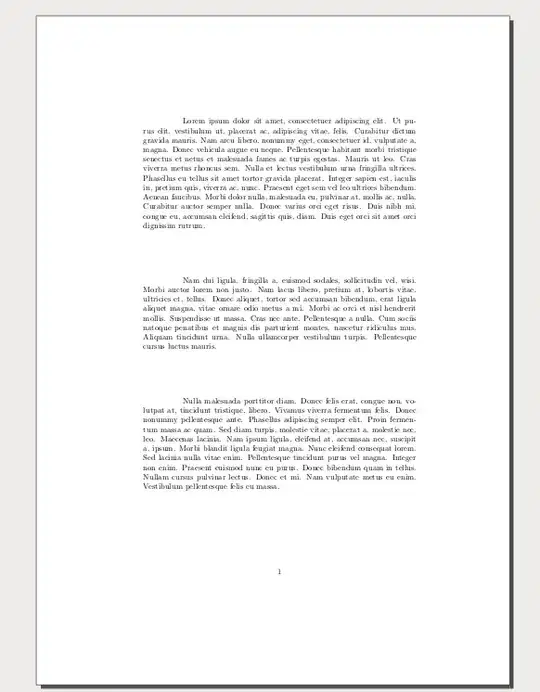
Note that often in LaTex you can use extensible ans/or shrinkable lenghts (see What is glue stretching?) so one can use some like:
\setlength{\parskip}{2cm plus 1.9cm minus 1.9cm}
or
\setlength{\parskip}{2cm plus 1 fill minus 0 cm}
Experiment adding a paragraphs in the MWE (e.g. change \lipsum[1-3] to \lipsum[1-4]) and see the effect with this or another settings.
A more reasonable settings could be:
\setlength\parskip{.5\baselineskip plus .1\baselineskip minus .1\baselineskip}
\setlength\parindent{0pt}
(These are exactly the setting for the artikel3 document class, cited in the parskip documentation)
;) with \parindent=0pt
– Fran
Oct 04 '14 at 20:09
parskip package since that package makes additional adjustments to prevent the increased parskip having unwanted side-effects. That is, the point of the package is precisely that it does not just adjust the parskip and parindent but also configures other aspects of layout appropriately in light of those changes.
– cfr
Oct 04 '14 at 20:45
It is better to use the parskip package (as shown in the question) than to just adjust the parskip and parindent yourself unless you are also prepared to make the kinds of adjustments required to avoid the side-effects of these changes.
In addition to adjusting these lengths, parskip does some basic work to avoid excessive spacing in list environments. Even if you do not think you use lists, you probably do since many LaTeX environments are based on lists. For example, quotation is a trivial list environment and there are many others.
Here is a document which just adjusts the lengths by hand based on Fran's answer:
\documentclass{article}
\usepackage{lipsum} % for example dummy text
\setlength\parskip{.5\baselineskip plus .1\baselineskip minus .1\baselineskip}
\setlength\parindent{0pt}
\begin{document}
  \lipsum[1]

  \begin{quotation}
    \lipsum[2]
  \end{quotation}

  \lipsum[3]

  \begin{itemize}
    \item This is the first item in a list of several items, which is preceded by none but followed by some.
    \item This is the second item in a list of several items, which is preceded by some and followed by some.
    \item This is the third item in a list of several items, which is preceded by some and followed by some.
    \item This is the fourth item in a list of several items, which is preceded by some but followed by none.
  \end{itemize}

  \lipsum[4]
\end{document}

As can be seen, excessive spacing is left around the quotation and list, in comparison with that which is left between regular paragraphs.
Here is the same document using parskip with default adjustments:
\documentclass{article}
\usepackage{lipsum} % for example dummy text
\usepackage[parfill]{parskip}
\begin{document}
  \lipsum[1]

  \begin{quotation}
    \lipsum[2]
  \end{quotation}

  \lipsum[3]

  \begin{itemize}
    \item This is the first item in a list of several items, which is preceded by none but followed by some.
    \item This is the second item in a list of several items, which is preceded by some and followed by some.
    \item This is the third item in a list of several items, which is preceded by some and followed by some.
    \item This is the fourth item in a list of several items, which is preceded by some but followed by none.
  \end{itemize}

  \lipsum[4]
\end{document}

It is still very possible to adjust the parskip while benefiting from the package's improved layout of list environments. This example uses the same parskip as that in the first document and as specified in Fran's 'reasonable' settings:
\documentclass{article}
\usepackage{lipsum} % for example dummy text
\usepackage[parfill]{parskip}
\setlength\parskip{.5\baselineskip plus .1\baselineskip minus .1\baselineskip}
\begin{document}
  \lipsum[1]

  \begin{quotation}
    \lipsum[2]
  \end{quotation}

  \lipsum[3]

  \begin{itemize}
    \item This is the first item in a list of several items, which is preceded by none but followed by some.
    \item This is the second item in a list of several items, which is preceded by some and followed by some.
    \item This is the third item in a list of several items, which is preceded by some and followed by some.
    \item This is the fourth item in a list of several items, which is preceded by some but followed by none.
  \end{itemize}

  \lipsum[4]
\end{document}

As can be seen, the manual adjustment of the parskip length does not undermine the enhancements to layout achieved by loading the parskip package. So this option offers the best results with standard classes.
That is, some classes are designed to accommodate non-zero parskip and zero parindent in their design, and these will likely have more fine-grained tuning. But for classes which are not so designed, loading the package parskip instead of, or in addition to, setting the parskip length explicitly will give the best results.
To avoid the oddity of the indented paragraph in the quotation, either use quote rather than quotation or let the latter environment be equal to the former one:
\documentclass{article}
\usepackage{lipsum} % for example dummy text
\usepackage[parfill]{parskip}
\setlength\parskip{.5\baselineskip plus .1\baselineskip minus .1\baselineskip}
\let\quotation\quote
\begin{document}
  \lipsum[1]

  \begin{quotation}
    \lipsum[2]
  \end{quotation}

  \lipsum[3]

  \begin{itemize}
    \item This is the first item in a list of several items, which is preceded by none but followed by some.
    \item This is the second item in a list of several items, which is preceded by some and followed by some.
    \item This is the third item in a list of several items, which is preceded by some and followed by some.
    \item This is the fourth item in a list of several items, which is preceded by some but followed by none.
  \end{itemize}

  \lipsum[4]
\end{document}

\parsep = \parskip, \itemsep = \z@, \topsep = \z@ and \partopsep = \z@.
– Fran
Oct 04 '14 at 22:25
parskip's choices may not be ideal, many people do seem to find the results less ideal if no additional adjustments are made. Lists were not in the question because it is an MWE. Most documents use lists in some way.
– cfr
Oct 04 '14 at 22:41
parskip with manual adjustments is likely to give unexpected results. Obviously, if somebody actually prefers what I referred to as 'excessive spacing', that is their prerogative. They are free to eschew the parskip package as you suggest.
– cfr
Oct 04 '14 at 22:42
parskip rather than merely setting the lengths manually* - not to use it rather than a class designed to support this layout. So, yes, artikel3.cls almost certainly would give better results. But switching class is a lot more disruptive - hence Robin Fairbairns provides parskip.
– cfr
Oct 04 '14 at 23:11


\documentclass{...}and ending with\end{document}. – Oct 04 '14 at 18:47\justifying? Do you maybe want the lines of a paragraph be typeset ragged-right? – Mico Oct 04 '14 at 18:53