4

Is there a simple way to get the number of rows of a given tabular ?

More precisely, I have a variable \t@b which contains something like

foo & bar \\ foo & bar \\ foo & bar

I will display the content of this variable inside a tabular environment. The number of columns is determined, but how can I find the number of rows of the resulting tabular ?

Arkandias
  • 268
  • Please help us to help you and add a minimal working example (MWE) that illustrates your problem. It will be much easier for us to reproduce your situation and find out what the issue is when we see compilable code, starting with \documentclass{...} and ending with \end{document}. –  Oct 05 '14 at 09:23
  • 1
    I do not think there is a relevant MWE to produce here (I do not have an error to show). I just want to know how to count the number of rows of \begin{tabular} \t@b \end{tabular} given \t@b (or equivalently the number of occurences of \\ inside \t@b). – Arkandias Oct 05 '14 at 09:37
  • 1
    @Arkandias see, Christian had to make a test file as you did not supply one. It always helps people who are answering if you supply a test file. – David Carlisle Oct 05 '14 at 09:48
  • 1
    essentially a duplicate of this, although you apparently only want the final value, not have the number printed each row: http://tex.stackexchange.com/questions/21243/automatic-table-row-numbers?rq=1 – David Carlisle Oct 05 '14 at 09:49
  • It seems as if you're trying to reinvent some wheel. Not sure if this helps but the pgfplotstable and the datatool package provide high-level support for database table. Also see this database-related question. –  Oct 06 '14 at 11:37

3 Answers3

6

The easiest way is to use a new column type which automatically counts the number of rows, e.g. by using the array package and the \newcolumntype. I assumed to have a left justified 2nd column.

This does not work, if the L column is specified more than once, of course!

\documentclass{book}%

\usepackage{array}
\usepackage{etoolbox}%


\newcounter{numberofrows}%

\pretocmd{\tabular}{\setcounter{numberofrows}{0}}{}{} % Resetting the number of rows counter

\def\tablecontent{%
  foo & bar \\ foo & bar \\ foo & bar \\
}%

\newcolumntype{L}{>{\stepcounter{numberofrows}}l}

\begin{document}

\begin{table}

\begin{tabular}{Ll}%
\tablecontent
\tablecontent
\tablecontent
\tablecontent
\tablecontent
\end{tabular}
\end{table}

The last table has \thenumberofrows~rows


\begin{table}
\begin{tabular}{L*{100}{l}}%
Hello \tabularnewline
World!\tabularnewline
This \tabularnewline
is \tabularnewline
a \tabularnewline
nice  \tabularnewline
table \tabularnewline
\end{tabular}
\end{table}

The last table has \thenumberofrows~rows


\end{document}

enter image description here

New version, counting the number of \\ in a macro

Using the xstring package and its \StrCount macro, it's possible to count the \\ in the \t@b macro. (However, it will not check, if there is a trailing \\ at the end and there should be no intermixing of \tabularnewline and \\ (I did not test this actually).

\documentclass{book}%

\usepackage{etoolbox}%
\usepackage{xstring}%

\def\tablecontent{%
  foo & bar \\ foo & bar \\ foo & bar \\ foo & bar \\ foo & bar \\ %
}%

\gdef\newlinecounts{}%


\gdef\newlinemacro{\\}%


\newcommand{\GetNumberOfRows}[2][\newlinecounts]{%
\expandarg%
\StrCount{#2}{\newlinemacro}[#1]%
}%


\begin{document}

\GetNumberOfRows{\tablecontent}
Number of table rows (looking ahead): \newlinecounts 

And now finally the table\par

\begin{center}
\begin{tabular}{ll}%
\tablecontent
\end{tabular}
\end{center}

\end{document}

enter image description here

  • You may want to mention that if the "data" in the tabular environment are entered in a more conventional way than is the case in your MWE, one needs to remember to specify an extra & before the \\ line break directives, so that the count incrementor has a chance to kick in. – Mico Oct 05 '14 at 10:48
  • A more easy way to ensure the counting is to use the first column for this ;-) –  Oct 05 '14 at 11:09
  • You should definitely mention in full what the easiest method may be. – Mico Oct 05 '14 at 11:42
  • Thank you for your answer! Is there a way to get the row number without printing the tabular, or at least before it? – Arkandias Oct 06 '14 at 06:29
  • @Arkandias: That's another question ;-) –  Oct 06 '14 at 11:38
  • OK sorry for not specifying enough my question. The problem is that I need to treat differently the tabular depending on the number of rows (actually I will add a first row before \t@b, that will depend on the number of rows inside \t@b). – Arkandias Oct 06 '14 at 16:39
  • 1
    @Arkandias: Isn't it easier to count the number of \\ in your \t@b macro? –  Oct 06 '14 at 19:26
  • Yes, but I don't know how to do that either... – Arkandias Oct 07 '14 at 11:44
  • 1
    @Arkandias: I added a version that counts the number of \\ such it's possible to know the number of rows ahead, under special conditions –  Oct 07 '14 at 14:26
  • could this also be possible in combination with csvreader? – Joost Döbken Jul 02 '16 at 10:46
  • @API: I've never used csvreader, so I can't give no answer on your question –  Jul 02 '16 at 10:51
2

Is there a simple way to get the number of rows in a given tabular?

Use some of the ideas in Coounter for use in array/tabular cells. Below I've added \savetabularrows{<label>} which stores the number of rows using the traditional \label-\ref system. This allows you to \ref{<label>} it elsewhere in the document, or use \thetabrow directly (after the table):
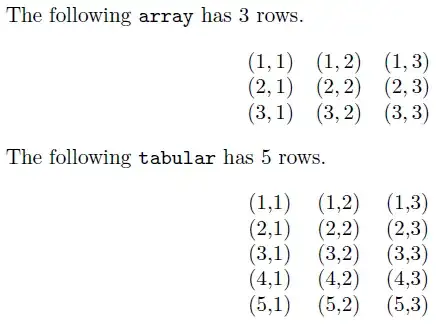
enter image description here

% https://tex.stackexchange.com/q/65649/5764
\documentclass{article}
\usepackage{array}% http://ctan.org/pkg/array

\makeatletter
\def\insert@column{%
   \the@toks \the \@tempcnta
   \global\advance\c@tabcol\@ne
   \ignorespaces \@sharp \unskip
   \the@toks \the \count@ \relax}

\let\old@arraycr\@arraycr
\def\@arraycr{\global\c@tabcol\z@\global\advance\c@tabrow\@ne\old@arraycr}

\let\old@tabarray\@tabarray
\def\@tabarray{\global\c@tabrow\@ne\global\c@tabcol\z@\old@tabarray}

\newcommand{\savetabularrows}[1]{\edef\@currentlabel{\arabic{tabrow}}\label{#1}}

\makeatother
\newcounter{tabcol}\newcounter{tabrow}
\begin{document}

The following \verb|array| has \ref{arrayrows}~rows.

\[
  \begin{array}{ccc}
    (\thetabrow,\thetabcol) & (\thetabrow,\thetabcol) & (\thetabrow,\thetabcol) \\
    (\thetabrow,\thetabcol) & (\thetabrow,\thetabcol) & (\thetabrow,\thetabcol) \\
    (\thetabrow,\thetabcol) & (\thetabrow,\thetabcol) & (\thetabrow,\thetabcol)
  \end{array}
  \savetabularrows{arrayrows}
\]

The following \verb|tabular| has \ref{tabularrows}~rows.

\begin{center}
  \begin{tabular}{ccc}
    (\thetabrow,\thetabcol) & (\thetabrow,\thetabcol) & (\thetabrow,\thetabcol) \\
    (\thetabrow,\thetabcol) & (\thetabrow,\thetabcol) & (\thetabrow,\thetabcol) \\
    (\thetabrow,\thetabcol) & (\thetabrow,\thetabcol) & (\thetabrow,\thetabcol) \\
    (\thetabrow,\thetabcol) & (\thetabrow,\thetabcol) & (\thetabrow,\thetabcol) \\
    (\thetabrow,\thetabcol) & (\thetabrow,\thetabcol) & (\thetabrow,\thetabcol)
  \end{tabular}%
  \savetabularrows{tabularrows}%
\end{center}

\end{document}​
Werner
  • 603,163
  • Thanks, but in order to determine the number or rows you have to print the tabular first, don't you? I would like to get the number of rows before printing the tabular... – Arkandias Oct 07 '14 at 11:48
  • 1
    @Arkandias: I've updated the answer to use the \label-\ref system. You can now use the row count wherever you wish via \ref{<label>}. – Werner Oct 07 '14 at 14:21
0

The package nicematrix provides an environment {NiceTabular} similar to the classical {tabular} (of array) but with further functionalities.

Among these, at the end of the environment, the LaTeX counter iRow contains the total number of rows of the tabular.

Actually, it's not exactly a LaTeX counter since it disappears at the end of the environment (by design). So, if you want to use its value outside the environement, you have to store its value in another LaTeX counter by an instruction in the \CodeAfter of the {NiceTabular}.

\documentclass{article}
\usepackage{nicematrix}

\begin{document}

\newcounter{NumberOfRows}

\begin{NiceTabular}{cc} foo & bar \ foo & bar \ foo & bar \ foo & bar \ foo & bar \ foo & bar \ foo & bar \ foo & bar \ foo & bar \ \CodeAfter \setcounter{NumberOfRows}{\value{iRow}} \end{NiceTabular}

The number of rows is \arabic{NumberOfRows}.

\end{document}​

Output of the above code

F. Pantigny
  • 40,250