Ignasi's answer to Forest trees on the same line shows how to effectively draw two trees in the same forest environment using the phantom trick noted in the forest documentation.
Doing this, however, leads to extra vertical distance in the tree(s), which is quite noticeable when aligned with something else. For example, putting the trees inside of an \ex leads to the "top" of the trees starting below the example number.
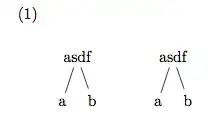
Is there a way to eliminate this extra distance so that the "tops" of the two trees are aligned with the example number?
MWE
\documentclass{article}

\usepackage{forest}
\usepackage{gb4e}

\begin{document}

\begin{exe}
    \ex{
        \begin{forest} baseline
            [, phantom, s sep = 3em
                [asdf
                    [a]
                    [b]
                ]
                [asdf
                    [a]
                    [b]
                ]
            ]
        \end{forest}
    }
\end{exe}

\end{document}


overlayoption in the phantom node? (On the phone, no TeX sorry) – percusse Oct 06 '14 at 06:59forestdocumentation returns nothing for the word "overlay". – Adam Liter Oct 06 '14 at 07:03phantommeans adding a phantom node with no visible connections to the roots of the two visible trees. This node is placed on the baseline as requested. Now you know whyadjustboxcan be useful, don't you?;-)– egreg Oct 06 '14 at 07:38forestenvironment to make it easier to draw arrows from one tree to the other. – Adam Liter Oct 06 '14 at 07:39