4

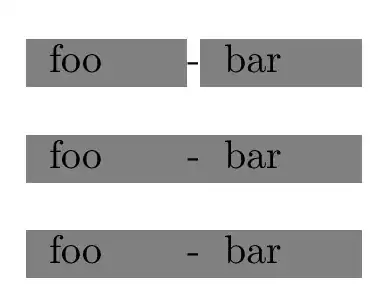
When I use \rowcolor, custom separators between columns are not affected:

\documentclass{article}

\usepackage{xcolor}
\usepackage{colortbl}

\begin{document}
    \begin{tabular}{p{1cm}!{-}p{1cm}}
        \rowcolor{gray} foo & bar
    \end{tabular}
\end{document}

The - is rendered with white background, although the whole row should be gray. How can I fix that?

Werner
  • 603,163
flyx
  • 2,051

2 Answers2

4

A couple of possibilities. Sorry the interface is rubbish, it's not entirely my fault.

enter image description here

\documentclass{article}

\usepackage{xcolor}
\usepackage{colortbl}

\begin{document}
    \begin{tabular}{p{1cm}!{-}p{1cm}}
        \rowcolor{gray} foo & bar
    \end{tabular}

\bigskip

    \begin{tabular}{p{1cm}!{-}p{1cm}}
        \rowcolor{gray}
        \multicolumn{1}{p{1cm}!{\fboxsep=0pt\colorbox{gray}{\strut-}}}{foo} & bar
    \end{tabular}


\bigskip

    \begin{tabular}{p{1cm}!{-}p{1cm}}
    \rowcolor{gray}
    \multicolumn{1}{>{\columncolor{gray}[\tabcolsep][15pt]}p{1cm}!{-}}{foo}& bar
    \end{tabular}

\end{document}
David Carlisle
  • 757,742
1

For information. If, instead of {tabular}, you use {NiceTabular} of nicematrix (with its key color-inside), you will have directly the expected output (because nicematrix uses PGF/TikZ to add color to the rows).

\documentclass{article}
\usepackage{xcolor}
\usepackage{nicematrix}

\begin{document} \begin{NiceTabular}{p{1cm}!{-}p{1cm}}[color-inside] \rowcolor{gray!50} foo & bar \end{NiceTabular} \end{document}

You need several compilations.

Output of the above code

F. Pantigny
  • 40,250