Here are two ways you can do this:
Large Brace:
You can specify a larger braces as per About big parenthesis larger than Bigg to achieve:
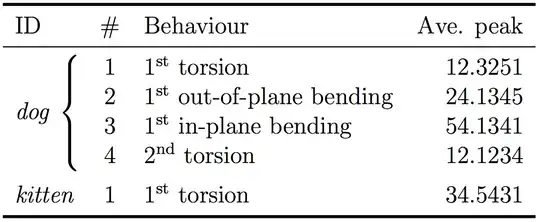
This does however require manual intervention to select the size of the brace.
\tikzmark:
Alternatively, you can use tikzmark to mark the important points of the brace and then use tikz to draw the brace. This is more flexible in that you don't need to tweak the code if you add/subtract rows plus provides a lot more flexibility in terms of how the brace is drawn:

Notes:
In both solutions, I adjusted the inter column spacing. Remove this if it is not desired.
The \tikzmark solution does require two runs. First one to determine the locations, and the second to do the drawing.
The \tikzmark is from Adding a large brace next to a body of text.
Code Bigger that \Big:
\documentclass[a4paper,12pt]{report}
\usepackage{amsmath}
\usepackage{booktabs}
\usepackage{multirow}

% https://tex.stackexchange.com/questions/6794/about-big-parenthesis-larger-than-bigg
\makeatletter
    \newcommand{\vast}{\bBigg@{3}}
    \newcommand{\Vast}{\bBigg@{3.5}}
    \newcommand{\vastt}{\bBigg@{4}}
    \newcommand{\Vastt}{\bBigg@{4.5}}
    %%
    %% Size from smallest to largest:
    %%\[ ( \big( \Big( \bigg( \Bigg( \vast( \Vast( \vastt( \Vastt(\]
\makeatother


\begin{document}
\begin{table}
\centering
\begin{tabular}{l@{\hspace*{0.5em}}clr}% <-- @{} adjusted inter column space
\toprule[1.5pt]
{ID} & {\#} & {Behaviour} & {Ave. peak} \\
\midrule
\multirow{4}{*}{\emph{dog} \vastt\{ } & 1 & $1^{\mathrm{st}}$ torsion  & 12.3251 \\
 & 2 & $1^{\mathrm{st}}$ out-of-plane bending & 24.1345 \\
 & 3 & $1^{\mathrm{st}}$ in-plane bending & 54.1341 \\
 & 4 & $2^{\mathrm{nd}}$ torsion & 12.1234 \\[5pt]

\emph{kitten} & 1 & $1^{\mathrm{st}}$ torsion & 34.5431 \\

\bottomrule[1.5pt]
\end{tabular}
\end{table}
\end{document}
Code: \tikzmark
\documentclass[a4paper,12pt]{report}
\usepackage{booktabs}
\usepackage{multirow}
\usepackage{xparse}
\usepackage{tikz}
\usetikzlibrary{calc}
\usetikzlibrary{decorations.pathreplacing}

\newcommand{\tikzmark}[1]{\tikz[overlay,remember picture] \node (#1) {};}

\newcommand*{\BraceAmplitude}{0.4em}%
\newcommand*{\VerticalOffset}{0.5ex}%
\newcommand*{\HorizontalOffset}{1.0em}%
\NewDocumentCommand{\InsertLeftBrace}{%
    O{} % #1 = draw options
    O{\HorizontalOffset,\VerticalOffset} % #2 = optional brace shift options
    m   % #3 = top tikzmark
    m   % #4 = center tikzmark
    m   % #5 = bottom tikzmark
}{%
    \begin{tikzpicture}[overlay,remember picture]
        \coordinate (Brace Top)    at ($(#4 |- #3.north) + (#2)$);
        \coordinate (Brace Bottom) at ($(#4 |- #5.south) + (#2)$);
    \draw [decoration={brace, amplitude=\BraceAmplitude}, decorate, thick, draw=blue, #1]
    (Brace Bottom) -- (Brace Top) ;
    \end{tikzpicture}%
}%


\begin{document}
\begin{table}
\centering
\begin{tabular}{l@{\hspace*{0.5em}}clr}% <-- @{} adjusted inter column space
\toprule[1.5pt]
{ID} & {\#} & {Behaviour} & {Ave. peak} \\
\midrule
\multirow{4}{*}{\emph{dog}\tikzmark{Center Mark}} & \tikzmark{Top Mark}1 &
        $1^{\mathrm{st}}$ torsion  & 12.3251 \\
 & 2 & $1^{\mathrm{st}}$ out-of-plane bending & 24.1345 \\
 & 3 & $1^{\mathrm{st}}$ in-plane bending & 54.1341 \\
 & \tikzmark{Bottom Mark}4 & $2^{\mathrm{nd}}$ torsion & 12.1234 \\[5pt]

\emph{kitten} & 1 & $1^{\mathrm{st}}$ torsion & 34.5431 \\

\bottomrule[1.5pt]
\end{tabular}
\InsertLeftBrace[red, ultra thick]{Top Mark}{Center Mark}{Bottom Mark}
\end{table}
\end{document}


