15

I'm pretty new to Latex, so please bare with me.

I'm trying to add this notation to my document:

enter image description here

I created the above picture from the Online Latex Equation Editor, but it seems that when I try to apply the same code in my editor (TeXstudio), things are different...

For example, the above picture was produced using the code:

D=\left\{ x\in\mathbb{N}|1\leq x\leq 100 \right\} 

But when I write it in my editor (enclosed in the $ sign of course), I get the following error when compiling:

Undefined control sequence. $D=\left{x\in \mathbb

The funny thing is that I was still able to see the output in the preview window (even though the editor shows that this line has error in it).
That's the first problem.

The second problem is, although I can see the output in the preview window, it won't be the same as the output I get from the Online Latex Equation Editor.
While the Online Latex Equation Editor produces this:

enter image description here

My TeXstudio editor produces this:

enter image description here

Notice the distinction in the N symbol that denotes the set of natural numbers. It is different the what I intended, which is the first version, as it produced by the Online Latex Equation Editor.

What's wrong here? Am I missing a package or something?

  • 10
    Welcome to TeX.SX! For \mathbb you should have \usepackage{amssymb} (or \usepackage{amsfonts}, but better to have the bigger thing). The bar should be \mid for correct spacing. Note that \left and \right here serve no purpose. – egreg Oct 31 '14 at 10:08
  • @egreg Brilliant, thanks! this sort everything out! – so.very.tired Oct 31 '14 at 10:09
  • 2
    @so.very.tired Please have a look at this post to see how to properly typeset {...|...} sets: http://tex.stackexchange.com/a/25411/11002 – yo' Oct 31 '14 at 12:42

2 Answers2

15

Probably the online editor loads the required package, which is amssymb (recommended for documents with math material). Note that amsfonts could be sufficient, but amssymb provides a richer supply of symbols.

\documentclass{article}

\usepackage{amsmath}
\usepackage{amssymb}

\newcommand{\numberset}[1]{\mathbb{#1}} 
\newcommand{\nat}{\numberset{N}}}

\begin{document}

\[
D = \{\, x\in\nat \mid 1\le x\le 100 \,\}
\]

\end{document}

Note that \left and \right are not necessary here (and should be used only when really needed). Also the vertical bar should be \mid for better spacing. The thin spaces at both ends are a recommended, although optional, refinement.

The indirect definition of \nat (for “natural numbers”) is a trick that allows for uniform appearance of objects having the same nature. If you (or somebody else, read a fussy supervisor) later decide that boldface should be used, you can just change the definition of \numberset.

enter image description here

If you need plenty of set notations, it may be better to use mathtools:

\documentclass{article}

\usepackage{amsmath}
\usepackage{amssymb}
\usepackage{mathtools}

\newcommand{\numberset}[1]{\mathbb{#1}}
\newcommand{\nat}{\numberset{N}}

\DeclarePairedDelimiterX{\Set}[2]\{\}{%
  \, #1 \;\delimsize\vert\; #2 \,
}

\begin{document}

\begin{gather*}
D=\Set{x\in\nat}{1\le x\le 100}\\
D=\Set[\big]{x\in\nat}{1\le x\le 100}\\
D=\Set[\Big]{x\in\nat}{1\le x\le 100}\\
D=\Set[\bigg]{x\in\nat}{1\le x\le 100}\\
D=\Set[\Bigg]{x\in\nat}{1\le x\le 100}\\
D=\Set*{x\in\nat}{1\le x\le \frac{200}{2}}
\end{gather*}

\end{document}

With the optional argument to \Set you can make the delimiters bigger. With \Set*, \left and \right are added.

enter image description here

egreg
  • 1,121,712
  • See my comment to tohecz above. After having used the two arg approach for a while, I'd no longer recommend it. The \Set{... \given... } is a lot more natural to read. – daleif Oct 31 '14 at 13:21
  • @daleif Yes, but your example in the documentation is very hard to understand and there are better ways to accomplish the same task. – egreg Oct 31 '14 at 13:24
  • Hard how? And better how? By all means, if we can make it better. – daleif Oct 31 '14 at 16:06
  • Is \;\delimsize\vert\; the same as \mathrel{\delimsize\vert}? And are these both the same as \mid when the \delimsize is the default size? – justin May 12 '16 at 21:06
  • 1
    @justin Not really the same, because \delimsize might be \middle in case you call \Set* and \mathrel{\delimsize\vert} would raise an error. – egreg May 12 '16 at 21:12
14

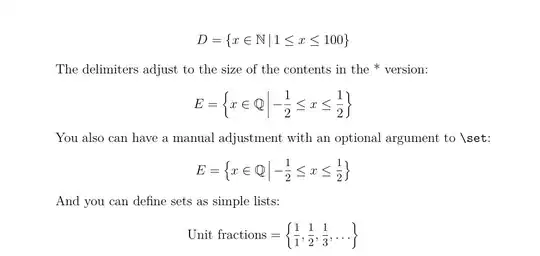
A variant solution, also based on mathtools, with the cooperation of xparse allows for a syntax that's closer to mathematical writing: you just have to type something like\set{x\in E;P(x)} for the set-builder notation, or \set{x_i} for sets defined as lists.

Note that it's unnecessary to load amsmath if you load mathtools.

Illustration:

\documentclass[12pt]{article}
\usepackage[utf8]{inputenc}
\usepackage{amssymb}
\usepackage{lmodern}
\usepackage{mathtools, nccmath}
\newcommand{\N}{\mathbb N}
\newcommand{\Q}{\mathbb Q}

\usepackage{xparse}
%
\DeclarePairedDelimiterX{\set}[1]{\{}{\}}{\setargs{#1}}
\NewDocumentCommand{\setargs}{>{\SplitArgument{1}{;}}m}
{\setargsaux#1}
\NewDocumentCommand{\setargsaux}{mm}
{\IfNoValueTF{#2}{#1} {#1\,\delimsize|\,\mathopen{}#2}}%{#1\:;\:#2}

\parindent = 0pt

\begin{document}

 \[ D = \set{x ∈ \N ; 1\leq x\leq 100} \]%

The delimiters adjust to the size of the contents in the * version:
\[ E = \set*{x ∈ \Q ; -\frac{1}{2}\leq x \leq \frac{1}{2}}\]%

You also can have a manual adjustment with an optional argument to \verb+\set+:
\[ E = \set[\big]{x ∈ \Q ; -\mfrac{1}{2}\leq x \leq \mfrac{1}{2}}\]%

And you can define sets as simple lists:
\[ \text{Unit fractions}= \set*{\mfrac{1}{1}, \mfrac{1}{2},\mfrac{1}{3}, ... } \]%

 \end{document} 

enter image description here

Andrew Swann
  • 95,762
Bernard
  • 271,350
  • 1
    I would much more prefer \DeclarePairedDelimiterX\set[2]\{\}{#1\mathrel{}\mathclose{}\delimsize|\mathopen{}\mathrel{}#2} :) – yo' Oct 31 '14 at 12:40
  • Once you have used it for a while you start to notice that a two arg syntax is not natural. I recommend marking the vertical line by a suitable \given macro and just a single arg. Then one can also use it for compressed notation like { x>2} – daleif Oct 31 '14 at 13:18
  • @daleif: Not sure to fully understand what you mean with ‘marking a suitable \given macro’. Having a syntax like \set{x \given P(x)}? – Bernard Nov 01 '14 at 12:53
  • See the latest mathtools manual – daleif Nov 01 '14 at 19:22
  • @daleif: I see. I'll try to combine this approach with ; used by xparse as a delimiter for the building property. However, I wonder how to use a (semi)colon instead of a vertical rule – I mean how to let the user choose his symbol as an optional argument. – Bernard Nov 01 '14 at 19:43
  • That is why I recommend not using ; or | in the syntax. Use something that makes sense when read aloud – daleif Nov 01 '14 at 19:47
  • @daleif: I feel like you misunderstand me. What I meant is some people write ; or : as meaning such that. I would like to let them have this possibility. The other point is that I used ; as a separator for xparse because it's not very much used in maths except precisely to mean ‘such that’, and because it's faster way to type than \given. So it's both easy to type and meaningful (even if you decide it will print a vertical rule). – Bernard Nov 01 '14 at 20:16
  • I know it is faster, but it does not make it more readable. Plus having something in the code that has several meanings end up being rather annoying, because it makes double checking more difficult. Say you are using : as your syntax and you want to check all :'s in the doc. Then you get disturbed by the syntax colons. The same reason why I recommend no | anywhere in the code. It can have so many different meanings, that changing one of these need mathematical insight. Using different macro names for the different uses makes this easier plus makes the math part of the code easier to understand – daleif Nov 02 '14 at 07:24