1. Tabularx
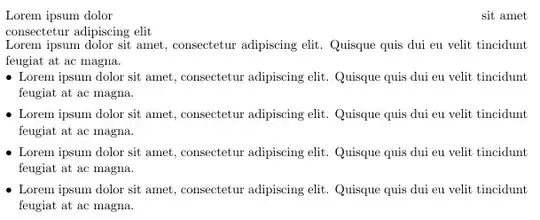
First the warning from subsection 4.3 last bullet in the tabularx-manual:
- Do not use \multicolumn entries which cross any X column.
To line up the text in the left margin, a simple solution is to load the package enumitem and use a local, optional value let the bullet flush the left margin [leftmargin=*].
To achieve your goal number two, I recommend Mico's solution in his answer below. Another solution is to set the text in the spanned columns in a parboxof same with as the spanned columns, i.e. the width of the table minus the distance between the columns, which is (\textwidth - 2\tabcolsep). I have loaded the calc package to perform the calculation. To enclose the list in a parbox may solve some spacing issue you may encounter when you use lists in tables, see for example this answer and its links.
As you will see, all text now line up at the right margin.
\documentclass[11pt, a4paper]{standalone}
\usepackage{tabularx,enumitem,calc}
\usepackage[left=25mm, right=25mm, top=25mm, bottom=25mm]{geometry}

\begin{document}
\noindent\begin{tabularx}{\textwidth}
         {>{\hsize=1.5\hsize}X
          >{\raggedleft\arraybackslash\hsize=0.5\hsize}X}
  Lorem ipsum dolor & sit amet \\
  consectetur adipiscing elit & \\
  \multicolumn{2}{>{\hsize=2\hsize}X}
  {\parbox{\textwidth-2\tabcolsep}
          {Lorem ipsum dolor sit amet, consectetur adipiscing
          elit. Quisque quis dui eu velit tincidunt feugiat
          at ac magna.
          \begin{itemize}[topsep=0pt,leftmargin=*]
            \item Lorem ipsum dolor sit amet, consectetur
                  adipiscing elit. Quisque quis dui eu velit
                  tincidunt feugiat at ac magna.
            \end{itemize}}%
      }
\end{tabularx}
\end{document}
If you have more than one list in the table, you may set the whole table in a local environment (enclose the table in curly brackets {} and have the optional agreement just after the first bracket, i.e.:
\setitemize{topmargin=0pt, leftmargin=*}
Or: If you will have the setup in all list in your document, put the setitemize-command in the preamble of your document.
2. Tabular
You may also try to use the ordinary tabular-environment (you need to load the array package).
When I analysed your MWE, it seems that it is the relation between column one and two, which trigger your use of tabularx. A slightly simpler solution might be to use two p-columns.
\documentclass[11pt, a4paper]{standalone}
\usepackage{tabularx,enumitem,calc}
\usepackage[left=25mm, right=25mm, top=25mm, bottom=25mm]{geometry}

\begin{document}

\noindent\begin{tabular}
               {p{0.75\linewidth-2\tabcolsep}
                >{\raggedleft\arraybackslash}p{0.25\textwidth-2\tabcolsep}}
               Lorem ipsum dolor & sit amet \\
               consectetur adipiscing elit & \\
               \multicolumn{2}{l}
               {\parbox{\textwidth-2\tabcolsep}
                       {Lorem ipsum dolor sit amet, consectetur
                       adipiscing elit. Quisque quis dui eu velit
                       tincidunt feugiat at ac magna.
                       \begin{itemize}[topsep=0pt,itemsep=0pt, leftmargin=*]
                         \item Lorem ipsum dolor sit amet, consectetur
                               adipiscing elit. Quisque quis dui eu
                               velit tincidunt feugiat at ac magna.
                         \item Lorem ipsum dolor sit amet, consectetur
                               adipiscing elit. Quisque quis dui eu
                               velit tincidunt feugiat at ac magna.
                         \item Lorem ipsum dolor sit amet, consectetur
                               adipiscing elit. Quisque quis dui eu
                               velit tincidunt feugiat at ac magna.
                         \item Lorem ipsum dolor sit amet, consectetur
                               adipiscing elit. Quisque quis dui eu
                               velit tincidunt feugiat at ac magna.\strut
                       \end{itemize}
       }}
\end{tabular}
\end{document}
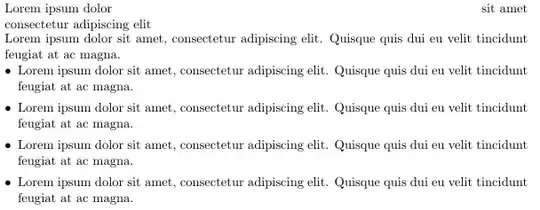
I have corrected the errors in my examples as suggested by Mico, to avoid the table to protrude into the right margins. The \noindentis not always necessary, f.ex. after a sectioning command. A better solution is to use Mico's p{\linewidth eventually reduced with -2\tabcolsep} if you do not use @{}to reduce the left and right space.


parboxandminipagehave the same complexity for me, so I don't have a preference between them. Anyway, your computation of the width of theparboxgave an insight to me. – martemiev Nov 04 '14 at 14:49