3

My example is:

\documentclass[12pt]{article}
\usepackage[margin=1in]{geometry}
\usepackage{tabulary}
\setlength{\tymin}{0.08\textwidth}

\setlength\extrarowheight{2pt}
\makeatletter
\def\z#14#2!!{\def\TY@classz{#17#2}}
\expandafter\z\TY@classz!!
\makeatother

\begin{document}
\begin{tabulary}{\textwidth}{p{9em}RRRRRRR}
\hline
& Ribeir\~{a}o Preto-Paul\'{i}nia & Uberaba-Ribeir\~{a}o Preto 
  & Itumbiara-Uberaba & Quirin\'{o}polis-Itumbiara
  & Jata\'{i}- Quirin\'{o}polis & Anhembi-Paul\'{i}nia & Total \\
\hline
NPV (US\$ million)
  & 230
  & 281
  & 49.9
  & -133
  & -69.1 
  & 134
  & 492 \\%$
Construction Emissions (million Mg CO${}_2$eq)
  & 0.069
  & 0.035
  & 0.053
  & 0.023
  & 0.016 
  & 0.011
  & 0.21 \\%$
Annual Net Avoided Operating Emissions (million Mg CO${}_2$eq)\textsuperscript{a}
  & 0.27
  & 0.14
  & 0.17
  & 0.03
  & 0.016 
  & 0.043
  & 0.67 \\%$
Cumulative Avoided GHG Emissions (million Mg CO${}_2$eq)\textsuperscript{b}
  & 7.94
  & 4.07
  & 5.12
  & 0.866
  & 0.474 
  & 1.29
  & 19.8 \\
NPV of Cumulative Avoided Emissions (US\$ million)\textsuperscript{c}
  & 248
  & 127
  & 160
  & 27
  & 14.7 
  & 40.1
  & 617 \\%$
\hline
\end{tabulary}
\end{document}

That results in the following:
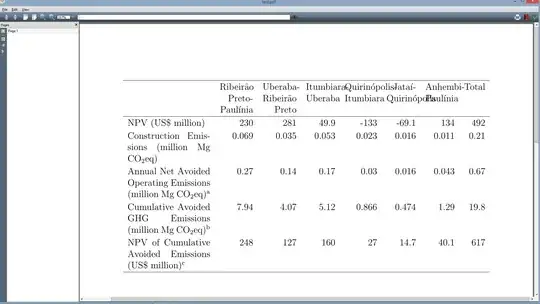
There is left over white space around the second column with overlapping content in the final five. Any ideas as to how to fix this? Thanks so much.

kennyB
  • 459
  • 1
    my packages don't have odd behaviour:-) tabulary doesn't have much chance with this input: the column headings are forcing the table to be wider than the specified size. I'd never use tabularx or tabulary for numeric tables such as this in anycase, just use a normal tabular – David Carlisle Nov 12 '14 at 22:51

1 Answers1

5

I'd just use tabular here;

enter image description here

\documentclass[12pt]{article}
\usepackage[margin=1in]{geometry}
\usepackage{tabulary}
\setlength{\tymin}{0.08\textwidth}

\setlength\extrarowheight{2pt}
\setlength\tabcolsep{2pt}
\newcommand\hd[1]{\begin{tabular}[t]{@{}c@{}}#1\end{tabular}}
\begin{document}
\noindent
\begin{tabular}{@{}>{\raggedright}p{9em}rrrrrrr@{}}
\hline
& \hd{Ribeir\~{a}o\\Preto-\\Paul\'{i}nia}&
  \hd{Uberaba-\\Ribeir\~{a}o\\ Preto}& 
  \hd{Itumbiara-\\Uberaba} &
  \hd{Quirin\'{o}polis-\\Itumbiara}&
  \hd{Jata\'{i}-\\Quirin\'{o}-\\polis}&
  \hd{Anhembi-\\Paul\'{i}nia}&
   \hd{Total}\\
\hline
NPV (US\$ million)
  & 230
  & 281
  & 49.9
  & -133
  & -69.1 
  & 134
  & 492 \\%$
Construction Emissions (million Mg CO${}_2$eq)
  & 0.069
  & 0.035
  & 0.053
  & 0.023
  & 0.016 
  & 0.011
  & 0.21 \\%$
Annual Net Avoided Operating Emissions (million Mg CO${}_2$eq)\textsuperscript{a}
  & 0.27
  & 0.14
  & 0.17
  & 0.03
  & 0.016 
  & 0.043
  & 0.67 \\%$
Cumulative Avoided GHG Emissions (million Mg CO${}_2$eq)\textsuperscript{b}
  & 7.94
  & 4.07
  & 5.12
  & 0.866
  & 0.474 
  & 1.29
  & 19.8 \\
NPV of Cumulative Avoided Emissions (US\$ million)\textsuperscript{c}
  & 248
  & 127
  & 160
  & 27
  & 14.7 
  & 40.1
  & 617 \\%$
\hline
\end{tabular}
\end{document}

If it was my table, I'd also try to shorten the labels in the first column, but not knowing the subject area, I did not try to abbreviate them here.

David Carlisle
  • 757,742
  • Thanks @DavidCarlisle, can I ask which part of the code gets the table to be \textwidth wide? If I change the fontsize to \footnotesize, for example, the table narrows. Thanks again - you are the tex.se champion. – kennyB Nov 12 '14 at 23:18
  • 1
    @kennyB making the table \textwidth wide should be a non-aim:-) with the default font that is not an issue as it wants to be wider than that (I had to shrink \tabcolsep to make it fit) if you have a table that is naturally smaller than full width stretching it out just separates the columns making it harder to read (\begin{tabular*}{\textwidth} if you must) – David Carlisle Nov 12 '14 at 23:22
  • Thanks so much. One thing which having narrower tables messes up is my below table captions, which I've implemented just using text within the table environment. Any ideas on this? – kennyB Nov 13 '14 at 00:17