7

How does I create an image like the one shown under this text directly in the LaTeX document? I have tried with TikZ, but I can only make boxes with the arrows inside, and not exactly like the image. I have to draw how the electrons are distributed in an d-orbital and it has to be as the shown here.

electron configuration

Maria
  • 85
  • 7

2 Answers2

6

As far as I understand, you dislike TikZ, but accept any LaTeX packages.

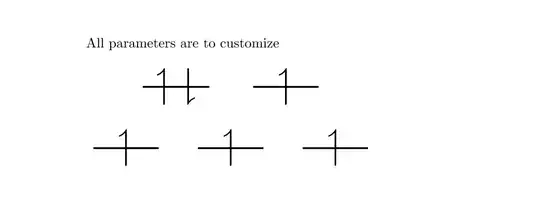
In the following solution all parameters are exemplary, as I don't know the proper usage of your orbital. You can certainly customize them.

\documentclass{article}

\usepackage{amsmath}
\usepackage{amssymb}
\usepackage{ulem}
\usepackage{graphics}

\begin{document}

\def\orbud{\scalebox{3}{\sout{$\;\upharpoonleft \,\downharpoonright\;$}\quad } }

\def\orbu{\scalebox{3}{\sout{$\;\;\upharpoonleft \;\;$}\quad }}

All parameters are to customize

\bigskip

\begin{tabular}{c}
\orbud \orbu\\[2em]
 \orbu  \orbu  \orbu
\end{tabular}

\end{document}

enter image description here

  • Why not just a simple raised rule instead of striking out? – percusse Nov 13 '14 at 04:25
  • @percusse To make the code as simple, as possible, even if additional packages must be loaded. A simple version for a new user. – Przemysław Scherwentke Nov 13 '14 at 05:34
  • Thanks. I do not dislike the tikz, I just could not get it to be as I needed. This is simpel, and does not fill much, which is quite nice. I have been using LaTeX for a few years but simpel and easy and nothing fancy.

    But thanks again :)

    – Maria Nov 13 '14 at 09:04
  • rule doesn't need ulemso you can remove even that. – percusse Nov 13 '14 at 11:17
2

With tikz:

\documentclass[tikz,border=5]{standalone}
\usetikzlibrary{arrows.meta}
\begin{document}
  \begin{tikzpicture}[line width=0.2pt]
    \draw (0,0) -- (1.8ex,0);
    \draw [arrows = {-Straight Barb[left,scale=0.5]}] (0.6ex,-0.6ex) -- (0.6ex,0.6ex);
    \draw [arrows = {-Straight Barb[left,scale=0.5]}] (1.2ex,0.6ex) -- (1.2ex,-0.6ex);
    \begin{scope}[xshift=1cm]
    \draw (0,0) -- (1.8ex,0);
    \draw [arrows = {-Straight Barb[left,scale=0.5]}] (0.9ex,-0.6ex) -- (0.9ex,0.6ex);
    \end{scope}
  \end{tikzpicture}
\end{document}

enter image description here

When used inline with text,

\documentclass{article}
\usepackage{tikz}
\usetikzlibrary{arrows.meta}
\begin{document}
  Some text
  \begin{tikzpicture}[line width=0.3pt]
    \draw (0,0) -- (1.8ex,0);
    \draw [arrows = {-Straight Barb[left,scale=0.5]}] (0.6ex,-0.6ex) -- (0.6ex,0.6ex);
    \draw [arrows = {-Straight Barb[left,scale=0.5]}] (1.2ex,0.6ex) -- (1.2ex,-0.6ex);
    \begin{scope}[xshift=1cm]
    \draw (0,0) -- (1.8ex,0);
    \draw [arrows = {-Straight Barb[left,scale=0.5]}] (0.9ex,-0.6ex) -- (0.9ex,0.6ex);
    \end{scope}
  \end{tikzpicture}
\end{document}

enter image description here

Here you may adjust the baseline suitably if you want.