8

We have been told to avoid eqnarray and use align instead.

The output of eqnarray here:

\newcommand{\Prob}{\operatorname{\mathbb{P}}}
\newcommand{\tp}{\operatorname{tp}}
\newcommand{\fp}{\operatorname{fp}}
\newcommand{\fn}{\operatorname{fn}}
\newcommand{\tn}{\operatorname{tn}}
\newcommand{\Act}{\operatorname{Actual}}
\newcommand{\Pre}{\operatorname{Predicted}}
\newcommand{\Ar}{\operatorname{Accuracy}}
\newcommand{\Ps}{\operatorname{Precision}}
\newcommand{\Rc}{\operatorname{Recall}}

\begin{eqnarray*}
  \Ar =& \Prob(\Act=\Pre)  &= \frac{\tp+\tn}{N} \\
  \Rc =& \Prob(\Pre=1|\Act=1)  &= \frac{\tp}{\tp+\fn} \\
  \Ps =& \Prob(\Act=1|\Pre=1)  &= \frac{\tp}{\tp+\fp}
\end{eqnarray*}

is imperfect:

latex output

but I cannot get even that with either align or alignat...

sds
  • 515
  • eqnarray does not support anything other than two & in a line, your first example just generates errors???? – David Carlisle Nov 17 '14 at 19:44
  • @DavidCarlisle: nope. no errors. – sds Nov 17 '14 at 19:45
  • align produces different output than eqnarray by design. The spacing in eqnarray is basically wrong. the spacing around = should not change just because the following line is aligned. eqnarray gives it the spacing from tabular more or less. – David Carlisle Nov 17 '14 at 19:46
  • I think perhaps you want alignat: \begin{alignat*}{3} foo &= bar &&= baz \\ foobar &= barquux &&= bazzot \end{alignat*}. Please include an image of the output that you desire. – Peter Grill Nov 17 '14 at 19:47
  • 1
    @sds that is why you should always provide a complete document. You must have loaded a package that redefines eqnarray as the one defined in the latex format will generate an error on that input. so cannot guess what your output looks like – David Carlisle Nov 17 '14 at 19:47
  • @DavidCarlisle: please see edit. thanks for you attention, sorry about poor first version. – sds Nov 17 '14 at 20:12
  • 1
    @sds oh so only two & taht's a highly hmm "inventive" use of eqnarray :-) it absolutely was never designed to be used like that, the central column is supposed to be used for = or other operator on which to align, not whole subterms!. Also your example still is not a document that people can run. – David Carlisle Nov 17 '14 at 21:06
  • @sds i updated my answer to match the new example. – David Carlisle Nov 17 '14 at 21:15

4 Answers4

5
\documentclass{article}
\begin{document}

\begin{eqnarray*}
foo &=& bar &=& baz \\
foobar &=& barquux &=& bazzot
\end{eqnarray*}
\end{document}

produces

! Extra alignment tab has been changed to \cr.

the standard eqnarray only takes two &

Using

\documentclass{article}
\usepackage{amsmath}
\begin{document}

\begin{alignat*}{3}
foo &= bar &&= baz \\
foobar &= barquux &&= bazzot
\end{alignat*}
\end{document}

produces

enter image description here

With the updated example, made into a complete document, the results are

enter image description here

\documentclass{article}
\usepackage{amsmath,amsfonts}
\begin{document}

\newcommand{\Prob}{\operatorname{\mathbb{P}}}
\newcommand{\tp}{\operatorname{tp}}
\newcommand{\fp}{\operatorname{fp}}
\newcommand{\fn}{\operatorname{fn}}
\newcommand{\tn}{\operatorname{tn}}
\newcommand{\Act}{\operatorname{Actual}}
\newcommand{\Pre}{\operatorname{Predicted}}
\newcommand{\Ar}{\operatorname{Accuracy}}
\newcommand{\Ps}{\operatorname{Precision}}
\newcommand{\Rc}{\operatorname{Recall}}

\begin{eqnarray*}
  \Ar =& \Prob(\Act=\Pre)  &= \frac{\tp+\tn}{N} \\
  \Rc =& \Prob(\Pre=1|\Act=1)  &= \frac{\tp}{\tp+\fn} \\
  \Ps =& \Prob(\Act=1|\Pre=1)  &= \frac{\tp}{\tp+\fp}
\end{eqnarray*}

\begin{alignat*}{3}
  \Ar &= \Prob(\Act=\Pre)  &&= \frac{\tp+\tn}{N} \\
  \Rc &= \Prob(\Pre=1|\Act=1)  &&= \frac{\tp}{\tp+\fn} \\
  \Ps &= \Prob(\Act=1|\Pre=1)  &&= \frac{\tp}{\tp+\fp}
\end{alignat*}


\end{document}

Note how align gives the = on the longest entry just the space normally given to = and just adds space as necessary to align. eqalign always pads the central column with additional space causing asymmetric spacing around = on all rows.

David Carlisle
  • 757,742
4

For your updated example code, I actually suggest that you use an array environment, with the value of \arraystretch increased to mimic a displaymath setting.

Two additional suggestions: (i) for the "conditioning operator", use \mid instead of | -- you'll get much better spacing; (ii) most of the items you've declared as math operators are, as far as I can tell, simple text strings; I would use \textrm instead of \operatorname in the definitions of \tp, \fp, etc.

The following screenshot shows the outputs of the array and eqnarray* environments:

enter image description here

\documentclass{article}
\usepackage{amsmath,amsfonts}
\DeclareMathOperator{\Prob}{\mathbb{P}}
\newcommand{\tp}{\textnormal{tp}}
\newcommand{\fp}{\textnormal{fp}}
\newcommand{\fn}{\textnormal{fn}}
\newcommand{\tn}{\textnormal{tn}}
\newcommand{\Act}{\textnormal{Actual}}
\newcommand{\Pre}{\textnormal{Predicted}}
\newcommand{\Ar}{\textnormal{Accuracy}}
\newcommand{\Ps}{\textnormal{Precision}}
\newcommand{\Rc}{\textnormal{Recall}}
\begin{document}
Output of \texttt{array}
\[
\renewcommand\arraystretch{2}
\begin{array}{r @{{}={}} c @{{}={}} l} % "{}={}" is inserted in the intercolumn spaces
  \Ar & \Prob(\Act=\Pre)          & \dfrac{\tp+\tn}{N} \\
  \Rc & \Prob(\Pre=1\mid \Act=1)  & \dfrac{\tp}{\tp+\fn} \\
  \Ps & \Prob(\Act=1\mid \Pre=1)  & \dfrac{\tp}{\tp+\fp} \\
\end{array}
\]

\bigskip
Output of \texttt{eqnarray*}
\begin{eqnarray*}
  \Ar =& \Prob(\Act=\Pre)          &= \frac{\tp+\tn}{N} \\
  \Rc =& \Prob(\Pre=1\mid \Act=1)  &= \frac{\tp}{\tp+\fn} \\
  \Ps =& \Prob(\Act=1\mid \Pre=1)  &= \frac{\tp}{\tp+\fp}
\end{eqnarray*}

\end{document}
Mico
  • 506,678
3

Here is an application of a macro I showed in Aligning equations with left and right comment (you find there explanations).

\documentclass{article}
\usepackage{amsmath,amssymb}

\newcommand{\Prob}{\operatorname{\mathbb{P}}}
\newcommand{\tp}{\mathrm{tp}}
\newcommand{\fp}{\mathrm{fp}}
\newcommand{\fn}{\mathrm{fn}}
\newcommand{\tn}{\mathrm{tn}}
\newcommand{\Act}{\mathrm{Actual}}
\newcommand{\Pre}{\mathrm{Predicted}}
\newcommand{\Ar}{\mathrm{Accuracy}}
\newcommand{\Ps}{\mathrm{Precision}}
\newcommand{\Rc}{\mathrm{Recall}}

% the magic trick, see https://tex.stackexchange.com/a/209732/4427
\makeatletter
\newcommand{\Cen}[2]{%
  \ifmeasuring@
    #2%
  \else
    \makebox[\ifcase\expandafter #1\maxcolumn@widths\fi]{$\displaystyle#2$}%
  \fi
}
\makeatother

\begin{document}

\begin{alignat}{2}
  \Ar ={}& \Cen{2}{\Prob(\Act=\Pre)}        &&= \frac{\tp+\tn}{N} \\
  \Rc ={}& \Cen{2}{\Prob(\Pre=1\mid\Act=1)} &&= \frac{\tp}{\tp+\fn} \\
  \Ps ={}& \Cen{2}{\Prob(\Act=1\mid\Pre=1)} &&= \frac{\tp}{\tp+\fp}
\end{alignat}

\end{document}

We need two groups of left-right columns, with no space between them, so I use alignat (the alignat* version will not print numbers). In the column we want centered, which is the second, I enclose the material as the second argument to \Cen (the first argument is the column number). We need &&= because the last column must be left aligned.

enter image description here

Note that the only real operator name is \Prob, the other symbols are just variables, so they should be defined with \mathrm. Note also \mid instead of |, which gives a better spacing.

Whether to center the second column is a judgment question; in my document I'd simply use gather or align to put the three equations flush left.

\begin{gather}
  \Ar = \Prob(\Act=\Pre) = \frac{\tp+\tn}{N} \\
  \Rc = \Prob(\Pre=1\mid\Act=1) = \frac{\tp}{\tp+\fn} \\
  \Ps = \Prob(\Act=1\mid\Pre=1) = \frac{\tp}{\tp+\fp}
\end{gather}

\begin{align}
&  \Ar = \Prob(\Act=\Pre) = \frac{\tp+\tn}{N} \\
&  \Rc = \Prob(\Pre=1\mid\Act=1) = \frac{\tp}{\tp+\fn} \\
&  \Ps = \Prob(\Act=1\mid\Pre=1) = \frac{\tp}{\tp+\fp}
\end{align}

enter image description here

egreg
  • 1,121,712
2

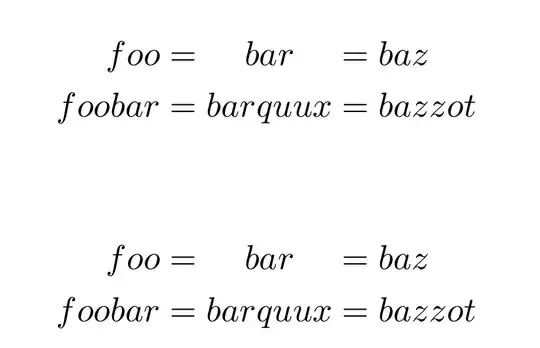
You can centre the middle column with the makebox or the eqparbox packages. The eqparbox commands use a tag that makes all boxes that use that tag have width equal to the largest width of boxes; by default, their contents is centred in the box.

\documentclass{article}
\usepackage{amsmath}
\usepackage{makebox}

\usepackage{eqparbox}

\begin{document}

\begin{alignat*}{3}
foo &= \makebox*{$ barquux $} {$ bar $}&&= baz \\
foobar &= barquux &&= bazzot
\end{alignat*}

\begin{alignat*}{3}
foo &= \eqmakebox[Col]{$ bar$} &&= baz \\
foobar &= \eqmakebox[Col]{$ barquux $} &&= bazzot
\end{alignat*}

\end{document} 

enter image description here

Bernard
  • 271,350