1

When writing papers such as this one https://github.com/geneura-papers/2015-Evostar/blob/b9474f66cd45aee316136831c4a9b4acaef4e89f/GPbot/GPbot-evostar2015.tex, we use LaTeX comments for, well, commenting on the paper itself and making suggestion. There are a couple of issues

  • When issues are resolved, we erase the comments by hand. Except when we don't, which is often.
  • When we submit the paper, we also have to erase all comments by hand. Sometimes we've submitted sources to places that allow downloading with all our comments, including in-jokes.
  • We have no way to know unresolved issues or, in some cases, who's created it. We usually sign them, but sometimes we forget.

We would need a tool that, maybe using it after compilation, would allow

  1. Use some simple markup for issues, like note important or solved (in which case it could be erased)
  2. Erase all issues for production (there's probably something that already does that, I'm sure), except maybe some marked as comments that should be left in the source (meta data such as file names or whatever)
  3. It would be perfect if it could be tied with git and GitHub
  4. List unresolved issued

It would be weird that there's no such tool, but I've been unable to find it. On the other hand, if we set down to write it, would anybody else be interested in using it? Has somebody found similar problems and how have you solved them?

jjmerelo
  • 210
  • Welcome to TeX.SX!. To be honest, I do not have a direct solution but some ideas or hints. Could you please tell on which operating systems you are going to work? – albert Nov 26 '14 at 17:33
  • 1
    Use a version control system. – jub0bs Nov 26 '14 at 17:38
  • If you have followed the link I put above, we do use a version control system. However, GitHub does not allow inline comments on the source, only on the commits. We did think about it, but it is not what we are looking for, since, in fact, it's not inline. We use GitHub issues (just check the site) for general discussion on the paper not tied to a particular line or phrase. – jjmerelo Nov 26 '14 at 17:42
  • @jjmerelo There is no link in your post, at least that I can find... I would also recommend the todonotes package. You can have a "Table of To-dos" at the beginning of your document, and each user can be assigned a color. These would be marked inline in the source and also show up in the PDF (unless you set the "final" option, in which case none would show in the PDF) – darthbith Nov 26 '14 at 17:48
  • Sorry about that. Just included. My (quite obvious) bad. Will check out that package. Looks almost, although not quite, what I'm looking for. – jjmerelo Nov 26 '14 at 18:19
  • 1
    @jjmerelo: If there is really no "out-of-the-box" solution for your problem, you could try to use a tag-like syntax. In general, you could imagine something like % TODO: stuff to be done and read those lines by a e.g. a python-script using regular expressions and summarize found lines in a additional file which would be kind of a ToDo-list. I'm not sure, but maybe you could even pass the linenumber to the summarized list which would give a you a nice overview. In addition, you could think about a command, providing the needed %TODO-line and passing options like editor and comment massage. – albert Nov 26 '14 at 18:30
  • @darthbith it's almost perfect if it had the "done" option implemented (it's in the wish list). Thanks anyway. – jjmerelo Nov 26 '14 at 18:30
  • @albert that is what I was looking for, more or less, but was wondering if there's some convention or best practice already established for it. Or, even better, convention and best practice and CTAN or post-processing module. – jjmerelo Nov 26 '14 at 18:32
  • Have you seen this question: http://tex.stackexchange.com/questions/83663/utility-to-strip-comments-from-latex-source – DG' Nov 26 '14 at 20:16
  • This is possibly related: http://tex.stackexchange.com/questions/140310/multiple-lists-of-to-do-notes/168160#168160, for cases where multiple authors need to comment on a document. – Steven B. Segletes Nov 26 '14 at 23:03
  • You should also look at fixme. I'm not saying it's better than todonotes. I have no idea as I've never used the latter. But it permits various gradations of notes (everything from fatal to mere annotations), authorship (each author can have their own version of the commands), different ways of displaying the notes (including a list of all fixmes) and various other things I haven't personally used. It would be pretty simple to eliminate these with a little sed and gawk for submission, especially if you branch/tag submitted versions and keep fixmes in trunk (svn terms sorry). – cfr Dec 28 '15 at 03:54

2 Answers2

2

This might be stating the obvious, but you could define a command that does nothing and use that as a marker in the input file.

This command ignores all input it receives. Its only function is as a comment in the input file. The first argument is optional, so you can type \FIX[note]{comment} or just \FIX{comment}.

\documentclass{article}

\newcommand{\FIX}[2][\relax]{\relax}
\newcommand{\SOLVED}{\FIX}

\begin{document}

The sentunz may not be spelld korrectly.
%%
\FIX[important]{Fire the employee who wrote this.}
\SOLVED[2014-11-26]{Employee fired}
%%

\end{document}

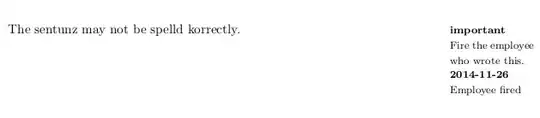
You could later redefine these commands to do something else, such as print a version with annotations in the margin:

\renewcommand{\FIX}[2][\relax]{\marginpar{{\footnotesize \textbf{#1}\par #2}}}

enter image description here

You could also create a counter for FIX commands, \newcounter{fix}, and increment it each time the command is called, \stepcounter{fix}. At the end of the document you could call a command to print \thefix in the annotated version.

musarithmia
  • 12,463
0

The FiXme package: CTAN Link Documentation FiXme is a collaborative annotation tool for LATEX documents. Seems to be a comprehensive solution.

A Feldman
  • 3,930