5

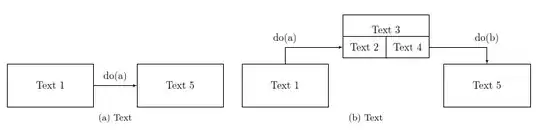
I am trying to use nodes to draw a simple relation in two figures. Basically what I want looks like this: enter image description here

How can I do that using tikz? The two relationships should be next to each other. I think if it used subfigures then it would be even better. Any ideas?

EDIT: This is what I have so far:

\documentclass{article}
\usepackage{tikz}
\usepackage{subcaption}
\usetikzlibrary{positioning,arrows}
\tikzset{
block/.style={
  draw, 
  rectangle, 
  minimum height=1.5cm, 
  minimum width=3cm, align=center
  }, 
line/.style={->,>=latex'}
}
\begin{document}
\begin{figure}[htbp]
\begin{subfigure}{.5\textwidth}
\centering
\begin{tikzpicture}
  \node[block] (a) {Text 1};
  \node[block, right = 0.5cm of a] (b) {Text 5};
  \draw[line] (a.east) |- (b.west);
\end{tikzpicture} 
\caption{Text}
\label{fig:myfirstsubfig}
\end{subfigure}
\begin{subfigure}{.5\textwidth}
  \centering
  \begin{tikzpicture}
  \node[block] (a) {Text 1};
  \node[block, above right = 0.2cm and 0.5cm of a] (b) {Text 3};
  \node[block, below right = 0.2cm and 0.5cm of b]   (c) {Text 5};
  \draw[line] (a.north) |- (b.west);
  \draw[line] (b.east) -| (c.north);
\end{tikzpicture} 
\caption{Text}
\label{fig:mysecondsubfig}
\end{subfigure}
\end{figure}
\end{document}

EDIT: Right now there are three problems: the two subfigures are not next to each other, the labels are missing and the subboxes for Text 2 and Text 4 are missing. Any ideas?

EDIT: Now the subfigures are next to each other. All I need right now are the subboxes and the labels.

  • 4
    These are really simple drawings, and perhaps you could post a minimal document showing what you've tried. On creating boxes with arrows see Tikz diagram: nodes with arrows. On placing figures side by side see Caption issue when placing figure side by side – Alan Munn Nov 29 '14 at 19:24
  • ok, but how can you give me a hint on how to create that box with 3 sections? – user2426316 Nov 29 '14 at 21:18
  • Just post whatever you *can* do and somebody will be happy to help you with the rest. You could put a tabular in a node. Or you could just put 3 nodes there, right next to each other. Or you could use one node and then add the lines inside it afterwards. But just do whatever you can, even if you just put that stuff in one box for now. – cfr Nov 29 '14 at 21:45
  • The pictures are too wide to go side-by-side on a portrait page. Do you want them to be smaller? Or do you want to use a landscape sheet? Or what? – cfr Nov 29 '14 at 22:29
  • You can make the boxes smaller, that's not a problem – user2426316 Nov 29 '14 at 22:35
  • I made the page wider for testing but obviously you can make the boxes smaller if you prefer. – cfr Nov 29 '14 at 22:40
  • maybe Rstudio can do that, there some graphics modules onto, they can solve and draw & export as LaTeX... Rstudio is r language based, very easy to install on nix, win or osx see u – leodebordo Nov 30 '14 at 01:21

1 Answers1

4

This doesn't look like the image but your code suggests that you are modifying it somewhat and I worked with that.

\documentclass{article}
\usepackage{tikz}
\usepackage{subcaption}
\usepackage[scale=.8]{geometry}
\usetikzlibrary{positioning,arrows}
\tikzset{
  block/.style={
    draw,
    rectangle,
    minimum height=1.5cm,
    minimum width=3cm,
    align=center
  },
  subblock/.style={
    draw,
    rectangle,
    minimum height=.75cm,
    minimum width=1.5cm,
    align=center
  },
  line/.style={->,>=latex'}
}
\begin{document}
  \begin{figure}[htbp]
    \begin{subfigure}[b]{.5\textwidth}
      \centering
      \begin{tikzpicture}
        \node[block] (a) {Text 1};
        \node[block, right = 1.5cm of a] (b) {Text 5};
        \draw[line] (a.east) -- (b.west) node [midway, above] {do(a)};
      \end{tikzpicture}
      \caption{Text}
      \label{fig:myfirstsubfig}
    \end{subfigure}
    \begin{subfigure}[b]{.5\textwidth}
      \centering
      \begin{tikzpicture}
        \node[block] (a) {Text 1};
        \node[block, above right = 0.2cm and 0.5cm of a] (b) {Text 3\\};
        \node (b2) [anchor=south west, subblock] at (b.south west) {Text 2};
        \node (b4) [anchor=south east, subblock] at (b.south east) {Text 4};
        \node[block, below right = 0.2cm and 0.5cm of b]   (c) {Text 5};
        \draw[line] (a.north) |- (b2.west) node [midway, above] {do(a)};
        \draw[line] (b4.east) -| (c.north) node [midway, above] {do(b)};
      \end{tikzpicture}
      \caption{Text}
      \label{fig:mysecondsubfig}
    \end{subfigure}
  \end{figure}
\end{document}

subblock style

cfr
  • 198,882
  • @user2426316 You're welcome. The subcaption documentation seems helpful - I've not used the package before. – cfr Nov 29 '14 at 22:51