3

I want to vertically center the text Rule boolean behavior in each row, how can I do this?
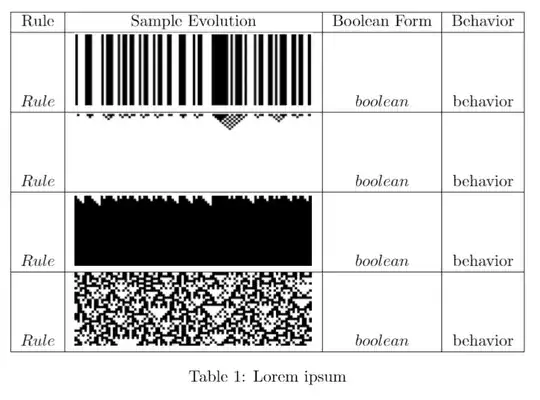
Sharelatex.

enter image description here

\documentclass{article}

\usepackage{graphicx} 
\graphicspath{ {images/} }

\usepackage[rightcaption]{sidecap}

\usepackage{wrapfig}

\begin{document}

\begin{table}
    \centering
    \begin{tabular}{|c|c|c|c|}
    \hline
    Rule & Sample Evolution & Boolean Form & Behavior\\
    \hline
    $Rule$  & \includegraphics{stable.png} &$boolean$ & behavior\\
    \hline
    $Rule$  & \includegraphics{decreasing.png} &$boolean$ & behavior\\
    \hline
    $Rule$  & \includegraphics{growing.png} & $ boolean $ & behavior\\
    \hline
    $Rule$  & \includegraphics{chaotic.png} &$ boolean $ & behavior\\
    \hline
    \end{tabular}
    \caption{Lorem ipsum}
\end{table}


\end{document}
  • 1
    never use math italic for words like $Rule$ the font is designed to make adjacent letters look like distinct variables and not like a word. Use \textit{Rule}, and \textit{Boolean} – David Carlisle Nov 30 '14 at 21:09

2 Answers2

4

replace each

\includegraphics{stable.png}

by

\raisebox{-.5\height}{\includegraphics{stable.png}}

or perhaps adjust the .5 to taste so that the reference point for the image is not on its bottom edge.

David Carlisle
  • 757,742
3

If you add also

\usepackage[export]{adjustbox}

you are able to use a valign=c option to your \includegraphics command, which is easier than using \raisebox.

Here's an example, where I also use booktabs and array facilities for better input. For instance the first and third columns will be in italic (note \upshape in the header for overriding it).

The third and fourth rows show the behavior with valign=t and without valign.

\documentclass{article}

\usepackage[export]{adjustbox}
\usepackage{graphicx} % loaded by adjustbox
\usepackage{booktabs} % better tables
\usepackage{array} % some more facilities

\begin{document}

\begin{table}
\centering
\begin{tabular}{>{\itshape}c c >{\itshape}c c}
\toprule

\upshape Rule & Sample Evolution & \upshape Boolean Form & Behavior\\

\midrule

Rule  & \includegraphics[height=2cm,valign=c]{duck} & boolean & behavior\\
\midrule
Rule  & \includegraphics[height=2cm,valign=t]{duck} & boolean & behavior\\
\midrule
Rule  & \includegraphics[height=2cm]{duck} & boolean & behavior\\

\bottomrule
\end{tabular}
\caption{Lorem ipsum}
\end{table}

\end{document}

enter image description here

egreg
  • 1,121,712