26

Original question

Is there any automated or semi-automated way of tracing outermost outline or whole path of letters in TikZ?

That I would be able (e.g. by using positioned nodes) to draw a letter using a letters, like shown below in my ascii-art (agreed, not really an art in this case):

   aaaaaaaa
  aaaaaaaaaa
 aa        aa 
            aa
   aaaaaaaa aa
  aaaaaaaaaaaa
 aa        aaa
 aaaaaaaaaaaaa
  aaaaaaaaa  aa

Comment

Martin's note made me certain what I already suspected, that within PGF/TikZ I am unable to trace any glyph from any font. IOW getting outline of glyph in a format supported by TikZ is a separate issue, rather not TeX-related, but worth being mentioned here.

Preliminary

Obtaining glyph outline

Let me summarize already mentioned techniques toward getting it to TikZ:

Obtaining glyph "filling"

It's something I wasn't asking at all, but it's other interesting idea that was brought up in answers:

  • convert for exporting glyph to text form and sed for cleaning it (provided by Jake)

Revised question

Mentioned earlier tracing is now part of preliminary process, as glyph outline (which can be any other path, but I'll stick with this particular example) is assumed to be known, so question should be rephrased.

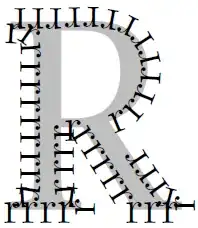
What are the techniques available in TikZ to outline (fill) glyph outline with text [like one letter]?

Support for diversification of outline/fill style depending on "density" and in-path "neighborhood" (e.g. style changing in case of serifs, bent parts, etc. would be a nice feature.

I'm mostly interested in TikZ, but if you want to share non-TikZ solutions, do it immediately!

Supplementary question

If you know or just came up with not described yet method of obtaining glyph outline (or "filling") and you think it's interesting or simply worth to be mentioned, tell us about it.


Afterword, i.e. paragraph about myself

Maybe I should add that I'm really new to PGF/TikZ. Even though I was using LaTeX for about ~8 years already (with various frequency, so I am far from being an expert), I never really get to TikZ. Back in the old days I did some work with PSTricks, but frankly speaking I forgot all of that since then. I saw TikZ examples a few years ago and was amazed how PGF/TikZ can provide nice abstractions for performing different drawing tasks. Lately I had to touch TikZ and meanwhile I started to think about using it in less common way, i.e. for creating some "artistic" drawings instead of plain diagrams, sketches and whatever it is used usually. PGF/TikZ manual is great, no question, but you must know what to look for and even if you know that, your wording maybe not exactly the same as used in the documentation, which makes finding sometimes hard (it's true especially for non-native English speaker, as in my case). You may say: just browse it! Sure, but ~700 pages is pretty much, so it's rather not something you will read and understand well even within month (correct me if I am wrong). Sorry for too long OT paragraph, but it should clear some things, because it's not like I am unwilling to look to manual myself, just sometimes it's far more productive to ask experts, because they have invaluable things that cannot be found in manual - experience and better intuition!

przemoc
  • 2,142
  • 2
    No not really, TeX itself doesn't have much idea about the fonts. All it needs are the font metrics (width, height, depth) of each letter and things like ligatures etc. The outlines of the letters are not known to TeX and therefore to TikZ. You would need to load the outlines somehow by yourself. – Martin Scharrer Jun 24 '11 at 22:17
  • @Martin: Thanks for confirming what I suspected. Any suggestion to how perform (as easily as possible) loading particular font outlines and converting them to TikZ compatible paths? – przemoc Jun 24 '11 at 22:22
  • Sorry, no idea. Fonts are not my specialty. – Martin Scharrer Jun 24 '11 at 22:24
  • I have to say that I am greatly pleased by the outcome of this question, because many interesting ideas and techniques have been brought up here, and maybe we'll even see some more! – przemoc Jun 25 '11 at 18:27
  • 2
    To the answerers: Note that if a question is worth answering it is most likely also worth up-voting. I still miss a few up-votes here ;-) (5 answers so, 4 up-votes, but vote is from me) – Martin Scharrer Jun 25 '11 at 18:40
  • @Martin: I gave my sockpuppets the day off, otherwise they'd have voted for this question (and my answer). – Andrew Stacey Jun 25 '11 at 20:49
  • Question has been revised. – przemoc Jun 25 '11 at 21:12
  • 2
    @przemoc: As Leo Liu mentioned - "The key is the outline itself". I won't write an answer, but here: Your question has nothing to do with TikZ, just learn FreeType 2. Yes, if you get the points, rendering them in TikZ is just trivial. There are 3 types of fonts - Metafont, PS Type 1, True Type. For Metafont read MetaFog: Converting METAFONT Shapes to Contours, for the other - FreeType 2. SVG fonts use quadratic Bezier curves, while PS Type 1 fonts use cubic Bezier curves - information is lost. Rasterizing depends on if the hints are used. – Karl Karlsson Jun 25 '11 at 22:28
  • Concerning the TikZ manual, I think it is not as bad as it looks. Although v2.10 is indeed 726 pages, the important part for a user is only 480 pages (that's everything up through "Libraries"). But indeed, the last section of that is full of very situational stuff, and so the "core" TikZ documentation is only 250 pages. But even that is too much: chapter III itself, which is the real documentation, is only 137 pages long. A book, to be sure, but not a very large one. If you just read through page 200 (that's 78 pages) you'll know all the basics. (continued) – Ryan Reich Jun 25 '11 at 22:30
  • (continued) Admittedly, you should read that all at some point. But it's much more pleasant to read the examples in Chapter I, which are all short and total only 69 pages. At that point you will "know what to look for" and then, as you said, you will know where to drop into Chapter III when you want details. Of course, reading this site has the same effect, since any good question on TikZ causes at least one tutorial-quality answer to sprout up. And you can't ask the book questions. – Ryan Reich Jun 25 '11 at 22:33
  • @Karl: Thanks for your concise overview of font types. I disagree with Your question has nothing to do with TikZ though, because after revising it (which I did ~1 hour before your comment) main part is clearly on topic and supplement part is well, just a supplement question that is not required to be answered. – przemoc Jun 25 '11 at 22:40
  • @Ryan: Obviously you're right. Regarding book questions, I hope you don't think my question is such one. So far I think that only one of my questions asked on TeX.SX was bad (as easily avoidable if I had put more effort in browsing/searching manual): Referring to tikzpicture center. OTOH it's debatable how advanced question should be to be a decent one (meant as lacking unspoken "useless" mark). Somehow I feel that even this mentioned (stupid?) question will be helpful to others, that's why I asked it after all. – przemoc Jun 25 '11 at 22:52
  • @przemoc: I meant "you can't ask questions to the book", not "you can't ask questions here that you could answer with the book". At least, the two questions of yours I've seen have been very interesting. Anyway, I was just trying to be encouraging; it is a very long manual. – Ryan Reich Jun 25 '11 at 22:55
  • @przemoc: I know, I answered without refreshing the browser first. But what I said still holds. Now it's this way. The only correct answer to your question (Leo Liu's) has nothing to do with your new question. So, this is too big change for a question. I think, it's better to revert the question to it's original state and ask a new question. – Karl Karlsson Jun 26 '11 at 10:20
  • @Karl: I disagree again, because below the original question (which mentioned TikZ precisely, so you really cannot tell Liu's answer is the only correct one, rather contrary; mind I'm not trying to depreciate his answer, just showing your wrong reasoning) the goal of it was explained. Question on SX is not combined only of words till question mark ?, but has some context within it is placed. Otherwise we would have just one not multi-line text input (like title) for each question. Somehow amazingly Jake and Andrew did not have any problems understanding it, so I think you're a bit picky here – przemoc Jun 26 '11 at 11:23
  • @przemoc: I always try to write for benefits of all. So: 1) Writing a new question you will get new good answers. Editing the old question will not. 2) Think about how your question will be useful to the others. Thats why questions are good to be as short and as clear as possible. Edit the question only for improvement, not for changing. Changing it confuses everybody. 3) I prefer Andrew Stacey's solution as the most practical one, and voted for it. But Leo Liu's solution is the only exact solution inside TeX. Yet the site here isn't for ImageMagick, FontForge or FreeType 2, but for TeX. – Karl Karlsson Jun 26 '11 at 14:41
  • @Karl: Same here. 1) I'm not convinced. 2) I improved my question and change was really negligible. As I stated many times on this page already, I was 100% sure after Martin's comment that getting outline of glyph within TikZ is not possible, so responses were trying to show how to obtain my goal, which was stated and even "illustrated". 3) I repeat: Leo's answer is not relevant as he dismissed TikZ requirement and goal (while it's good he wrote it, because it is quite informative piece of text). Sure, TeX.SE is about all flavours of TeX, but it's often used with other tools. Thus... – przemoc Jun 26 '11 at 15:06
  • @Karl: I see no point in pretending that *TeX are all we need and castigating mentioning of others tools in TeX-related subjects! It would be simply stupid. With your attitude I maybe should even downvote Jake for showing a trick with convert + sed and Andrew for mentioning FontForge, but I'll never do such thing. Silly rigidness is the last thing that should be enforced in TeX.SE. – przemoc Jun 26 '11 at 15:12
  • I agree with Karl that the revised bit is a new question. In fact, Jake's comment on my answer is a good answer to that part (if I've understood it correctly) but as it is buried in a comment, that isn't a great place for it to be. Best for you and best for other users would be to put this question back how it was and ask the new bit as a completely new question. You can (and should) refer back to this one. – Andrew Stacey Jun 26 '11 at 17:49
  • @Andrew: Maybe my English is just not good enough, as I really don't understand, what is so different now? My goal was to outline (meant as a verb) the outline (meant as a noun) of the glyph, which can be generalized to any known path (known, because after Martin's comment I assumed the path is already known and after update I summarized IMO useful techniques of obtaining glyph outline just as a bonus). Improved parts are that I A) extended outlining also to filling, somewhat legitimizing Jake's answer, B) performed mentioned generalization, C) generalized what is used for outline/fill.... – przemoc Jun 26 '11 at 18:31
  • @Andrew: The only really new part is Support for diversification of outline/fill style depending on "density" and in-path "neighborhood" (e.g. style changing in case of serifs, bent parts, etc. as we're considering glyph outline as a basis) would be a nice feature. as it aims at unexpressed before desire to have some nice control of how outlining/filling is performed. It's not that I am strongly against creating new question. It's just that I feel I am somehow misunderstood here and would like to clear it, not just reverse the question. OTOH it is much better phrased now, maybe only IMO. – przemoc Jun 26 '11 at 18:36
  • @Karl: When you say "the site here isn't for ImageMagick, FontForge or FreeType 2, but for TeX", do you mean that the question "How can I place TikZ nodes on the outline of a glyph?" should simply be answered with "You can't"? I don't see why it shouldn't be accepted to use other tools to work around a TeX limitation. – Jake Jun 26 '11 at 22:23
  • @Karl: Sorry, I re-read your comment, and now I'm not sure anymore whether you were saying answers should be restricted to TeX-only solutions, since you say "I prefer Andrew Stacey's solution as the most practical one". – Jake Jun 26 '11 at 22:36
  • @Jake: Karl was possibly referring to TikZ part of Andrew's answer, i.e. drawing outline using letters (as opposed to getting outline of the letters). – przemoc Jun 27 '11 at 13:03
  • Hopefully after last update it's OK now and with some luck I'll avoid unspoken "exile". :-) I've removed generalizations simplifying revised question and fixed title accordingly. but I kept support for diversification, even though it possibly won't be addressed. I can accept Andrew's answer now and bring up some topics again in further questions. – przemoc Jun 28 '11 at 08:23
  • Incidentally (I know this is old and is far down the comment list ...) whether or not SVG fonts use cubic or quadratic beziers is beside the point. The SVG produced by fontforge when converting a font to SVG uses cubic beziers. So the outline is the honest outline with no loss of information. The SVG file also contains the kerning, which is nice. – Andrew Stacey Apr 10 '12 at 09:24

5 Answers5

35

Update 2012-04-10: There's a preliminary package for this on the TeX-SX Launchpad site. You need to run tex on the file pgflibraryshapes.letters.dtx to produce the TikZ/PGF libraries. To generate the font files themselves, you need x2svg.pe font (uses fontforge) to convert to SVG format and svgtopgf.pl font.svg prefix > <fontname>-<fontshape>-paths.tex to convert the SVG to PDF paths (the prefix should be of the form letter@<fontname>@<fontshape>@). Take a look at letter-shapes-test.tex for a sample. The normal and italic shapes for the STIX fonts are already converted. Due to the licensing, they are called stikz!


Do you want something like this?

traced letters

Here's the source code:

\documentclass{standalone}
\usepackage{tikz}
\usetikzlibrary{%
  svg.path,
  decorations.text,
}

\begin{document}

\begin{tikzpicture}[scale=.3]
\draw[decorate,decoration={text along path,text={AAAAAAAAAAAAAAAAAAAAAAAAAAAAAAAAAAAAAAAAAAAAAAAAAAAAAAAAAAAAAAAAAAAAAAAAAAAAAAAAAAAAAAAAAAAAAAAAAAAAAAAAAAAAAAAAAAAAAAAAAAAAAAAAAAAAAAAAAAAAAAAAAAA}}] svg "M707 0h-255v19c36 0 43 2 55 9c8 4 14 15 14 24c0 15 -7 42 -19 70l-41 94h-262l-46 -114c-5 -13 -9 -30 -9 -42c0 -31 22 -41 70 -41v-19h-199v19c58 6 67 27 126 167l206 488h20l246 -563c28 -65 42 -86 94 -92v-19zM447 257l-116 275l-115 -275h231z";
\draw[xshift=25cm,decorate,decoration={text along path,text={aaaaaaaaaaaaaaaaaaaaaaaaaaaaaaaaaaaaaaaaaaaaaaaaaaaaaaaaaaaaaaaaaaaaaaaaaaaaaaaaaaaaaaaaaaaaaaaaaaaaaaaaaaaaaaaaaaaaaaaaaaaaaaaaaaaaaaaaaaaaaaaaaaaaaaaaaaaaaaaaaaaaaaaa}}] svg "M442 66v-28c-30 -38 -56 -48 -90 -48c-37 0 -59 20 -64 73h-1c-53 -60 -102 -73 -145 -73c-62 0 -105 38 -105 104c0 52 31 91 70 117c30 20 67 39 180 81v54c0 62 -33 90 -78 90c-40 0 -70 -22 -70 -49c0 -18 6 -21 6 -42c0 -19 -20 -41 -46 -41c-21 0 -43 19 -43 46
c0 26 16 58 51 80c28 18 70 30 115 30c56 0 94 -16 118 -45s28 -50 28 -111v-191c0 -46 13 -66 31 -66c16 0 26 5 43 19zM287 127v141c-62 -22 -103 -43 -128 -66c-24 -22 -34 -46 -34 -77c0 -53 30 -77 69 -77c20 0 41 5 58 16c29 20 35 34 35 63z";
\end{tikzpicture}
\end{document}

The method of producing this was fairly straightforward. I loaded the font in fontforge and exported it as an SVG font. That then gave me the fonts as SVG paths. Since TikZ can accept SVG format, I could then cut and paste that in to a TikZ document. That lot could be done beforehand so that there was a file with the paths already specified.


Edit (2012-01-29): I had occasion to want to do this with fairly arbitrary letters so semi-automated it. It's not "production" ready, as there's still the odd bit needed to make it truly usable with no extra tweaking, but it's at the usable-if-you-know-what-you're-doing stage.

  1. Convert the font to SVG. You need fontforge installed. Then the following script, made executable, will invoke fontforge and convert the font specified on the command line to SVG format (output saved in the current directory). Eg if it is saved as x2svg.pe (note the extension) then run as x2svg.pe /path/to/font/amazing-font.otf.

    #! /usr/bin/fontforge -script
    
    Open($1)
    Generate($1:t:r + ".svg")
    
  2. Extract the glyph paths from the resulting XML file. The following Perl script does a reasonable job: it should trim excess whitespace at the start and end as well. Also, one could do with a better naming scheme (I tried unicode, but that got confusing).

    perl -MXML::Twig -e '
    $xml = XML::Twig->new(
    twig_handlers => {
    glyph => sub { $n = $_->{att}{"glyph-name"}; $n =~ s/_//g; print  %% "\\svgletter{" . $n  . "}{" . $_->{att}{d} . "}\n";}
    }
    );
    $xml->parsefile("amazing-font.svg");
    ' > amazing-font.letters.tex
    
  3. Then in the TeX file, we just need to input this file and use the paths. Here's an example:

    \documentclass{article}
    \usepackage{tikz}
    \usetikzlibrary{svg.path}
    \newcommand\svgletter[2]{%
      \expandafter\def\csname svgglyph#1\endcsname{svg "#2"}
    }
    
    \input{TeXGyreSchola-Bold.letters}
    
    \def\STOP{stop}
    \def\NOTHING{}
    \def\empty{}
    \newcommand\outline[1]{%
    \outlinelet#1\STOP}
    
    \let\thisis\newpage
    
    \newcommand\vfillornewpage{%
      \ifx\thisis\vfill
      \let\thisis\newpage
      \else
      \let\thisis\vfill
      \fi
      \thisis}
    
    \newcommand\outlinelet[1]{%
      \let\next=\vfillornewpage
      \ifx#1\STOP
      \else
      \tikz[baseline=0pt] \draw[scale=0.09,ultra thick] \csname svgglyph#1\endcsname;
      \let\next=\outlinelet
      \fi
      \next}
    
    
    \begin{document}
    
    \outline{Outline}
    
    \end{document}
    

    With result:

    outlined font in TikZ

    Obviously, one could be more adventurous in the actual use of the path. Also, it would be good to have a more systematic way of getting the right scale factor (perhaps measuring the height of an "x"). Don't expect kerning!

Andrew Stacey
  • 153,724
  • 43
  • 389
  • 751
  • @Andrew: Very cool, A for Andrew! wink wink – Paulo Cereda Jun 25 '11 at 21:18
  • Instead of using the text along decoration, maybe the decorations.markings library in conjunction with \draw [decorate,decoration={markings,mark=between positions 0 and 1 step 0.01 with {\node [transform shape] {a};}}] ... ; might be a more elegant approach. – Jake Jun 26 '11 at 01:21
  • SVG fonts use quadratic Bezier curves, while PS Type 1 fonts use cubic Bezier curves - some information is lost. So, the solution trough SVG font is an approximate, the same way rasterization is. And thats normal, because SVG fonts are made only for on screen viewing, but not for print. – Karl Karlsson Jun 26 '11 at 10:30
  • 1
    @Karl: Fortunately, the font that I used was a TrueType font which uses quadratic bezier curves so in this case, no information was lost. Facetiousness aside, you are correct. Nonetheless, there comes a point at which precision has to give way to expediency. – Andrew Stacey Jun 26 '11 at 17:46
  • @Jake: I was pretty sure that there would be a better way to do that. – Andrew Stacey Jun 26 '11 at 17:46
  • @Andrew, @Jake: Your approaches (text along path, markings,mark=between positions) have their upsides and downsides, and it's good to know both. Unfortunately with high resolutions (step 0.001 and similar) marking becomes too slow and isn't correctly working, as I noted in the comment to Ryan's answer to my other question (Finding centroid...). – przemoc Jun 27 '11 at 12:56
  • 1
    I've just had occasion to revisit this, working with the STIX fonts, and one thing I found was that the SVGs produced by fontforge use cubic beziers. So no information is lost. – Andrew Stacey Apr 10 '12 at 09:20
  • @Andrew: I love such revisits. Thank you for improving the answer even after several months! – przemoc Apr 10 '12 at 20:09
  • @AndrewStacey: Over on http://www.latex-community.org, a question has come up to which your approach may well be the answer. I've tried to lure the questioner over here, but they were put off by the need for rep in order to comment (that is a bit of an annoying restriction). Would you mind taking a look at http://latex-community.org/forum/viewtopic.php?f=45&t=20835 and helping the poor guy out? – Jake Jul 09 '12 at 06:25
  • @Jake Sorry, been out of touch for a couple of weeks. I'm not registered at latex-community and am hesitant at registering for yet another forum. You could say that follow-up questions are allowed! – Andrew Stacey Jul 19 '12 at 11:44
  • This recalled me this other question: http://tex.stackexchange.com/questions/96766/writing-practice-sheets-dotted-letters – Andrestand Oct 02 '15 at 09:48
25

Since you want to fill the letter with discrete nodes, you don't actually need a vector shape of the outline: A raster will suffice. Here's a one line script that compiles a LaTeX document containing just the required letter, uses ImageMagick to rasterise the resulting pdf and output it in text format, and finally cleans it up using a sed command:

pdflatex -jobname "letter" "\documentclass{standalone} \begin{document} a \end{document}" &&     convert -density 300 letter.pdf txt:- |     sed -e '1d' -e '/white/d' -e 's/:.*//' -e 's/,/ /g' > letter.txt;

The resulting letter.txt file can then be plotted using pgfplots (or plain TikZ, but that would require a bit of looping) with the mark=text option:

\documentclass{article}

\usepackage{pgfplots}

\begin{document}
\raisebox{3mm}{\scalebox{24}{a}} %For comparison
\begin{tikzpicture}
\begin{axis}[y dir=reverse,
    only marks,
    width=7cm,
    axis equal,
    hide axis=true]
\addplot [mark=text,text mark=a] table {letter.txt};
\end{axis}
\end{tikzpicture}

\end{document}

ascii art with latex!

Jake
  • 232,450
  • I don't want to fill letter using letters, just outline it using them. I know, my ascii-art wasn't good enough, so looking only at it you could be easily misguided. Anyway, I'm aware of some image to ascii-art converters, yet I didn't think about using them at all. Your solution is so simple, yet so smart! Kudos! – przemoc Jun 25 '11 at 09:07
  • Rasterization depends on the algorithm used. For sure font renderers use different rasterization algorithms than ImageMagic, so the result will differ. And also the font renderer uses square dots, but not general rectangle shapes. I think, ImageMagic can't read the fonts hinting. But if it can - than the result will not be based on the outline. – Karl Karlsson Jun 26 '11 at 10:52
  • @Karl: In the approach I outlined above, ImageMagick is not at all aware of what it is rasterising, so it definitely doesn't take into account font hinting. As far as ImageMagick is concerned, the object to be rasterised is just a general picture. I'm not entirely sure what you mean with your remark about the square dots -- ImageMagick just turns the PDF into a raster image, so the picture elements will be square pixels. The result is most certainly not based on the outline -- I had misunderstood what przemoc was trying to achieve. In essence, I just presented a way of producing TeX ASCII art. – Jake Jun 26 '11 at 12:10
  • You have 5 "natural" ways to anchor a pixel - 4 corners and 1 center. The same goes for the letters. So we have 25 "natural" ways of rasterizing and arranging the letters. And of course, infinitely many "unnatural" ways. Even in the limit of infinite rasterization resolution we still have 5 "natural" ways to anchor a letter. These 5 anchoring will produce different images. And the letters aren't square like pixels. – Karl Karlsson Jun 26 '11 at 15:00
17

Without TikZ but with pdf-trans.tex from texlive but I'm not sure of this code . It's my first experiment with pdf-trans

\documentclass[11pt]{article} 
\input pdf-trans
\font\f=qx-lmr10    at 60pt
\newbox\qbox

\def\outline#1{%
\setbox\qbox\hbox{\f #1}%
\boxgs{2 Tr 0.8 g}{}\copy\qbox
}%
\pagestyle{empty}
\parindent=0pt

\begin{document}

 \outline{Alter}

\end{document} 

enter image description here

Alain Matthes
  • 95,075
  • @przemoc This works only with pdftex, I think. – Alain Matthes Jun 25 '11 at 15:21
  • Nice finding. Even if I don't see how it could be useful in my case (I wasn't asking for general outline technique), it's good to know about such package existence. Its example.pdf shows many nice features, which pdf-trans brings to LaTeX. BTW For ~6 years already I'm using pdflatex only, so such requirement is ok for me. – przemoc Jun 25 '11 at 15:39
  • Very nice, but is it possible to get word wrap in multiline text? Without that feature the utility is limited. – mmj Apr 15 '13 at 14:45
  • @mmj Not possible with the definition of \outline. With a multiline text, perhaps it's possible to apply the macro to each word with a loop or someting like this but I'm not sure. I'm not a great expert of TeX. – Alain Matthes Apr 15 '13 at 17:28
15

If you want to manipute the outline, PSTricks (pst-text package) or Asymptote may be better choice.

The document of pst-text shows how to use it in detail. Note that it can be only compiled with latex + dvips. For example

% latex + dvips + ps2pdf
\documentclass{article}
\usepackage{pst-text}
\DeclareFixedFont{\LBR}{T1}{hlh}{m}{n}{2cm}% Lucida Bright
\begin{document}
\pstextpath{%
  \pscharpath*[linestyle=none,fillstyle=solid,fillcolor=lightgray]
    {\LBR R}}{rrrrrrrrrrrrrrrrrrrrrrrrrrrrrrrrrrrrrrrrrrrrrrrrr}
\end{document}

enter image description here

In Asymptote, you can use function

path[] texpath(Label L);

to get the path of the letter easily. Asymptote has fewer restrictions than PSTricks, you can use pdfLaTeX or XeLaTeX with it. For example:

settings.tex="xelatex";
usepackage("fontspec");
texpreamble("\setmainfont{Lucida Bright}");
path[] R = texpath(Label("R", fontsize(6cm), align=Align));

fill(R, lightgray);

for (path p: R) {
    real len = arclength(p);
    for (real i = 0; i < len; i += 10pt) {
        label("r", arcpoint(p, i));
    }
}

enter image description here

Leo Liu
  • 77,365
  • Thanks for your effort. I am no longer using pstricks. I heard about Asymptote before, so maybe I'll touch it in future. I wasn't interested in outline per se though, but it's nice to see another method to obtain it. – przemoc Jun 25 '11 at 18:18
  • @przemoc: The key is the outline itself. It is much easier to use the path. Since tikz itself cannot (impossible) extract the outline of the character from the font, there won't be a pure tikz solution. – Leo Liu Jun 25 '11 at 18:30
  • Yes, I understood it quite early, just after Martin's comment. Yet, as I've written in comment below my question, I am grateful for all answers, even not strictly answering my question. Even though I am no longer PSTricks and dvips user, I upvoted your answer, because you're on topic and I did not strictly limited expected answers to TikZ world only. Sure, tag suggests it, but it's not like violating it is a crime. :) – przemoc Jun 25 '11 at 18:41
  • @przemoc: Yes. If you must use tikz, you can use pstoedit or other tools (like fontforge that Andrew uses) to extract the path for tikz. – Leo Liu Jun 25 '11 at 18:52
13

I dont know about TikZ, but you can get a pstricks outline by using Inkscape. Input the text and then select and copy it to bitmap. You can trace the bitmap (Inkscape uses Potrace internaly) and export the graphics to Latex with pstricks macros.

enter image description here


The pstricks output is then

enter image description here

Danie Els
  • 19,694
  • 2
    You can use the extention called inkscape2tikz(http://code.google.com/p/inkscape2tikz/) to obtain the tikz code. – Azoun Jun 25 '11 at 04:50
  • @Azoun: Thank you both! @Danie: Rasterization and tracing worsen a bit quality and there is no reason to do it. After exporting plain letter you can just change \pscustom options: set line style, avoid filling, etc. @Azoun: This extension is actually more interesting than I thought, because it stores text literally unless you perform conversion Object to Path. – przemoc Jun 25 '11 at 09:30