Friends, consider the following example (mytext.tex):
\documentclass[a5paper,oneside,12pt]{book}

\begin{document}

{\Huge A}

\newpage

{\Huge B}

\newpage

{\Huge C}

\newpage

{\Huge D}

\newpage

{\Huge E}

\newpage

{\Huge F}

\newpage

{\Huge G}

\newpage

{\Huge H}

\end{document}
I'd like to generate and print a booklet using the pdfpages package as suggested in Booklets in memoir class, so my other code looks like this:
\documentclass{scrartcl}
\usepackage{pdfpages}
\begin{document}
\includepdf[pages=-,booklet,landscape]{mytext.pdf}
\end{document}
It works perfectly, and my booklet is done, with 2 pages from the original document in each page of the new document. This is the result:
   Page 1      |     Page 2       |    Page 3      |     Page 4
  H       A    |    B       G     |   F       C    |    D       E
Page 8  Page 1 |  Page 2  Page 7  | Page 6  Page 3 |  Page 4  Page 5
This is the booklet format. So far, so good.
It happens that I should print it by myself, and this format is not good for my needs. So I'd like if the pdfpages could insert pages in the following format:
   Page 1      |     Page 2       |    Page 3      |     Page 4
  D       A    |    B       C     |   G       D    |    E       F
Page 4  Page 1 |  Page 2  Page 3  | Page 8  Page 5 |  Page 6  Page 7
That way, I could print my document in both sides and cut the pages easily:

EDIT: Other view (pages 2 and 4 are flipped just to explain their position):

In other words:
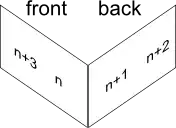
where n is a page number such that n mod 4 = 1.
Could also be [n+2, n], [n+1, n+3] instead of [n+3, n], [n+1, n+2].
As one mentioned, I could manually specify the page order, but it's not feasible for a document with +100 pages.
Any ideas?


pdftexmanual. – Martin Scharrer Jun 28 '11 at 21:13