How can one hide/display all descriptions in a description environment at the same time.
\documentclass[]{article}

\begin{document}

\begin{description}
\item[Keep This] Discard This
\item[Keep This] Discard This
\end{description}

\end{document}
How can one hide/display all descriptions in a description environment at the same time.
\documentclass[]{article}
\begin{document}
\begin{description}
\item[Keep This] Discard This
\item[Keep This] Discard This
\end{description}
\end{document}

If you want to completely hide all description environments you can simply redefine the description environment to ignore anything in its body via the environ package. So with \RenewEnviron{description}{}{}: you obtain:

If you still want the \item labels form the description environments then you can hide the answer environment in the same manner via \RenewEnviron{answer}{}:

Then, when you want the ansers you can use \NewEnviron{answer}{\BODY} to obtain:

description environment\documentclass[]{article}
\usepackage{environ}
\usepackage{comment}
%\excludecomment{answer}
\includecomment{answer}
\RenewEnviron{description}{}{}
\begin{document}
Some text before.
\begin{description}
\item[A]
\begin{answer}
Answer A
\end{answer}
\item[B]
\begin{answer}
Answer B
\end{answer}
\end{description}
Some text after.
\end{document}
answer environment\documentclass[]{article}
\usepackage{environ}
\NewEnviron{answer}{}% <--- Use this to hide the answer environment
%\NewEnviron{answer}{\BODY}% <--- Use this if you want the answer environment
\begin{document}
Some text before.
\begin{description}
\item[A]
\begin{answer}
Answer A
\end{answer}
\item[B]
\begin{answer}
Answer B
\end{answer}
\end{description}
Some text after.
\end{document}

answer environment.
– Peter Grill
Dec 18 '14 at 21:53
comment pacakge) already provides for this (but does requite the \item content to be an environment).
– Peter Grill
Dec 18 '14 at 22:00
You can switch easily between different definitions of a command, added a % and deleting another one. I do this a lot, to change layout. Think of your tex document as a kind of database, keeping as much formatting information as possible in the header.
\documentclass[]{article}

%\newcommand*{\thing}[2]{\item[#1] #2}
\newcommand*{\thing}[2]{\item[#1]}

\begin{document}


\begin{description}
\thing{A}{A}
\thing{B}{B}
\end{description}

\end{document}

One option would be to redefine the way description works, capturing all its \item[<stuff>] content and disregarding everything else. This catch-and-release is possible through a local redefinition of \item and placing the entire environment inside a box. That way things are not set to the page, but you can process the environment.
The above brief discussion is implemented below:

\documentclass{article}

\let\olddescription\description% Store \description (\begin{description})
\let\endolddescription\enddescription% Store \enddescription (\end{description})
\newsavebox{\descriptionbox}
\makeatletter
\newcommand{\discarddescription}{%
  \renewenvironment{description}
    {\gdef\descriptionlist{}% Clear description list
     \begingroup% Begin local scope
     \def\item[####1]{\g@addto@macro\descriptionlist{\item[####1]}}% Redefine \item[.] to capture its argument
                                                                   % and store it in \descriptionlist
     \begin{lrbox}{\descriptionbox}}% Start capturing elements
    {\end{lrbox}% End capturing elements
     \endgroup% Close local scope
     \begin{olddescription}\descriptionlist\end{olddescription}}% Set captured items in regular description
}
\newcommand{\restoredescription}{%
  \let\description\olddescription% Restore \description (\begin{description})
  \let\enddescription\endolddescription% Restore \enddescription (\end{description})
}
\makeatother

\begin{document}

\begin{description}
  \item[Keep this] Definitely keep this
  \item[Keep that] Definitely keep that
\end{description}

\discarddescription

\begin{description}
  \item[Keep this] Discard this
  \item[Keep that] Discard that
\end{description}

\restoredescription

\begin{description}
  \item[Keep this] Definitely keep this
  \item[Keep that] Definitely keep that
\end{description}

\end{document}
Switches are provided to discard description content (via \discarddescription) and restore its original functionality (via \restoredescription).

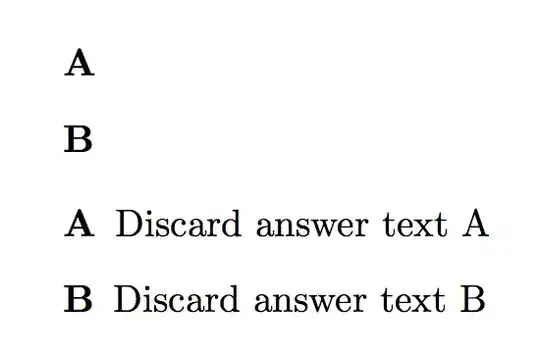
This exploits the fact that in a description one has to specify the optional argument. It's better to give personal environments a name different from the generic one anyway, so I defined an answers environment; each item is introduced by \answer.
\documentclass{article}
\usepackage{environ}

\newif\ifshowanswers
%\showanswerstrue % uncomment for showing answers

\NewEnviron{answers}{%
  \begin{description}
  \ifshowanswers
    \let\answer\item
    \BODY
  \else
    \expandafter\processitems\BODY\answer\processitems
  \fi
  \end{description}
}

\makeatletter
\long\def\processitems\answer[#1]#2\answer#3\processitems{%
  \item[#1]%
  \if\relax\detokenize{#3}\relax
    \expandafter\@gobble
  \else
    \expandafter\@firstofone
  \fi
  {\processitems\answer#3\processitems}% restart the recursion
}

\begin{document}

\begin{answers}
\answer[A] Discard answer text A
\answer[B] Discard answer text B
\end{answers}

% this is by way of example
\showanswerstrue

\begin{answers}
\answer[A] Discard answer text A
\answer[B] Discard answer text B
\end{answers}

\end{document}

beginendpair around each answer, so given latex syntax that's "normal" rather than "painstaking" isn't it? What markup do you want? – David Carlisle Dec 18 '14 at 21:32\itemand another\item(with special care taken for the last one). However, how do you handle[A]and[B]in the above case? Do you include both the problem and the answer in the same\item? Perhaps we need to see a more comprehensive example... – Werner Dec 18 '14 at 21:32[A]or[B]that does not belong inside theanswerenvironment? – Werner Dec 18 '14 at 21:43