10

I have one picture, but in fact it is a combination of two figures. Therefore I am able to use \includegraphics only one time. Still, I want to use two labels for left and right side. I searched for the answer but I could not find. I am sending the picture of the expected result. Could you please help me?

enter image description here

Ruben
  • 13,448
  • Welcome to TeX SX! Can't you split your image into two images with an external application? And what is the image format? – Bernard Dec 23 '14 at 00:54
  • Thanks for your welcome. I am not able to split the image to two parts since there are red lines to combine them. The image format is jpg. – Kadir akın Dec 23 '14 at 01:00
  • Can I use two subfloats for only one \includegraphics ? If the two figures were separate it would be easy. When I use subfloat, I put \includegraphics inside each subfloat, but I guess, the case of the question is different. – Kadir akın Dec 23 '14 at 01:10

1 Answers1

9

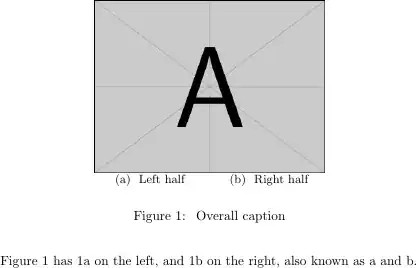
You can subcaption an empty minipage, similar to what's shown in section 2 of the subcaption documentation.
enter image description here

\documentclass{article}
\usepackage{graphicx}
\usepackage{subcaption}

\begin{document}

\begin{figure}
\centering
\includegraphics[width=0.5\textwidth]{example-image-a}

\begin{minipage}{0.25\textwidth}
\subcaption{\label{left} Left half}
\end{minipage}
\begin{minipage}{0.25\textwidth}
\subcaption{\label{right} Right half}
\end{minipage}

\caption{\label{figure} Overall caption}
\end{figure}

Figure~\ref{figure} has \ref{left} on the left, and \ref{right} on the right,
also known as \subref{left} and \subref{right}.

\end{document}
Mike Renfro
  • 20,550
  • Thanks, where I will put two labels (\label{left_image} and \label{right_image}) in this solution ? Then I will use \ref to reference these two figures seperately in my text.

    In addition, I have one problem, I added \usepackage{subcaption}, I can see the texts "Left half" and "Right half" under my image, but I don't see automatic placement of (a) (b) as existing in your example (it does not write (a)Left half for my case). What can be the reason ?

    – Kadir akın Dec 23 '14 at 01:30
  • I normally put labels inside the captions. Technically, as long as \label occurs after \caption, you're ok. But nesting it inside the caption is foolproof, and I don't have to remember the order. If you're not seeing the subcaption labels, then there's something in your preamble or class that's setting things differently. Use my MWE and start adding packages until the problem appears, or take your document and start commenting out parts until the problem goes away. That'll isolate the problem. – Mike Renfro Dec 23 '14 at 01:37
  • I followed your suggestion (step by step added packages). I saw that the problem is about \usepackage{subfig}. I don't see (a) (b) if I use \usepackage{subfig}. If there is no automatic (a) (b), I see "?" in my text while referring the figures. So, removing \usepackage{subfig} allows me to use subcaption package for this solution. However, if I remove \usepackage{subfig}, in this case all the labels in subfloats are gone, so this is another problem. Isn't it possible to use subfig and subcaption packages at the same time ? – Kadir akın Dec 23 '14 at 01:48
  • Feel free to edit your question with a MWE that shows why you might want to use subfig. – Mike Renfro Dec 23 '14 at 01:57
  • Based on your answer, I used the solution below. Then it also worked with subfig package without using subcaption package.

    \begin{figure} \centering \includegraphics[width=0.5\textwidth]{example-image-a}

    \begin{minipage}{0.25\textwidth} \subfloat[]{\label{ima}}

    \end{minipage} \begin{minipage}{0.25\textwidth} \subfloat[]{\label{imb}}

    \end{minipage}

    \caption{Overall caption} \end{figure}

    Fig. \ref{ima} is at left, Fig. \ref{imb} is at right.

    – Kadir akın Dec 23 '14 at 02:29