10

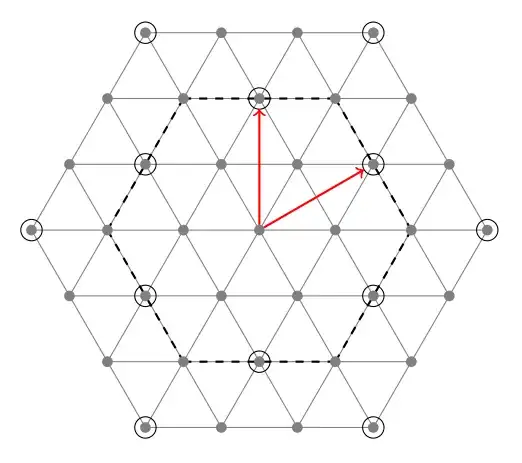
I would like to draw a hexagonal diagram made up of many small equilateral triangles, and be able to label specific vertices in the diagram. In particular, something like this:

enter image description here

But ideally rotated so that one of the sides is on top rather than a vertex.

Could someone point me in the right direction?

Leo Liu
  • 77,365
KBriggs
  • 527
  • 1
    http://tex.stackexchange.com/questions/1943/how-to-draw-triangular-grid-in-tikz could be a start – Caramdir Jun 29 '11 at 18:08
  • Please make sure that all images are uploaded using the official stackexchange interface, i.e. the image icon on top of the text field (shortcut: CTRL+G). This ensures that all images are always accessible and do not get deleted after a while. – Martin Scharrer Jun 29 '11 at 18:20
  • @Caramdir: I saw that earlier, but I was hoping that there was something that would make manipulation of the vertices a bit simpler. That way seems a bit brute force. – KBriggs Jun 29 '11 at 19:01
  • @Martin Scharrer: Thanks for the tip, I will keep that in mind next time – KBriggs Jun 29 '11 at 19:01
  • Kyle: I converted your second "answer" to appropriate comments now. As @Stefan already said. Please use comments to reply to answers to your question and reserve answers for actual solutions. – Martin Scharrer Jun 29 '11 at 19:52

4 Answers4

11

I try to find another way in the spirit of TikZ without complicated macros.

First part : the method

First I define vertices. Some of them are on circle and define hexagons. Circles or hexagons are numeroted from 0 to 3. 0 is the center. Then on each hexagons, I place vertices numeroted from 0 to 5 for the first; 0 to 11 for the second and 0 to 17 for the third one. In a first time,I use nodes but for the final drawing, I will use coordinates. A vertice is defined by h;i h for hexagon and i for indice.

\documentclass{article}

\usepackage{tikz}
\usetikzlibrary{calc,arrows}

\begin{document}
\begin{tikzpicture}
  %%%  define vertices with coordinates     
\node (00) at (0,0) {00}; 
\foreach \c in {1,...,3}{%  
\foreach \i in {0,...,5}{% 
\pgfmathtruncatemacro\j{\c*\i}
 % little trick \c*\i  gives 0,1,2,3,4,5 for this first circle
 % 0,2,4 etc.. for the second one and 0,3,6 for the third one.
 % the for the second hexagon, i define the midpoints ith indices : 1,3,5,..
 % and for the third hexagon , two points betweens 3;0 and 3;3 etc...

 %  pgfmathtruncatemacro is used because we can't accept 3;2.0 for a name
\node[circle,minimum width=4pt,inner sep=0pt] (\c;\j) at (60*\i:\c){\c;\j};  
} }
% now on the second hexagon we need to place between each corners, a midpoint
% to finish we need to change 12 in 0 so I use  mod 
\foreach \i in {0,2,...,10}{%
 % perhaps foreach now gives some possibilities to avoid  \pgfmathtruncatemacro
\pgfmathtruncatemacro\j{mod(\i+2,12)}% 
\pgfmathtruncatemacro\k{\i+1}
 % midpoint I use the same method further 
\node (2\k) at ($(2;\i)!.5!(2;\j)$)  {2;\k} ;    }

% now on the third hexagon we need to place between each corners, two points
% to finish we need to change 18 in 0 so I use  mod
%  ($(3;\i)!1/3!(3;\j)$) is a barycenter coeff 1 and 2
\foreach \i in {0,3,...,15}{% 
\pgfmathtruncatemacro\j{mod(\i+3,18)} 
\pgfmathtruncatemacro\k{\i+1} 
\pgfmathtruncatemacro\l{\i+2}
\node (3\k) at ($(3;\i)!1/3!(3;\j)$)  {3;\k} ;
\node (3\l) at ($(3;\i)!2/3!(3;\j)$)  {3;\l} ;
 }     
\end{tikzpicture} 
\end{document}

I get this picture. You can see the names of the nodes.

enter image description here

Second part : Drawing the graph

I change node with coordinates

\documentclass{article}

\usepackage{tikz}
\usetikzlibrary{calc,arrows}


\begin{document}

\begin{tikzpicture}
%%%  define vertices with coordinates
\coordinate (0;0) at (0,0); 
\foreach \c in {1,...,3}{%  
\foreach \i in {0,...,5}{% 
\pgfmathtruncatemacro\j{\c*\i}
\coordinate (\c;\j) at (60*\i:\c);  
} }
\foreach \i in {0,2,...,10}{% 
\pgfmathtruncatemacro\j{mod(\i+2,12)} 
\pgfmathtruncatemacro\k{\i+1}
\coordinate (2;\k) at ($(2;\i)!.5!(2;\j)$) ;}

\foreach \i in {0,3,...,15}{% 
\pgfmathtruncatemacro\j{mod(\i+3,18)} 
\pgfmathtruncatemacro\k{\i+1} 
\pgfmathtruncatemacro\l{\i+2}
\coordinate (3;\k) at ($(3;\i)!1/3!(3;\j)$)  ;
\coordinate (3;\l) at ($(3;\i)!2/3!(3;\j)$)  ;
 }

 %%%%%%%%% draw lines %%%%%%%%
 \foreach \i in {0,...,6}{% 
 \pgfmathtruncatemacro\k{\i}
 \pgfmathtruncatemacro\l{15-\i}
 \draw[thin,gray] (3;\k)--(3;\l);
 \pgfmathtruncatemacro\k{9-\i} 
 \pgfmathtruncatemacro\l{mod(12+\i,18)}   
 \draw[thin,gray] (3;\k)--(3;\l); 
 \pgfmathtruncatemacro\k{12-\i} 
 \pgfmathtruncatemacro\l{mod(15+\i,18)}   
 \draw[thin,gray] (3;\k)--(3;\l);}    
%%%%%%%%% some specific lines %%%%%%%%%% 
 \foreach \i in {0,2,...,10} {
   \pgfmathtruncatemacro\j{mod(\i+2,12)} 
   \draw[thick,dashed] (2;\i)--(2;\j);}     
%%%%%%%%% draw points %%%%%%%% 
\fill [gray] (0;0) circle (2pt);
 \foreach \c in {1,...,3}{%
 \pgfmathtruncatemacro\k{\c*6-1}    
 \foreach \i in {0,...,\k}{% 
   \fill [gray] (\c;\i) circle (2pt);}}  
%%%%%%%%% some specific points %%%%%%%%%%  
 \foreach \n in {0,3,...,15}{% 
   \draw (3;\n) circle (4pt);}
 \foreach \n in {1,3,...,11}{% 
   \draw (2;\n) circle (4pt);}
%%%%%%%%%% arrows %%%%%%%%%%%%
\draw[->,red,thick,shorten >=4pt,shorten <=2pt](0;0)--(2;3);
\draw[->,red,thick,shorten >=4pt,shorten <=2pt](0;0)--(2;1); 
\end{tikzpicture}  
\end{document}

The result :

enter image description here

Alain Matthes
  • 95,075
  • This solution shows elegance. – Frédéric Jun 30 '11 at 11:08
  • @Frédéric Thanks. Perhaps it's possible to avoid \pgfmathtruncatemacro with /pgf/foreach/count=⟨macro⟩from⟨value⟩ – Alain Matthes Jun 30 '11 at 11:51
  • Thanks very much for the detailed breakdown of the code. I really appreciate the effort you took in answering my question. This is exactly what I was looking for. If you don't mind me asking, where did you learn to code so well in tikz? – KBriggs Jun 30 '11 at 17:15
  • My codes are not always very fine ! I learned in the pgfmanual, in the sources of pgf and I read some very good answers of the pgf-list. Now I learn a lot here by looking at the codes proposed by Jake, Martin, Caramdir, Andrew, Seamus, Gonzalo , Stefan etc... Sorry if I forget some names but TikZ'experts are many ... – Alain Matthes Jun 30 '11 at 17:26
  • Thanks again! I am playing around with this solution - it requires the least extra packages and it is not so hard to understand once I mess around with the variables and see how the figure changes. I think I will be able to do everything I need using this code as a skeleton model to build from.

    Thanks so much! :)

    – KBriggs Jun 30 '11 at 17:49
6

Sorry it's not a good example of code with tkz-berge but there are a lot of possibilities with tkz-graph and tkz-berge that I made the most simple without great ideas.

You need to find better names. To see the names of vertices you can change Art with Classic \GraphInit[vstyle=Classic]

\documentclass[]{article}
\usepackage[usenames,dvipsnames]{xcolor}
\usepackage{tkz-berge}
\begin{document}

\begin{tikzpicture}
\GraphInit[vstyle=Art]
   \SetGraphUnit{2} 
   \Vertex{A}     
   \grCycle[prefix=a,rotation=30,RA=6]{6}
   {\SetUpEdge[style={ultra thick},color=red]
   \grCycle[prefix=b,RA=3.464]{6} } 
   \SetVertexArt[MinSize    = 4pt]  
   \grCycle[prefix=c,rotation=30,RA=2]{6}     
   \grCycle[prefix=d,rotation=30,RA=4]{6}
   \NO(d2){e2} \NO(b2){e3} 
   \NO(b1){e4} \NO(d0){e5}
   \SO(d3){e6} \SO(b4){e7} 
   \SO(b5){e8} \SO(d5){e9}
   \NO(a3){f1} \NO(f1){f2} 
   \NO(a5){f3} \NO(f3){f4}
   \Edges(a2,d2,c2,A,c5,d5,a5)
   \Edges(a3,d3,c3,A,c0,d0,a0) 
   \Edges(a4,d4,c4,A,c1,d1,a1)
   \Edges(f2,d2,e2,b2,c1,b1,e4,d1) 
   \Edges(d1,e3,b2,c2,b3,f1) 
   \Edges(d0,f4,b0,c5,b5,e8,d4,e7,b4,c3,b3,f2) 
   \Edges(d0,e5,b1,c0,b0,f3,d5,e9,b5,c4,b4,e6,d3,f1)
   \SetUpEdge[style={->,ultra thick,double},color=blue]
   \Edges(A,b0)  \Edges(A,b1)
 \end{tikzpicture}   
\end{document}

I forgot the rotation :

\begin{tikzpicture}[rotate=30] ....

enter image description here

A better idea to begin this code is :

 \begin{tikzpicture}
\GraphInit[vstyle=Art]
 \SetVertexArt[MinSize  = 4pt] 
   \SetGraphUnit{2}
     \grCycle[prefix=V,RA=4]{6}
     \foreach \n in {0,...,5}{%
     \begin{scope}[shift=(V\n)]
        \grCycle[prefix=V\n,RA=2]{6}
     \end{scope}}   
 \end{tikzpicture}

enter image description here

version 3

 \begin{tikzpicture}
   \foreach \n in {0,...,3} 
    {\begin{scope}[shift={({\n*sqrt(3)},\n)},rotate=90]
    \pgfmathsetmacro\order{7-\n} 
    \grEmptyPath[prefix=\n,RA=2]{\order} 
 \end{scope} } 
    \foreach \n in {-1,...,-3} 
    {  \begin{scope}[shift={({\n*sqrt(3)},-\n)},rotate=90]
    \pgfmathsetmacro\order{7+\n} 
 \grEmptyPath[prefix=\n,RA=2]{\order} 
 \end{scope} } 
 \end{tikzpicture} 

enter image description here

Alain Matthes
  • 95,075
  • Some choices for prefix and numbers are bad (very bad). It's possible with foreach to make something better but with good names for the vertices. – Alain Matthes Jun 29 '11 at 19:07
  • @Kyle tkz-berge is on ctan and texlive 2011. I can give some explanations about the code. The actual version uses xkeyval, so tikz's style are not very well integrated. The next version with pgfkeys will be better. – Alain Matthes Jun 29 '11 at 19:16
  • Altermundus: That looks great! Unfortunately, I am having trouble getting those packages working (I am very unfamiliar with the way in which package files are downloaded and used). – KBriggs Jun 29 '11 at 19:28
  • I would, but I don't seem to have a "comment" option on his posts as I do here. Maybe I am just being silly and not seeing it. – KBriggs Jun 29 '11 at 19:40
  • @Kyle I think now you can find these packages on Miktex or If you can't install the prerelease of TL 2011, you need only to download the tkz collection (http://www.ctan.org/tex-archive/macros/latex/contrib/tkz). You have all the packages. With TL, ypu put them inside your texmf, with MikTeX you install the packages exactly another package and you refresh the base. You need to install tkz-base because berge need tkz-tools-arith.tex. Some of these macros will be on the next version of pgf/tikz – Alain Matthes Jun 29 '11 at 19:44
  • Kyle, @Stefan: You can always comment to answers to your questions. The problem here was that the question was posted under an different, unregistered account. The two account have the same name and image, so its difficult to see that they are different. I merged both now together, so Kyle can comment here. – Martin Scharrer Jun 29 '11 at 19:46
  • @Kyle: I also converted your post to a comment. I kept the comments to it as well for clarity, but might delete them after a while as a clean-up. Sorry @Altermundus for the noise. – Martin Scharrer Jun 29 '11 at 19:48
  • @Martin : No problem for me, except the question because I have some difficulties to use correctly my personal packages ! :) – Alain Matthes Jun 29 '11 at 19:55
  • Hello, What exactly is my texmf? I have no such folder that I have been able to see. Is it just a folder that I create and put these things into, and allow tex to find them when it needs them?

    By the way, thanks very much to the moderators, admins for your patience and help getting things working for me :)

    – KBriggs Jun 29 '11 at 20:55
  • @Kyle What is your Tex distribution and what is your system OSX,Linux or Windows ? if you work on linux, you can create the folder texmf if it does not exist in your home $cd ~ and $mkdir texmf with OSX you can create the folder texmf if it does not exist in your library $ cd ~/library. With MikTex but I'm not an expert you need to create the folder localtexmf if it does not exist here C:\MiKTeX\localtexmf. Then in each case you can place the packages in texmf/tex/latex or localtexmf/tex/latex. – Alain Matthes Jun 29 '11 at 21:08
  • @Kyle With MikTeX you need to refresh the base. You can see this link http://tex.stackexchange.com/questions/12701/where-is-texmf-on-a-windows-install – Alain Matthes Jun 29 '11 at 21:14
  • I am using texlive 2010 with Linux (Ubuntu 10.10). Thanks for the instructions, I will give it a shot first thing tomorrow. – KBriggs Jun 29 '11 at 22:14
  • @Kyle there is no problem with Linux. Verify that you don't have a texmfin your home, and the you can create it. Inside you can create a directory tex and inside texyou create latex. See Alan'answer here : http://tex.stackexchange.com/questions/8357/how-to-have-local-package-overide-default-package but you don't nedd to create all the sub-directories. I think you can read the doc of texlive, there is a lot of things useful. – Alain Matthes Jun 30 '11 at 04:47
3

Download geogebra and draw the figure. You can then export it as a TikZ or PSTricks and use it within LaTeX.

yannisl
  • 117,160
  • I will download and play with it. I was hoping for a tex-based solution that I could set up as a generic template of the lattice and then just mess around with the vertices, but I may end up having to draw it as you suggest. – KBriggs Jun 29 '11 at 19:01
  • @Kyle B You can use the exported TikZ code as a template and then modify to suit. It is a great way to learn more about PSTricks and TikZ. – yannisl Jun 29 '11 at 20:35
3

I suggest you my solution. It is a little bit tricky and probably it is not the most beautiful TikZ/TeX code around the web, but it works fine and it is identical to original picture.

EDIT: just cleaned up a bit the code

Here we go the code:

\documentclass{standalone}

\usepackage{tikz}
\usetikzlibrary{calc,intersections,arrows}


\begin{document}

%%%%%%%% INPUT %%%%%%%
\def\edge{1.2}       %
\def\N{4}            %
\def\LabelsOn{0}     %
\def\IntRadius{0.05} %
\def\ExtRadius{0.08} %
%%%%%%%%%%%%%%%%%%%%%%
\pgfdeclarelayer{background}
\pgfsetlayers{background,main}
\begin{tikzpicture}[>         = latex,
                    shorten > = \IntRadius cm,
                    shorten < = \IntRadius cm]

\pgfmathtruncatemacro{\cond}{mod(\N,2)}
\pgfmathtruncatemacro{\condI}{mod(\N,3)}
\pgfmathsetmacro{\cosine}{cos(30)}

\def\ClipOn#1{
\foreach[count=\t] \ang in {0,60,...,360}{
\coordinate (P\t) at (\ang:#1);
}
\clip (P1)--(P2)--(P3)--(P4)--(P5)--(P6)--cycle;
}


\ifnum\cond=0%pari
  \gdef\cond{0}
\else
  \gdef\cond{1}
\fi
\ClipOn{\N*\edge+\ExtRadius/\cosine+0.02}
\foreach[count=\t] \row in {-\N,...,\N}{
   \ifnum\cond=0
     \def\translate{0}
   \else
     \def\translate{\edge/2}
   \fi
   \ifnum\condI=0 %divisibile per 3
     \gdef\circles{3}
   \else
     \pgfmathtruncatemacro{\temp}{\condI-1}
     \global\let\circles\temp
   \fi
   \begin{pgfonlayer}{background}
   \ClipOn{\N*\edge}
   \draw[lightgray] (-\N*\edge,\row*\edge*\cosine)--++(2*\N*\edge,0);
   \end{pgfonlayer}
   \foreach \column in {-\N,...,\N}{
     \coordinate (\row/\column) at (\column*\edge+\translate,\row*\edge*\cosine);
     \ifnum0=\row
       \begin{pgfonlayer}{background}
       \ClipOn{\N*\edge}
       \foreach \deltaAng in {60,120}{
       \draw[lightgray] ($(\row/\column)+(180+\deltaAng:\N*\edge)$)--
                        ($(\row/\column)+(\deltaAng:\N*\edge)$);
       }
       \end{pgfonlayer}
     \fi
     \ifnum\LabelsOn=1
       \node[above] at (\row/\column){\row/\column};
     \fi
     \fill (\row/\column)circle[radius=\IntRadius];
     \ifnum\circles=3
       \ifnum\cond=0
         \draw (\row/\column)circle[radius=\ExtRadius];
       \else
         \draw ($(\row/\column)+(-2*\edge,0)$)circle[radius=\ExtRadius];
       \fi
       \pgfmathtruncatemacro{\temp}{\circles-2}
     \else
       \pgfmathtruncatemacro{\temp}{\circles+1}
     \fi
     \global\let\circles\temp
   }
   \ifnum\cond=0
    \gdef\cond{1}
   \else
    \gdef\cond{0}
   \fi
}
\draw[line width=1pt] (P1)--(P2)--(P3)--(P4)--(P5)--(P6)--cycle;

\draw[dashed,line width=1pt] (2/1)--(2/-1)--(0/-2)--(-2/-1)--(-2/1)--(0/2)--cycle;

\draw[->,red,line width=1.1pt](0/0)--(1/1)--(0/2);
\draw[->,red,line width=1.1pt](0/0)--(2/0);

\end{tikzpicture}
\end{document}

The result is the following:enter image description here

The input are:

  1. \edge = triangle edge length
  2. \N = number of node on the radius less the center one
  3. \LabelsOn = if setted to 1, it shows all the node name. It is useful to draw the arrows and the hexagons. See the picture below for what I mean. enter image description here

I could add the circle radius input and so on.

If someone has some idea to improve the code, you are welcome.

Hope it helps.

Azoun

Azoun
  • 2,317
  • Very nice, it certainly does help. I wish I understood what all of the code is doing, though ^_^ – KBriggs Jun 30 '11 at 01:53