3

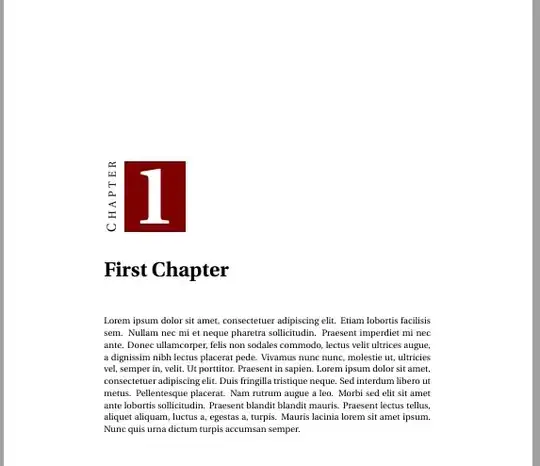
How do I justify the chapternumber in the MWE below to the left? Thanksenter image description here

\documentclass[11pt, a4paper, oneside]{memoir}
\usepackage{color,calc,graphicx,soul,fourier}
\definecolor{wine}{rgb}{.5,0,0}
\makeatletter
\newlength\dlf@normtxtw
\setlength\dlf@normtxtw{\textwidth}
\def\myhelvetfont{\def\sfdefault{mdput}}
\newsavebox{\feline@chapter}
\newcommand\feline@chapter@marker[1][4cm]{%
\sbox\feline@chapter{%
\resizebox{!}{#1}{\fboxsep=1pt%
  \colorbox{wine}{\color{white}\bfseries\thechapter}%
}}%
\rotatebox{90}{%
\resizebox{%
  \heightof{\usebox{\feline@chapter}}+\depthof{\usebox{\feline@chapter}}}%
{!}{\scshape\so\@chapapp}}\quad%
\raisebox{\depthof{\usebox{\feline@chapter}}}{\usebox{\feline@chapter}}%
 }
\newcommand\feline@chm[1][4cm]{%
\sbox\feline@chapter{\feline@chapter@marker[#1]}%
\makebox[0pt][l]{% 
\makebox[0cm][r]{\usebox\feline@chapter}%
}}
\makechapterstyle{daleif1}{
\renewcommand\chapnamefont{\normalfont\Large\scshape\raggedleft\so}
\renewcommand\chapternamenum{}
\renewcommand\printchaptername{}
\renewcommand\printchapternum{\null\hfill\feline@chm[2.5cm]\par}
\renewcommand\afterchapternum{\par\vskip\midchapskip}
\renewcommand\printchaptertitle[1]{\chaptitlefont ##1\par}
}
\makeatother
\chapterstyle{daleif1}

\usepackage{blindtext}

\begin{document}
\chapter{First Chapter}
\blindtext
\end{document}
kenniy
  • 65
  • Hi and welcome: \renewcommand\printchapternum{\hspace{2.5cm}\feline@chm[2.5cm]\par} – Johannes_B Dec 24 '14 at 18:55
  • Note that having the number to the left will leave huge white space on the right, dominated by the big object at the left. This setting seems more balanced. – egreg Dec 24 '14 at 19:00
  • thanks @Johannes_B .. well @egreg ..I just prefer everything aligned to the left. I actually am using \colorbox{white}{\color{wine}\bfseries\thechapter} in the actual document. I just inverted it in d MWE to make it glaring. – kenniy Dec 24 '14 at 19:10

1 Answers1

3

I added two \hfils to the end of \feline@chm, and turned an \hfill into an \hfil in \printchapternum.

\documentclass[11pt, a4paper, oneside]{memoir}
\usepackage{color,calc,graphicx,soul,fourier}
\definecolor{wine}{rgb}{.5,0,0}
\makeatletter
\newlength\dlf@normtxtw
\setlength\dlf@normtxtw{\textwidth}
\def\myhelvetfont{\def\sfdefault{mdput}}
\newsavebox{\feline@chapter}
\newcommand\feline@chapter@marker[1][4cm]{%
\sbox\feline@chapter{%
\resizebox{!}{#1}{\fboxsep=1pt%
  \colorbox{wine}{\color{white}\bfseries\thechapter}%
}}%
\rotatebox{90}{%
\resizebox{%
  \heightof{\usebox{\feline@chapter}}+\depthof{\usebox{\feline@chapter}}}%
{!}{\scshape\so\@chapapp}}\quad%
\raisebox{\depthof{\usebox{\feline@chapter}}}{\usebox{\feline@chapter}}%
 }
\newcommand\feline@chm[1][4cm]{%
\sbox\feline@chapter{\feline@chapter@marker[#1]}%
\makebox[0pt][l]{% 
\makebox[0cm][r]{\usebox\feline@chapter}%
}\hfil\hfil}
\makechapterstyle{daleif1}{
\renewcommand\chapnamefont{\normalfont\Large\scshape\raggedleft\so}
\renewcommand\chapternamenum{}
\renewcommand\printchaptername{}
\renewcommand\printchapternum{\null\hfil\feline@chm[2.5cm]\par}
\renewcommand\afterchapternum{\par\vskip\midchapskip}
\renewcommand\printchaptertitle[1]{\chaptitlefont ##1\par}
}
\makeatother
\chapterstyle{daleif1}

\usepackage{blindtext}

\begin{document}
\chapter{First Chapter}
\blindtext
\end{document}

enter image description here