1

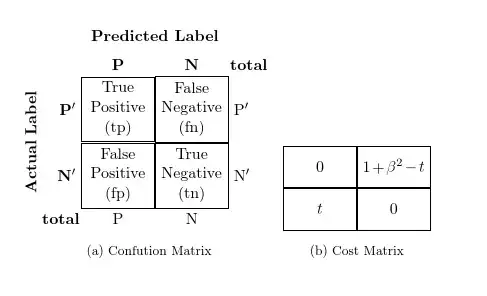
I am trying to draw two figures (three, in fact, but even two is not working) side by side using TikZ. I added two TikZ drawings in matrix.tex using \newcommand and tried to add them in the main file. But it is not working. (I got this idea from Placing TikZ drawings in a minipage side by side)

\documentclass[twoside,11pt]{article}
\usepackage{amsmath}
\usepackage{algorithm}
\usepackage{algorithmicx}
\usepackage{algpseudocode}
\usepackage{tikz}
\usetikzlibrary{positioning}
\usepackage{caption}
\usepackage{subcaption}

\begin{document}
\input{matrix.tex}
\begin{figure}[t]
\captionsetup[subfigure]{font=footnotesize}
\centering

\subcaptionbox{Confution Matrix}[.4\textwidth]{
\begin{tikzpicture}[box/.style={draw,rectangle,text width=1.5cm,align=left}]
\confmatrix
\end{tikzpicture} }

\subcaptionbox{Cost Matrix}[.3\textwidth] {
\begin{tikzpicture}[box/.style={draw,rectangle,minimum size =1cm,text width=1.5cm,align=left}]
\costmatrix
\end{tikzpicture} }

\end{figure}
\end{document}

matrix.tex

\newcommand{\confmatrix}{
\matrix (conmat) [row sep=.01cm,column sep=.01cm, ampersand replacement = \&]    {
\node (tpos) [box, align = center,
label=left:\( \mathbf{P'} \),
label=above:\( \mathbf{P} \)
] {True \\ Positive \\ (tp)};
\&
\node (fneg) [box, align = center,
label=above:\textbf{N},
label=above right:\textbf{total},
label=right:\( \mathrm{P}' \)] {False \\ Negative \\ (fn)};
\\
\node (fpos) [box, align = center,
label=left:\( \mathbf{N'} \),
label=below left:\textbf{total},
label=below:P] {False \\ Positive \\ (fp)};
\&
\node (tneg) [box, align = center,
label=right:\( \mathrm{N}' \),
label=below:N] {True \\ Negative \\ (tn)};
\\
};
\node [rotate=90,left=.01cm of conmat, text  width=2.5cm,align=center,anchor=center] {\textbf{Actual Label}};
\node [above=.05cm of conmat] {\textbf{Predicted Label}};
}

\newcommand{\costmatrix}{
\matrix (costmat) [row sep=.01cm,column sep=.01cm, ampersand replacement = \&] {
\node (tpcos) [box, align = center] {$0$};
\&
\node (fncos) [box, align = center] {$1+\beta^2-t$};
\\
\node (fpcos) [box, align = center] {$t$};
\&
\node (tncos) [box, align = center] {$0$};
\\
};
}
Shew
  • 313
  • How does your preamble look like? You should include the used packages and the missing TikZ pictures (or maybe better just some minimal TikZ pictures showing the same problem) in your MWE. – cryingshadow Dec 28 '14 at 09:24
  • I also don't see what approach in the answers of http://tex.stackexchange.com/questions/156096/placing-tikz-drawings-in-a-minipage-side-by-side you are following. – cryingshadow Dec 28 '14 at 09:30
  • @cryingshadow. edited. – Shew Dec 28 '14 at 09:30
  • The TikZ pictures are still missing. – cryingshadow Dec 28 '14 at 09:31
  • @cryingshadow. done – Shew Dec 28 '14 at 09:42
  • Where is this xfunctions package from? I don't find it using Google... – cryingshadow Dec 28 '14 at 09:52
  • Just to be sure, have you tried with \input{./matrix.tex}? – Pier Paolo Dec 28 '14 at 10:45
  • @cryingshadow. xfunction is a custom package. you can simply comment it. It is not necessary for this part. – Shew Dec 28 '14 at 10:48
  • @PierPaolo, Yes, I tried it and it doesn't work. – Shew Dec 28 '14 at 10:48
  • Try to delete the semicolons ; at the end of your \newcommands definition. – Pier Paolo Dec 28 '14 at 10:55
  • @PierPaolo. No use. It is the same thing. – Shew Dec 28 '14 at 11:03
  • 1
    If I comment the xfunctions package out (and if that it intended, you should remove it from the MWE), I get the following error: ! Undefined control sequence. l.19 \abx@aux@sortscheme {nyt} – cryingshadow Dec 28 '14 at 11:04
  • I could compile your code after removing the semicolons. However, I didn't use the \input{matrix.tex} command, instead I put the definitions directly in the master .tex file. If this doesn't work, too, please post the error you get when you compile your document. – Pier Paolo Dec 28 '14 at 11:08
  • @cryingshadow. I am able to compile without any error after commenting xfunction. – Shew Dec 28 '14 at 11:17
  • @PierPaolo. My problem is not with compiling the code. My code compiles perfectly. Problem is, instead of showing the images side-by-side, image is shown one above the other. I tried by putting the definitions directly in the master file. – Shew Dec 28 '14 at 11:20
  • Sorry, my bad. Remove the blank line between the \subcaptionboxes (you may also have to add horizontal space (\hspace{2em}) to prevent figures from overlapping.) – Pier Paolo Dec 28 '14 at 11:23
  • @PierPaolo. Ok thanks, it works. But, even if the captions are on the same hieght, the images are not on the same line. I would prefer to align the figures on the same line (bottom line) and align captions also. – Shew Dec 28 '14 at 11:27

1 Answers1

1

Rather than guessing how much space to allow, I would calculate the widths of the figures. I do this in the code below using \settowidth....

As Pier Paolo mentioned, you need to remove the blank line between the sub-figures else it will be interpreted, as usual, as a paragraph break. Following the documentation, I've also used % to avoid spurious spaces you may not want.

I'm not quite sure why you have the code for the pictures' contents separated from the environments, but leaving that as is, you might try something like this:

\documentclass[twoside,11pt]{article}
\usepackage{amsmath}
\usepackage{algorithm}
\usepackage{algorithmicx}
\usepackage{algpseudocode}
\usepackage{tikz}
\usetikzlibrary{positioning}
\usepackage{caption}
\usepackage{subcaption}
\captionsetup[subfigure]{font=footnotesize}% this should be consistent throughout your document
\newcommand{\confmatrix}{%
  \matrix (conmat) [row sep=.01cm,column sep=.01cm, ampersand replacement = \&] {
    \node (tpos) [box, align = center,
    label=left:\( \mathbf{P'} \),
    label=above:\( \mathbf{P} \)
    ] {True \\ Positive \\ (tp)};
    \&
    \node (fneg) [box, align = center,
    label=above:\textbf{N},
    label=above right:\textbf{total},
    label=right:\( \mathrm{P}' \)] {False \\ Negative \\ (fn)};
    \\
    \node (fpos) [box, align = center,
    label=left:\( \mathbf{N'} \),
    label=below left:\textbf{total},
    label=below:P] {False \\ Positive \\ (fp)};
    \&
    \node (tneg) [box, align = center,
    label=right:\( \mathrm{N}' \),
    label=below:N] {True \\ Negative \\ (tn)};
    \\
  };
  \node [rotate=90,left=.01cm of conmat, text  width=2.5cm,align=center,anchor=center] {\textbf{Actual Label}};
  \node [above=.05cm of conmat] {\textbf{Predicted Label}};
}
\newcommand{\costmatrix}{%
  \matrix (costmat) [row sep=.01cm,column sep=.01cm, ampersand replacement = \&] {
    \node (tpcos) [box, align = center] {$0$};
    \&
    \node (fncos) [box, align = center] {$1+\beta^2-t$};
    \\
    \node (fpcos) [box, align = center] {$t$};
    \&
    \node (tncos) [box, align = center] {$0$};
    \\
  };
}
\newlength\confmatrixwidth
\newlength\costmatrixwidth
\settowidth{\confmatrixwidth}{%
  \begin{tikzpicture}[box/.style={draw,rectangle,text width=1.5cm,align=left}]
    \confmatrix
  \end{tikzpicture}}
\settowidth{\costmatrixwidth}{%
  \begin{tikzpicture}[box/.style={draw,rectangle,minimum size =1cm,text width=1.5cm,align=left}]
    \costmatrix
  \end{tikzpicture}}
\begin{document}
  \begin{figure}[t]
    \centering
    \subcaptionbox{Confution Matrix}[\confmatrixwidth]{%
      \begin{tikzpicture}[box/.style={draw,rectangle,text width=1.5cm,align=left}]
        \confmatrix
      \end{tikzpicture}}%
    \subcaptionbox{Cost Matrix}[\costmatrixwidth]{%
      \begin{tikzpicture}[box/.style={draw,rectangle,minimum size =1cm,text width=1.5cm,align=left}]
        \costmatrix
      \end{tikzpicture}}%
  \end{figure}
\end{document}

side-by-side matrices

in this case, the sub-figures are aligned on the baseline, and their captions are aligned also. I'm not clear whether this is what you are trying to do, but this seemed too long for a comment.

cfr
  • 198,882