25

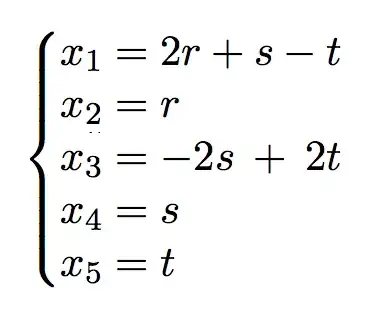
I want to figure out how I can align a system of linear equations very nicely.

At the moment I am using the following command:

\systeme{x_1=2r + s -t,x_2= r, x_3=-2s +2t, x_4=s, x_5=t}

But this gives me something ugly in staircase form, like:

enter image description here

Any way I could fix it so the x_i's are all at the left side, nicely underneath each other, and possibly with the equation signs also aligned?

Here is a MWE:

\documentclass[11pt,a4paper,openany]{report}
\usepackage{amssymb,amsmath,amsthm}
\usepackage[dutch]{babel}
\usepackage{mdframed}
\usepackage{systeme,mathtools}
\makeatletter
\renewcommand*\env@matrix[1][*\c@MaxMatrixCols c]{%
  \hskip -\arraycolsep
  \let\@ifnextchar\new@ifnextchar
  \array{#1}}
\makeatother
\usepackage{lipsum}
\usepackage{relsize}
\newcommand\md{\ }

\begin{document}

\systeme{x_1=2r + s -t,x_2= r, x_3=-2s +2t, x_4=s, x_5=t}

\end{document}
Andrew Swann
  • 95,762
Kamil
  • 459
  • normally one uses align or one of its variants from amsmath but it is impossible to comment on your code as \systeme is not a standard plain or latex command and you give no indication of its definition. – David Carlisle Jan 04 '15 at 23:31
  • I'm using TexnicCenter, and I just use the package: \usepackage{systeme,mathtools}. There's no special definition, it's just standard. – Kamil Jan 04 '15 at 23:32
  • I need to have \systeme because I want that there appears an array on the left to make it clear to the reader that it is a system of equations. – Kamil Jan 04 '15 at 23:37
  • Please edit your post to show a complete, compilable document starting with \documentclass... and ending with \end{document}. That way, people will not have to spend time gradually extracting every essential detail from you, only to find they overlooked something after spending time posting an answer. – cfr Jan 04 '15 at 23:39
  • 1
    You have given no indication of what \systeme is, I had never heard of the command searching around suggests you are using a package of the same name and using latex, but you really should provide a complete example from \documentclass to \end{document} by editing the above question – David Carlisle Jan 04 '15 at 23:41
  • @Kamil it is not standard at all, there are thousands of packages, you can not expect to just mention some command defined in some contributed package without saying what package you are using and expect people to recognise it. – David Carlisle Jan 04 '15 at 23:42
  • How do I enter a code here from my LaTeX document? It doesn't seem to work. – Kamil Jan 04 '15 at 23:43
  • make a small (6 or 7 line) latex document, add it to your question then indent by 4 spaces by highlighting and clicking the {} button in the editor which will make it a code section, as I did in my edits to your one line example – David Carlisle Jan 04 '15 at 23:45
  • @Kamil but the posted code doesn't help, it needs to be a complete document and needs to demonstrate the problem, so it doesn't need all the theorem definitions etc but it should use \systeme and should have \end{document} – David Carlisle Jan 04 '15 at 23:51
  • Is it possible to somehow import the output I get in LaTeX into here, so I can show what's actually wrong? – Kamil Jan 04 '15 at 23:55
  • You need to add it as an image, I did it, but I also had to fix your example, as it still was not a document that could be run. – David Carlisle Jan 04 '15 at 23:58
  • 1
    Use \systeme* – egreg Jan 05 '15 at 00:00
  • It is not clear now what your question is. The package documentation is French which I find difficult, but it seems the main point of the command is to align the coefficients of different variables and as your system uses a different variable on each row they are placed in separate columns. If you do not want that then it seems you do not want this command. – David Carlisle Jan 05 '15 at 00:01
  • @egreg Thanks! That fixed it. Do you maybe know how I can reduce the white space between each linear equation? – Kamil Jan 05 '15 at 00:03
  • This is NOT a MWE. – Robai Mar 19 '23 at 08:16
  • Note: You can translate PDF's using Google Translate. It's a pain, but better than trying to read the French documentation if you don't know French. https://translate.google.com/?sl=fr&tl=en&op=docs – Paul Wintz Jan 03 '24 at 10:22

5 Answers5

25

The command to use for this is \systeme*:

\documentclass[11pt,a4paper,openany]{report}
\usepackage{amsmath}
\usepackage{systeme}

\begin{document}

I want to figure out how I can align a system of linear equations very nicely.
At the moment I am using the following command:
\[
\systeme*{x_1=2r + s -t,x_2= r, x_3=-2s +2t, x_4=s, x_5=t}
\]

\end{document}

enter image description here

By setting the value of \syslineskipcoeff you can modify the spacing; the default value is 1.25:

\[
\syslineskipcoeff{1}
\systeme*{x_1=2r + s -t,x_2= r, x_3=-2s +2t, x_4=s, x_5=t}
\]

enter image description here

egreg
  • 1,121,712
22

Here's a solution that uses only the array package and an array environment. In case you're curious about what's going on in the preamble of the array environment:

  • The four columns that contain variables are of type r

  • To get the correct spacing around the = symbols and the + and - signs, the amount of intercolumn whitespace (governed by the length parameter \arraycolsep) is first set to 0pt.

    • The = symbols are inserted automatically; the directive @{{}={}} tells LaTeX to treat = as an object of type mathrel.

    • The directives >{{}}c<{{}} tell LaTeX to center-set the column contents (which will be either +, -, or blank) and to treat them as objects of type mathbin.

enter image description here

\documentclass[11pt,a4paper,openany]{report}
\usepackage{array}
\begin{document}
\[
\left\{
\setlength\arraycolsep{0pt}
\begin{array}{ r @{{}={}} r  >{{}}c<{{}} r  >{{}}c<{{}}  r }
x_1 & 2r &+&  s &-&  t \\
x_2 &  r               \\
x_3 &    &-& 2s &+& 2t \\ 
x_4 &    & &  s        \\
x_5 &    & &    & &  t \\
\end{array}
\right.
\]
\end{document}
Mico
  • 506,678
14

The systeme command is designed for the "matrix-like" (if you can't tell, I'm an engineer, not a mathematician) portion of the system to be on the left-hand side, not the right-hand side.

If you can accept a simple LHS->RHS swap of your input, systeme works out of the box:

\documentclass{article}
\usepackage{systeme}

\begin{document}
\systeme{2r + s -t=x_1, r=x_2, -2s +2t=x_3, s=x_4, t=x_5}
\end{document}

enter image description here

It is likely possible to create a new command in the spirit of \systeme{} with the aligned and unaligned sides reversed, but the code is above my head. ;-)

Paul Gessler
  • 29,607
9

A simple hack with the aligned environment:

\documentclass{article}
\usepackage[utf8]{inputenc}
\usepackage{systeme}
\usepackage{amsmath}

\begin{document}

\[ \left\{\begin{aligned}x_1 & = \\x_2 & =\\x_3 & =\\x_4 & =\\x_5 & =\\ \end{aligned}\sysdelim. . \systeme[rst]{2r + s -t , r , -2s +2t, s, t}\right.
 \]%

\end{document} 

enter image description here

Bernard
  • 271,350
3

Using a TABstack. In this case the "Center" of \tabbedCenterstack refers to vertical centering, the [r] refers to horizontal right alignment of each column, \stackMath processes the data in math mode, and \TABbinary inserts a {} prior to and following each cell, so as to give the + and - the proper horizontal spacing.

\documentclass[11pt,a4paper,openany]{report}
\usepackage{tabstackengine}
\stackMath
\begin{document}
\[
\left\{
\TABbinary\tabbedCenterstack[r]{
x_1 =& 2r &+&  s &-&  t \\
x_2 =&  r               \\
x_3 =&    &-& 2s &+& 2t \\ 
x_4 =&    & &  s        \\
x_5 =&    & &    & &  t
}\right.
\]
\end{document}

enter image description here

  • +1. What would you say are the main differences between using \TABbinary\tabbedCenterstack[r] and using an array environment? – Mico Jan 05 '15 at 15:12
  • @Mico 0pt intercolumn gap is default in tabbed... stacks; Center-stacks are long stacks, thus all lines are forced to be equal baselineskips apart (though short stacks are more akin to arrays in this regard); interrow vertical baselineskip is easily set with \setstackgap{L}{length}; more options for how to automatically treat math operators with \TABbinary, \TABbinaryRight, and \TABbinaryLeft; \fixTABwidth{T} is available to force all columns to equal width; while centerstacks are vertically centered, stacks and understacks are not, which is often very useful. – Steven B. Segletes Jan 05 '15 at 15:28