6

I would like to write a macro getlengthin to get a length or dimen as floating point number in a specified unit. Here is what I have created so far:

\documentclass{article}

\usepackage[nomessages]{fp}

\newcount\lengthcount
\newcount\unitcount
\def\getlengthin#1#2{%
    \lengthcount=#1%
    \unitcount=\dimexpr1#2%
    \FPdiv\result{\the\lengthcount}{\the\unitcount}%
    \result%
}

\def\a{\getlengthin{\paperwidth}{mm}} % \edef does not work here !

\begin{document}

    \a

    \getlengthin{\paperwidth}{mm}

    \getlengthin{\textheight}{mm}

\end{document}

For some reason I need to calculate the length in the preamble and I tried to use edef, but edef does not work with my macro. What is the problem here?

Patrick S
  • 168

2 Answers2

5

A modification of my answer at https://tex.stackexchange.com/a/213027/4427

\documentclass{article}

\usepackage{xparse,siunitx}

\ExplSyntaxOn \DeclareExpandableDocumentCommand{\convertdim}{O{2}mm} { \fp_eval:n { round ( \dim_to_decimal_in_unit:nn { #2 } { 1#3 } , #1 ) } } \ExplSyntaxOff

\NewDocumentCommand{\getlengthin}{O{2}mm} {% \SI[round-mode=places,round-precision=#1]{\convertdim{#2}{#3}}{#3}% }

\begin{document}

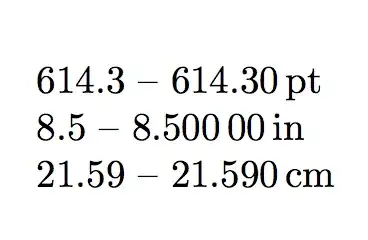
\convertdim{\paperwidth}{pt} -- \getlengthin{\paperwidth}{pt}

\convertdim[5]{\paperwidth}{in} -- \getlengthin[5]{\paperwidth}{in}

\convertdim[3]{\paperwidth}{cm} -- \getlengthin[3]{\paperwidth}{cm}

\end{document}

For both commands the optional argument is the number of digits for the rounding.

The first command is fully expandable, so it can be used in other contexts where a decimal number is needed.

enter image description here

See also the lengthconvert package.

egreg
  • 1,121,712
3

Here's a way to do this:

8.50 in
193.30 mm
19.3 cm

\documentclass{article}

\usepackage{siunitx}
\ExplSyntaxOn
  \cs_new_eq:NN \calc \fp_eval:n
\ExplSyntaxOff

\makeatletter
\newcommand{\getlengthin}[3][]{%
  \setlength{\@tempdima}{#2}% Capture length
  \setlength{\@tempdimb}{1 #3}% Capture unit
  \SI[round-mode=places,round-precision=2,#1]
    {\calc{\strip@pt\@tempdima/\strip@pt\@tempdimb}}{#3}% Divide length by unit
}
\makeatother

\begin{document}

\getlengthin{\paperwidth}{in}

\getlengthin{\textheight}{mm}

\getlengthin[round-precision=1]{\textheight}{cm}

\end{document}

\getlengthin[<options>]{<length>}{<unit>} takes additional <options> from siunitx.


If you wish to perform conversions between lengths without really printing them, you can set them directly without problem:

\setlength{<length register>}{<length in whatever unit you want>}

So, for example, \setlength{\mylen}{12in} will set \mylen to 12 inches, but internally convert it to points (something you don't have to worry about). Or, \setlength{\mylen}{\dimexpr 3cm+2in-5pt+3bp-1mm} if you want an expression containing multiple units of measure.

Werner
  • 603,163
  • Thanks for your answer, but unfortunately my problem is not completely solved yet: I need to calculate the length in the preamble, but when I add \edef\a{\getlengthin{\paperwidth}{in}} after makeatother and \a after \begin{document} I still get an error. – Patrick S Jan 09 '15 at 19:08
  • @PatrickS: If you just want to "calculate the length in the preamble", then you don't need to use a conversion. Set them using \setlength{<length register>}{<length in whatever measurement>}. – Werner Jan 09 '15 at 19:40
  • "Calculate the length" was not the right term, I am rather trying to "read" the length in a specific unit in the preamble. The convertdim command from egreg's answer did the job. Anyway, thank you for your help. – Patrick S Jan 09 '15 at 19:53