In my LaTeX document, I'd like to have two paragraphs which are separated by some smaller vertical spacing.
When I use the following code, this works just as intended, automatically:
\documentclass[a4paper]{article}

\usepackage[english]{babel}
\usepackage[utf8]{inputenc}

\setlength{\parindent}{0cm}

\begin{document}

Lorem ipsum dolor sit amet, consetetur sadipscing elitr, sed diam nonumy eirmod tempor invidunt ut labore et dolore magna aliquyam erat, sed diam voluptua.\\

At vero eos et accusam et justo duo dolores et ea rebum. Stet clita kasd gubergren, no sea takimata sanctus est Lorem ipsum dolor sit amet.

\end{document}

But when I wrap these two paragraphs in \begin{flushleft} ... \end{flushleft} (which is what I'm trying to do), the result changes to the following, unforunately:
...

\begin{flushleft}

Lorem ipsum dolor sit amet, consetetur sadipscing elitr, sed diam nonumy eirmod tempor invidunt ut labore et dolore magna aliquyam erat, sed diam voluptua.\\

At vero eos et accusam et justo duo dolores et ea rebum. Stet clita kasd gubergren, no sea takimata sanctus est Lorem ipsum dolor sit amet.

\end{flushleft}

...
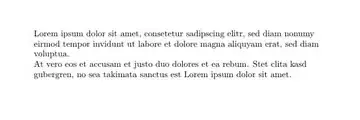
Is there any way I can get the original style of paragraphs and spacing -- just with a ragged right side (instead of full justification)?
I have already seen that wrapping each paragraph in the environment separately helps. But is this really the only way to solve the problem? Having lots of paragraphs, I would prefer to set the justification once only, apparently.


\\that is always wrong. the code does not "work as intended" it producesUnderfull \hbox (badness 10000) in paragraph at lines 11--12Badness 10000 means that the paragraph is infinitely bad according to TeX's notion of quality of linebreaking – David Carlisle Jan 12 '15 at 01:39