Does anyone know how to control the width and color of the left bar in the leftbar environment?
Asked
Active
Viewed 1.6k times

2 Answers
24
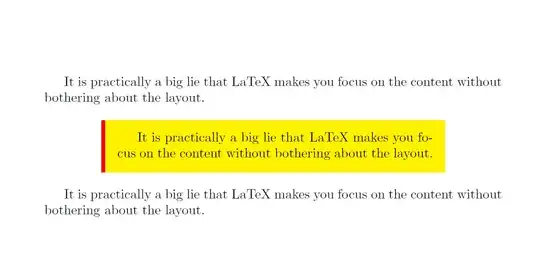
Ignore the optional argument:
\documentclass{article}
\usepackage{xcolor}
\usepackage{framed}

\renewenvironment{leftbar}[1][\hsize]
{%
    \def\FrameCommand
    {%
        {\color{red}\vrule width 3pt}%
        \hspace{0pt}%must no space.
        \fboxsep=\FrameSep\colorbox{yellow}%
    }%
    \MakeFramed{\hsize#1\advance\hsize-\width\FrameRestore}%
}
{\endMakeFramed}

\def\fact{It is practically a big lie that LaTeX makes you focus on the content without bothering about the layout.}
\begin{document}
\fact
\leftbar
\fact
\endleftbar
\fact
\end{document}

Specify the optional argument:
You can specify the optional argument as the following example:
\documentclass{article}
\usepackage{xcolor}
\usepackage{framed}

\renewenvironment{leftbar}[1][\hsize]
{%
    \def\FrameCommand
    {%
        {\color{red}\vrule width 3pt}%
        \hspace{0pt}%must no space.
        \fboxsep=\FrameSep\colorbox{yellow}%
    }%
    \MakeFramed{\hsize#1\advance\hsize-\width\FrameRestore}%
}
{\endMakeFramed}

\def\fact{It is practically a big lie that LaTeX makes you focus on the content without bothering about the layout.}
\begin{document}
\fact
\leftbar[0.75\linewidth]
\fact
\endleftbar
\fact
\end{document}

Display Name
- 46,933
-
How do I make the box itself colorless (i.e., I want it to have the same color of the background)? – user1999 Jul 07 '11 at 19:06
-
change that \fboxsep=\FrameSep\colorbox{yellow}% to % \fboxsep=\FrameSep\colorbox{yellow}% – Feb 05 '12 at 21:24
13
The width and color (i.e. the non-use of color) seems to be hard-coded into this environment:
\leftbar:
\long macro:->\def \FrameCommand {\vrule width 3pt \hspace {10pt}}\MakeFramed {\advance \hsize -\width \FrameRestore }


\endleftbar:
\long macro:->\endMakeFramed
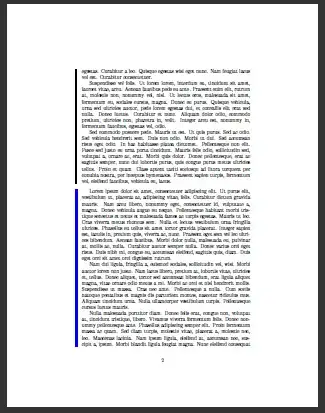
Simply define your own version which the appropriate color and width. The best thing is to add length register which values can be changed afterwards:
\documentclass{article}

\usepackage{framed}
\usepackage{xcolor}
\usepackage{lipsum}% dummy text


\newlength{\leftbarwidth}
\setlength{\leftbarwidth}{3pt}
\newlength{\leftbarsep}
\setlength{\leftbarsep}{10pt}

\newcommand*{\leftbarcolorcmd}{\color{leftbarcolor}}% as a command to be more flexible
\colorlet{leftbarcolor}{black}

\renewenvironment{leftbar}{%
    \def\FrameCommand{{\leftbarcolorcmd{\vrule width \leftbarwidth\relax\hspace {\leftbarsep}}}}%
    \MakeFramed {\advance \hsize -\width \FrameRestore }%
}{%
    \endMakeFramed
}


\begin{document}

\begin{leftbar}
\lipsum
\end{leftbar}


\setlength{\leftbarwidth}{5pt}
\setlength{\leftbarsep}{8pt}
\colorlet{leftbarcolor}{blue}

\begin{leftbar}
\lipsum
\end{leftbar}

\end{document}

Martin Scharrer
- 262,582
-
Sorry for asking on such an old post. How to get rid of the vertical space before and after the leftbar environment? – Aymane Fihadi Apr 12 '18 at 11:01
-
1@AymaneFihadi: Looking at the manual of the used
framedpackage tells that this space is stored in the length\OuterFrameSep. So use\setlength\OuterFrameSep{0pt}to remove it completely. It might be however, that you need a small amount to avoid the text sticking together (maybe1ex,\baselineskip, or\smallskipamount, or similar). Test it out. – Martin Scharrer Apr 12 '18 at 18:51 -
Thank you, it was very kind of you to go through the manual for responding. \setlength\OuterFrameSep{0pt} weirdly get rid of the space before the frame but not the space after the frame. – Aymane Fihadi Apr 14 '18 at 00:53
leftbarenvironment of theframedpackage, don't you? Note that this package is kind of superseded by the similarmdframedpackage. – Martin Scharrer Jul 07 '11 at 13:53