12

Does anyone know how to change the font name listed in the "Document Properties" window of the PDF reader? For example, instead of A030-Reg-8r, which is an Arial clone, I'd like to have written Arial. I know that this is a bad idea but these are the requirements of my university.

Here is a screenshot to illustrate what I'm talking about.
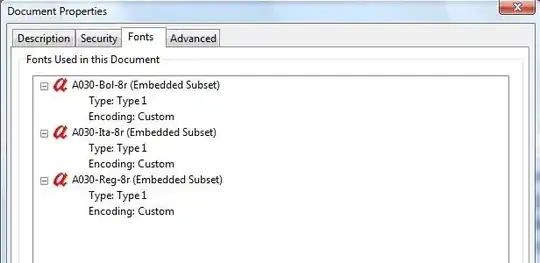
screenshot

Alan Munn
  • 218,180
Damien
  • 121
  • 9
    Ah, bureaucracy, when will you be replaced by productivity? :-) – Harold Cavendish Jul 07 '11 at 19:21
  • 2
    I don't think it's possible: the name shown reflects the PostScript name of the actual font used in the PDF. If it's a clone, changing its name would break the licence, the copyright and possibly other laws. – egreg Jul 07 '11 at 19:24
  • 3
    If you have Arial on your computer, it might be as simple as loading fontspec and compiling with xelatex or lualatex. See this answer here: LaTeX Arial Narrow font. Just change the font name to Arial. – Alan Munn Jul 07 '11 at 19:47
  • 2
    Quite apart from the other points, I'd point out that font names are not really important. Legal reasons mean that the name of a font can be protected but not the design. You are being asked to use a particular design of font, so the name should really not matter. (Also, do you really think someone is going to check this?) – Joseph Wright Jul 16 '11 at 05:05
  • 2
    Just only give them hardcopies. Then they can't check. BAM. problem solved. – Seamus Jul 26 '11 at 21:33

1 Answers1

3

At least on a simple file it works to use Multivalent to uncompress the PDF, then change the font name, then recompress

$ java tool.pdf.Uncompress mypdf.pdf
$ < mypdf-u.pdf sed 's/A030-Reg-8r/Arial/g' > mypdf-fixed-u.pdf
$ java tool.pdf.Compress mypdf-fixed-u.pdf 

This may be a bit fragile, for example if 'A030-Reg-8r' happens to show up in some image data stream. I believe QPDF has a special mode that is supposed to make this kind of manual editing of PDFs a bit easier/more structured, by converting to a format that has a few comments that tools can use to find their way around the document.

Lev Bishop
  • 45,462
  • 7
    PS I wouldn't recommend this. But you know that. It can't be that hard for you to get hold of actual Arial, can it? – Lev Bishop Jul 07 '11 at 19:39
  • pdftk also can uncompress and compress PDFs. I would keep the number of characters (i.e. bytes) constant. (Not that I recommend to do it this way) – Martin Scharrer Jul 07 '11 at 19:56