4

Question

How can I keep the current page nodes aligned with the same physical corners of the page in a document where the main layout is portrait, but some pages with longtable are in the landscape environment. In other words, how can I rotate the nodes clockwise like the header, body, margin, and footer. The nodes are from the packages tikz and tikzpagenodes.

Related Questions

Example

I want to essentially be able to rotate the tikz nodes clockwise without changing the anchor names. In other words, the reference names north west, north, north east, east, south east, south, south west, west should still refer to the same locations as for a portrait page. (In the code below, the showboxes output should be rotated with the page.)

Desired Result:

  1. I want to be able to draw lines around the sections without worrying about alignment in landscape or portrait. (just like I don't have to worry about the header or footer being correctly aligned: remember that the physical page will be portrait in the book; just the body will be rotated.)
  2. I want the blue bar to be at the same physical location on every page of my book to indicate that that page has the start of a section on it.

Sample Code

\documentclass{article}
\usepackage{fontspec}
\usepackage[%
     a4paper,
 %   includeheadfoot,
     head=1.5cm,%\baselineskip,  % distance from bottom of header to block of text aka \headsep e.g. \baselineskip
     foot=1.5cm,  % distance from top of footer to block of text aka \footskip
     headheight=12pt,     % height for the header block (no equivalent for footer)
 %   heightrounded,       % ensure an integer number of lines
     marginparwidth=2cm,  % right marginal note width
     marginparsep=2mm,    % distance from text block to marginal note box
 %   height=\textheight,  % height of the text block
 %   width=\textwidth,    % width of the text block
     top=2.5cm,           % distance of the text block from the top of the page
     bottom=3cm,
     left=2.5cm,
     right=2.5cm,
%     showframe,           % show the main blocks
%     verbose,             % show the values of the parameters in the log file
 ]{geometry}
\usepackage{pdflscape}
\usepackage{tikz} % Absolute positioning, advanced vector graphics
\usepackage{tikzpagenodes} % Adds nodes around page boxes (e.g. body)
\usetikzlibrary{calc,positioning,decorations} % Extensions for tikz (increase compilation time)
% Title Packages
\usepackage[compact,explicit,noindentafter]{titlesec}
\usepackage[rightlabels,dotinlabels]{titletoc}
\usepackage{tocloft}
\usepackage{needspace}
\usepackage{fancyhdr}
\usepackage{longtable}
% TikZ Definitions
\newcommand{\tikztitlenumber}[1]{%
\begin{tikzpicture}[remember picture, overlay,baseline]
    \node [font=\Huge\fontsize{50}{60}\selectfont,text=blue,anchor=south east,inner sep=0pt, outer sep=0pt] (titlenumber)  {#1};
    \node [] (titlerighttop) at (titlenumber.north -| current page.east) {};
    \node [] (titlerightbottom) at (titlenode -| current page.east) {};
    \path [fill=blue] (titlerighttop.north) rectangle ($ (titlerightbottom) + (-2mm,0mm) $);
\end{tikzpicture}}

\newcommand{\marginmark}[1]{%
\tikz[overlay,remember picture] \node [minimum height=2cm,anchor=west,rotate=90, color=gray] at (current page marginpar area.south) {\fontsize{20}{30}\selectfont #1}; }

\newcommand{\tikztitleline}{%
\begin{tikzpicture}[overlay,remember picture]
    \draw (titlenode.west) -- (titlenode -| current page text area.north east);
\end{tikzpicture}
}%

% TITLE FORMATTING
\titleformat{\section}[hang]{\needspace{6cm}\color{blue}\Huge\bfseries}{}{0pt}{\tikz[remember picture,overlay] \node [anchor=base west,yshift=-4mm] (titlenode) {};#1\hfill\tikztitlenumber{\thesection}}[\thispagestyle{sectionpage}\tikztitleline]
\titlespacing{\section}{0pt}{40pt}{20pt}

\newcommand{\showboxes}{%
\begin{tikzpicture}[remember picture,overlay]
    \draw [red] (current page text area.south west) rectangle
        (current page text area.north east);
    \draw [green] (current page header area.south west) rectangle
        (current page header area.north east);
    \draw [blue] (current page footer area.south west) rectangle
        (current page footer area.north east);
    \draw [black] (current page marginpar area.south west) rectangle
        (current page marginpar area.north east);
\end{tikzpicture}
}%

\fancypagestyle{sectionpage}
{
   \fancyhf{} % clear all fields
   \renewcommand{\headrulewidth}{0pt}
   \lhead{}
   \rhead{}
   \lfoot{}
   \cfoot{}
   \rfoot{%
    \begin{minipage}[m]{.3\textwidth}
    \begin{flushright}
        \bfseries\footnotesize \thepage
    \end{flushright}
    \end{minipage}
    \marginmark{}
    }%
}%
\usepackage{lipsum}
\begin{document}
\section{Portrait Section}
\showboxes{}
\lipsum
\begin{landscape}
\showboxes{}
\section{Landscape Section}
\begin{longtable}{|l|p{6cm}|p{11cm}|p{4cm}|} \hline
\label{Table:references}
\textcolor{blue}{\textbf{Nr.}}       & \textcolor{blue}{\textbf{Start of Clause}} & \textcolor{blue}{\textbf{Info}} & \textcolor{blue}{\textbf{End of Clause}}\\ \hline
[1]  & These numbers  & A whole lotta info       & are not in order.   \\ \hline
[2]  & These numbers  & A whole lotta info       & are not in order.   \\ \hline
[3]  & These numbers  & A whole lotta info       & are not in order.   \\ \hline
[4]  & These numbers  & A whole lotta info       & are not in order.   \\ \hline
[5]  & These numbers  & A whole lotta info       & are not in order.   \\ \hline
[6]  & These numbers  & A whole lotta info       & are not in order.   \\ \hline
[7]  & These numbers  & A whole lotta info       & are not in order.   \\ \hline
[8]  & These numbers  & A whole lotta info       & are not in order.   \\ \hline
[9]  & These numbers  & A whole lotta info       & are not in order.   \\ \hline
[10] & These numbers  & A whole lotta info       & are not in order.   \\ \hline
[11] & These numbers  & A whole lotta info       & are not in order.   \\ \hline
[14] & These numbers  & A whole lotta info       & are not in order.   \\ \hline
[15] & These numbers  & A whole lotta info       & are not in order.   \\ \hline
[16] & These numbers  & A whole lotta info       & are not in order.   \\ \hline
[17] & These numbers  & A whole lotta info       & are not in order.   \\ \hline
[19] & These numbers  & A whole lotta info       & are not in order.   \\ \hline
[20] & These numbers  & A whole lotta info       & are not in order.   \\ \hline
[21] & These numbers  & A whole lotta info       & are not in order.   \\ \hline
[22] & These numbers  & A whole lotta info       & are not in order.   \\ \hline
[23] & These numbers  & A whole lotta info       & are not in order.   \\ \hline
[24] & These numbers  & A whole lotta info       & are not in order.   \\ \hline
\end{longtable}
\end{landscape}
\end{document}

Output
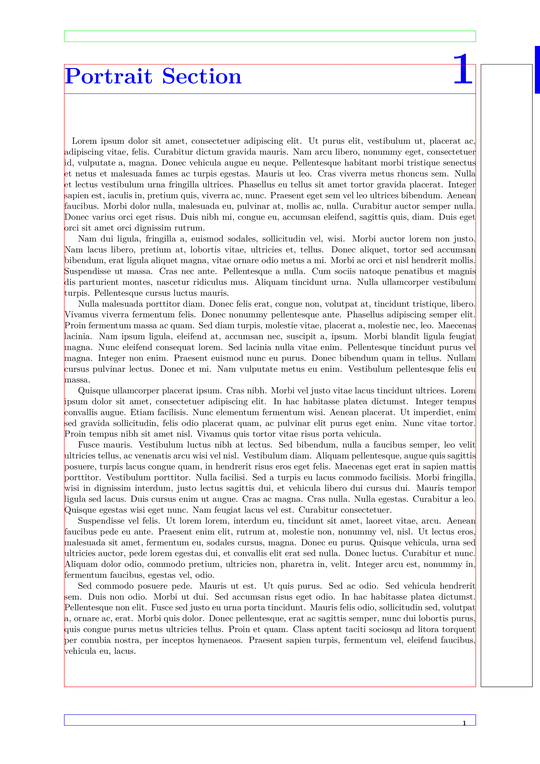
Page 1 Page 2

Honing in on the Problem

Reduced Minimal Working Example according to Gonzalo

\documentclass{article}
\usepackage{pdflscape}
\usepackage{tikzpagenodes}
\usepackage{lipsum}

\newcommand{\showboxes}{%
\begin{tikzpicture}[remember picture,overlay]
    \draw [red] (current page text area.south west) rectangle
        (current page text area.north east);
    \draw [green] (current page header area.south west) rectangle
        (current page header area.north east);
    \draw [blue] (current page footer area.south west) rectangle
        (current page footer area.north east);
    \draw [black] (current page marginpar area.south west) rectangle
        (current page marginpar area.north east);
\end{tikzpicture}
}

\begin{document}
\section{Portrait Section}
\showboxes{}
\lipsum[4]
\begin{landscape}
\showboxes{}
\section{Landscape Section}
\lipsum[4]
\end{landscape}
\end{document}
  • Minimize your example. It contains a lot code which is not needed to understand or reproduce the problem. You should also mention how your compile - the engine is important in this case. – Ulrike Fischer Feb 05 '15 at 13:11
  • Normally I would agree with you, but I must cite Gonzalo's comment as to why I am think this code is minimal enough. http://tex.stackexchange.com/q/226480/13552 Sorry about that. I am caught in the middle of different expectations. – Jonathan Komar Feb 05 '15 at 13:15
  • I don't see how you can justify from Gonzalo's comment the use of fancyhdr, titlesec, tocloft, to name a few. Even the longtable is not needed. Page nodes can be demonstrated with a few words. You should show a complete but also minimal example. So clean up your preamble. – Ulrike Fischer Feb 05 '15 at 13:29
  • @macmadness86 In the mentioned comment I requested to add to MWEs only those settings relevant to the problem discussed. In the other question you provided too little information; in this one, as Ulrike pointed out, you gave superfluous information. Once you have a complete document illustrating the problem, you can start "polishing" it by removing unnecessary elements until you reach the precise minimal amount of information needed. – Gonzalo Medina Feb 05 '15 at 13:31
  • I think, by no fault of one side, there is a serious disconnect between the LaTeX experts and the majority of users on this website. When an intermediate user (I am classifying myself as that) runs into a problem, it is difficult to discern what code should be included in the "minimal" example. My reasoning for inclusion is as follows: Xelatex>fontspec, layout>geometry,I have an issue with nodes>tikz and related. Nodes in sectioning commands>titlesec and related (include based on Gonzalo), longtable on landscapes>(include based on Gonzalo). So you see, there was logic behind my MWE. – Jonathan Komar Feb 05 '15 at 13:38
  • 1
    @macmadness86 I know that building truly MWEs can sometimes be difficult, but as I tried to explain before, once you have a working example, you can start trimming it down until it becomes minimal (or almost minimal). For example, see this reduced version of your code: http://pastebin.com/QPbEkcgr it's shorter and still allows us to understand and reproduce the problem. If you want to, you can use that code in your question (it is almost minimal). – Gonzalo Medina Feb 05 '15 at 13:43
  • +1 I've added your code to the question Gonzalo. Hopefully this helps you, @UlrikeFischer. – Jonathan Komar Feb 05 '15 at 13:47
  • You can do it using everypage, or at least create new nodes with the desired properties. Of course, one would need to either implement it on a page by page basis or be able to detect landscape/portrait (comparing \linewidth to \textwidth is how I usually do it) – John Kormylo Feb 05 '15 at 15:35
  • 1
    @macmadness86: It may be difficult for you to discern what code should be included but it is not impossible and you can learn it. Simply spent some time to ponder over every line of code if you can remove it. – Ulrike Fischer Feb 05 '15 at 15:35
  • This is a perfect example of what I am talking about. Code cannot be trimmed by an intermediate user who has no idea why the problem is occurring, nor what the experts might need to solve the problem. The only thing I have to go on is your suggestions (you did not give any in your first comment, except to specify the engine--which I thought was clear from fontspec). On multiple occasions, experts have told me something like, "HEY, you didn't mention that, how should I have known that?" Thank you for recognizing the difficulty in minimizing code. – Jonathan Komar Feb 05 '15 at 15:39
  • @macmadness86 You can trim the code by removing (e.g.) half the preamble/document, compiling, resolving any error codes, and seeing if the output is as desired. If the output is as desired, uncomment half of the previously commented out half and repeat. It's quite tedious, but you learn pretty quickly what's important and what's not. The other option is to start from a blank document and add packages until the output turns up the way you don't want. – darthbith Feb 05 '15 at 15:44
  • 1
    Did you actually try to trim? Did you e.g. try to remove the \fancypagestyle{sectionpage}{...} to check if it is relevant for the problem? Did you try to remove the longtable to test if it is relevant? Sorry but you are hiding behind a "I'm so helpless"-argument. – Ulrike Fischer Feb 05 '15 at 15:45
  • I feel like I am talking to a brick wall. Did you read my logic? \fancypagestyle{sectionpage}{...} COULD be relevant for a solution, because it is called by the \titleformat definition, which containts tikz code, which is what is not working. So you see, there is a chain here and you are really not helping by insisting that I effortless posting bloated code on this forum! I put time and effort into my questions. Assuming I am using a helpless argument completely false and ridiculous. (You should have seen the preamble from which this code originated) – Jonathan Komar Feb 05 '15 at 15:51
  • @darthbith As I was trying to explain before, normally that is my approach, but I've been told multiple times by experts that I should have mentioned something that I failed to mention. Therefore, I try to include the most important details based on past experiences. To get ridiculed by people like Ulrike for being "helpless"-that is nonsense and only frustrates me. An example: her answer does not respect titlesec, something that was I was recommended to remove by her and Gonzalo. Obviously I do not want this, so it is in my MWE. I just wish I could get some credibility here for my thoughts. – Jonathan Komar Feb 05 '15 at 16:09
  • 1
    Yes there is a chain. And so for the next step you should try to remove the \titleformat and test if it is relevant. Sorry but the fact that you could get it wrong and perhaps remove something relevant is not an excuse not to try it at all. – Ulrike Fischer Feb 05 '15 at 16:17
  • Obviously having a simple MWE is critical for identifying errors. There are no compilation errors in this document. The problem exists solely in the appearance of the output. I put everything in my sample code that I saw as relevant to an effective solution. Even if I were to minimize things as you say, my question is to what end? There are NO compilation issues. You ignore my logic, and make belittling comments. I am have no time for that. – Jonathan Komar Feb 05 '15 at 16:31
  • 1
    The problem starts with \pgfpoint and the current page node. – John Kormylo Feb 05 '15 at 18:14

3 Answers3

4

If you want to leave the page nodes precisely where the were in portrait (except rotated), you can use the following.

\documentclass{article}
%\usepackage{fontspec}
\usepackage[%
     letterpaper,
 %   includeheadfoot,
     head=1.5cm,%\baselineskip,  % distance from bottom of header to block of text aka \headsep e.g. \baselineskip
     foot=1.5cm,  % distance from top of footer to block of text aka \footskip
     headheight=12pt,     % height for the header block (no equivalent for footer)
 %   heightrounded,       % ensure an integer number of lines
     marginparwidth=2cm,  % right marginal note width
     marginparsep=2mm,    % distance from text block to marginal note box
 %   height=\textheight,  % height of the text block
 %   width=\textwidth,    % width of the text block
     top=2.5cm,           % distance of the text block from the top of the page
     bottom=3cm,
     left=2.5cm,
     right=2.5cm,
%     twoside
%     showframe,           % show the main blocks
%     verbose,             % show the values of the parameters in the log file
 ]{geometry}
\usepackage{pdflscape}
\usepackage{tikz} % Absolute positioning, advanced vector graphics
\usetikzlibrary{calc,positioning,decorations} % Extensions for tikz (increase compilation time)
\usepackage{tikzpagenodes} % Adds nodes around page boxes (e.g. body)
\usepackage{fancyhdr}
\usepackage[compact,explicit,noindentafter]{titlesec}
\usepackage[rightlabels,dotinlabels]{titletoc}
\usepackage{tocloft}
\usepackage{needspace}
\usepackage{lipsum}

\makeatletter
\newif\if@landscape% add test for landscape mode
\@landscapefalse
\let\old@landscape=\landscape
\def\landscape{\@landscapetrue\old@landscape}
\let\old@endlandscape=\endlandscape
\def\endlandscape{\old@endlandscape
\@landscapefalse}

\expandafter\def\csname pgf@sh@np@current page\endcsname{%
\if@landscape
  \def\southwest{\pgfpointorigin}%
  \def\northeast{\pgfpoint{\pgfsys@thepageheight}{\pgfsys@thepagewidth}}%
\else
  \def\southwest{\pgfpointorigin}%
  \def\northeast{\pgfpoint{\pgfsys@thepagewidth}{\pgfsys@thepageheight}}%
\fi}
\expandafter\def\csname pgf@sh@nt@current page\endcsname{%
\if@landscape{1}{0}{0}{1}{\dimexpr\paperwidth-2.17in}{.5cm}%
\else{1}{0}{0}{1}{0pt}{0pt}%
\fi}
\def\pgf@sh@nt@pagenodes{%
\if@landscape{0}{-1}{1}{0}{\dimexpr\paperheight-2.17in}{\dimexpr\paperwidth+0.5cm}%
\else{1}{0}{0}{1}{0pt}{0pt}%
\fi}
\def\@newtikzpagenode#1{%
    \expandafter\let\csname pgf@sh@ns@#1\expandafter\endcsname\csname pgf@sh@ns@current page\endcsname
    \expandafter\let\csname pgf@sh@nt@#1\endcsname\pgf@sh@nt@pagenodes
    \expandafter\let\csname pgf@sh@pi@#1\expandafter\endcsname\csname pgf@sh@pi@current page\endcsname
    \expandafter\def\csname pgf@sh@np@#1\endcsname
}
\@newtikzpagenode{current page text area}{%
\if@landscape
    \def\southwest{\pgfpoint{\current@textarea@left}{\paperwidth-\current@textarea@top-\linewidth}}%
    \def\northeast{\pgfpoint{\current@textarea@left+\textwidth}{\paperwidth-\current@textarea@top}}%
\else
    \def\southwest{\pgfpoint{\current@textarea@left}{\paperheight-\current@textarea@top-\textheight}}%
    \def\northeast{\pgfpoint{\current@textarea@left+\textwidth}{\paperheight-\current@textarea@top}}%
\fi}
\@newtikzpagenode{current page header area}{%
\if@landscape
    \def\southwest{\pgfpoint{\current@textarea@left}{\paperwidth-\current@textarea@top+\headsep}}%
    \def\northeast{\pgfpoint{\current@textarea@left+\textwidth}{\paperwidth-\current@textarea@top+\headsep+\headheight}}%
\else
    \def\southwest{\pgfpoint{\current@textarea@left}{\paperheight-\current@textarea@top+\headsep}}%
    \def\northeast{\pgfpoint{\current@textarea@left+\textwidth}{\paperheight-\current@textarea@top+\headsep+\headheight}}%
\fi}
\@newtikzpagenode{current page footer area}{%
\if@landscape
    \def\southwest{\pgfpoint{\current@textarea@left}{\paperwidth-\current@textarea@top-\linewidth-\footskip}}%
    \def\northeast{\pgfpoint{\current@textarea@left+\textwidth}{\paperwidth-\current@textarea@top-\linewidth-\footskip+\headheight}}%
\else
    \def\southwest{\pgfpoint{\current@textarea@left}{\paperheight-\current@textarea@top-\textheight-\footskip}}%
    \def\northeast{\pgfpoint{\current@textarea@left+\textwidth}{\paperheight-\current@textarea@top-\textheight-\footskip+\headheight}}%
\fi}
\@newtikzpagenode{current page marginpar area}{%
\if@landscape
    \def\southwest{\pgfpoint
        {\current@textarea@left\ifoddpageoroneside+\textwidth+\marginparsep\else-\marginparsep-\marginparwidth\fi}%
        {\paperwidth-\current@textarea@top-\linewidth}%
    }%
    \def\northeast{\pgfpoint
        {\current@textarea@left\ifoddpageoroneside+\textwidth+\marginparsep+\marginparwidth\else-\marginparsep\fi}%
        {\paperwidth-\current@textarea@top}%
    }%
\else
    \def\southwest{\pgfpoint
        {\current@textarea@left\ifoddpageoroneside+\textwidth+\marginparsep\else-\marginparsep-\marginparwidth\fi}%
        {\paperheight-\current@textarea@top-\textheight}%
    }%
    \def\northeast{\pgfpoint
        {\current@textarea@left\ifoddpageoroneside+\textwidth+\marginparsep+\marginparwidth\else-\marginparsep\fi}%
        {\paperheight-\current@textarea@top}%
    }%
\fi}
\newcommand{\lsrotate}{\if@landscape 90\else 0\fi}
%\tikzset{every node/.style={rotate=\lsrotate}}% this will also affect nodes in the text area
\makeatother

% TikZ Definitions
    \newcommand{\tikztitlenumber}[1]{%
\begin{tikzpicture}[remember picture, overlay,baseline]
    \node [font=\Huge\fontsize{50}{60}\selectfont,text=blue,anchor=south east,inner sep=0pt, outer sep=0pt] (titlenumber)  {#1};
    \node [] (titlerighttop) at (titlenumber.north -| current page.east) {};
    \node [] (titlerightbottom) at (titlenode -| current page.east) {};
    \path [fill=blue] (titlerighttop.north) rectangle ($ (titlerightbottom) + (-2mm,0mm) $);
\end{tikzpicture}}

\newcommand{\marginmark}[1]{%
\tikz[overlay,remember picture] \node [minimum height=2cm,anchor=west,rotate=90, color=gray] at (current page marginpar area.south) {\fontsize{20}{30}\selectfont #1}; }

\newcommand{\tikztitleline}{%
\begin{tikzpicture}[overlay,remember picture]
    \draw (titlenode.west) -- (titlenode -| current page text area.north east);
\end{tikzpicture}
}%

% TITLE FORMATTING
\titleformat{\section}[hang]{\needspace{6cm}\color{blue}\Huge\bfseries}{}{0pt}{\tikz[remember picture,overlay] \node [anchor=base west,yshift=-4mm] (titlenode) {};#1\hfill\tikztitlenumber{\thesection}}[\thispagestyle{sectionpage}\tikztitleline]
\titlespacing{\section}{0pt}{40pt}{20pt}

\newcommand{\showboxes}{%
\begin{tikzpicture}[remember picture,overlay]
    \draw [red] (current page text area.south west) rectangle
        (current page text area.north east);
    \draw [green] (current page header area.south west) rectangle
        (current page header area.north east);
    \draw [blue] (current page footer area.south west) rectangle
        (current page footer area.north east);
    \draw [black] (current page marginpar area.south west) rectangle
        (current page marginpar area.north east);
\end{tikzpicture}
}%

\fancypagestyle{sectionpage}
{
   \fancyhf{} % clear all fields
   \renewcommand{\headrulewidth}{0pt}
   \lhead{}
   \rhead{}
   \lfoot{}
   \cfoot{}
   \rfoot{%
    \begin{minipage}[m]{.3\textwidth}
    \begin{flushright}
        \bfseries\footnotesize \thepage
    \end{flushright}
    \end{minipage}
    \marginmark{}
    }%
}%

\begin{document}
\begin{landscape}
\section{Landscape Section}
\showboxes{}
\lipsum[1-4]
\begin{tikzpicture}
\node{normal tikzpicture};
\end{tikzpicture}
\end{landscape}
\section{Portrait Section}
\showboxes{}
\lipsum[1-4]
\begin{tikzpicture}
\node{normal tikzpicture};
\end{tikzpicture}
\end{document}

alternate page nodes

John Kormylo
  • 79,712
  • 3
  • 50
  • 120
2

I quit before I got to the column nodes. Still don't know why the 0.5cm is needed.

\documentclass{article}
%\usepackage{fontspec}
\usepackage[%
     a4paper,
 %   includeheadfoot,
     head=1.5cm,%\baselineskip,  % distance from bottom of header to block of text aka \headsep e.g. \baselineskip
     foot=1.5cm,  % distance from top of footer to block of text aka \footskip
     headheight=12pt,     % height for the header block (no equivalent for footer)
 %   heightrounded,       % ensure an integer number of lines
     marginparwidth=2cm,  % right marginal note width
     marginparsep=2mm,    % distance from text block to marginal note box
 %   height=\textheight,  % height of the text block
 %   width=\textwidth,    % width of the text block
     top=2.5cm,           % distance of the text block from the top of the page
     bottom=3cm,
     left=2.5cm,
     right=2.5cm,
%     twoside
%     showframe,           % show the main blocks
%     verbose,             % show the values of the parameters in the log file
 ]{geometry}
\usepackage{pdflscape}
\usepackage{tikz} % Absolute positioning, advanced vector graphics
\usetikzlibrary{calc,positioning,decorations} % Extensions for tikz (increase compilation time)
\usepackage{tikzpagenodes} % Adds nodes around page boxes (e.g. body)

\makeatletter
\newif\if@landscape% add test for landscape mode
\@landscapefalse
\let\old@landscape=\landscape
\def\landscape{\@landscapetrue\old@landscape}
\let\old@endlandscape=\endlandscape
\def\endlandscape{\old@endlandscape\@landscapefalse}

\expandafter\def\csname pgf@sh@np@current page\endcsname{%
\if@landscape
  \def\southwest{\pgfpointorigin}%
  \def\northeast{\pgfpoint{\pgfsys@thepageheight}{\pgfsys@thepagewidth}}%
\else
  \def\southwest{\pgfpointorigin}%
  \def\northeast{\pgfpoint{\pgfsys@thepagewidth}{\pgfsys@thepageheight}}%
\fi}
\expandafter\def\csname pgf@sh@nt@current page\endcsname{%
\if@landscape{1}{0}{0}{1}{\dimexpr\paperwidth-2.17in}{.5cm}%
\else{1}{0}{0}{1}{0pt}{0pt}%
\fi}
\def\pgf@sh@nt@pagenodes{%
\if@landscape{1}{0}{0}{1}{\dimexpr\paperwidth-1.97in}{.5cm}%
\else{1}{0}{0}{1}{0pt}{0pt}%
\fi}
\def\@newtikzpagenode#1{%
    \expandafter\let\csname pgf@sh@ns@#1\expandafter\endcsname\csname pgf@sh@ns@current page\endcsname
    \expandafter\let\csname pgf@sh@nt@#1\endcsname\pgf@sh@nt@pagenodes
    \expandafter\let\csname pgf@sh@pi@#1\expandafter\endcsname\csname pgf@sh@pi@current page\endcsname
    \expandafter\def\csname pgf@sh@np@#1\endcsname
}
\@newtikzpagenode{current page text area}{%
\if@landscape
    \def\southwest{\pgfpoint{\current@textarea@left}{\paperwidth-\current@textarea@top-\textheight}}%
    \def\northeast{\pgfpoint{\current@textarea@left+\linewidth}{\paperwidth-\current@textarea@top}}%
\else
    \def\southwest{\pgfpoint{\current@textarea@left}{\paperheight-\current@textarea@top-\textheight}}%
    \def\northeast{\pgfpoint{\current@textarea@left+\textwidth}{\paperheight-\current@textarea@top}}%
\fi}
\@newtikzpagenode{current page header area}{%
\if@landscape
    \def\southwest{\pgfpoint{\current@textarea@left}{\paperwidth-\current@textarea@top+\headsep}}%
    \def\northeast{\pgfpoint{\current@textarea@left+\linewidth}{\paperwidth-\current@textarea@top+\headsep+\headheight}}%
\else
    \def\southwest{\pgfpoint{\current@textarea@left}{\paperheight-\current@textarea@top+\headsep}}%
    \def\northeast{\pgfpoint{\current@textarea@left+\textwidth}{\paperheight-\current@textarea@top+\headsep+\headheight}}%
\fi}
\@newtikzpagenode{current page footer area}{%
\if@landscape
    \def\southwest{\pgfpoint{\current@textarea@left}{\paperwidth-\current@textarea@top-\textheight-\footskip}}%
    \def\northeast{\pgfpoint{\current@textarea@left+\linewidth}{\paperwidth-\current@textarea@top-\textheight-\footskip+\headheight}}%
\else
    \def\southwest{\pgfpoint{\current@textarea@left}{\paperheight-\current@textarea@top-\textheight-\footskip}}%
    \def\northeast{\pgfpoint{\current@textarea@left+\textwidth}{\paperheight-\current@textarea@top-\textheight-\footskip+\headheight}}%
\fi}
\@newtikzpagenode{current page marginpar area}{%
\if@landscape
    \def\southwest{\pgfpoint
        {\current@textarea@left\ifoddpageoroneside+\linewidth+\marginparsep\else-\marginparsep-\marginparwidth\fi}%
        {\paperwidth-\current@textarea@top-\textheight}%
    }%
    \def\northeast{\pgfpoint
        {\current@textarea@left\ifoddpageoroneside+\linewidth+\marginparsep+\marginparwidth\else-\marginparsep\fi}%
        {\paperwidth-\current@textarea@top}%
    }%
\else
    \def\southwest{\pgfpoint
        {\current@textarea@left\ifoddpageoroneside+\textwidth+\marginparsep\else-\marginparsep-\marginparwidth\fi}%
        {\paperheight-\current@textarea@top-\textheight}%
    }%
    \def\northeast{\pgfpoint
        {\current@textarea@left\ifoddpageoroneside+\textwidth+\marginparsep+\marginparwidth\else-\marginparsep\fi}%
        {\paperheight-\current@textarea@top}%
    }%
\fi}
\makeatother

\begin{document}
\begin{landscape}
\begin{tikzpicture}[remember picture,overlay,ultra thick]% draw nodes
\draw[red] (current page.south west) -- (current page.north east);
\draw (current page.north west) -- (current page.south east);
\draw[green] (current page header area.south west) rectangle (current page header area.north east);
\draw[red] (current page text area.south west) rectangle (current page text area.north east);
\draw[blue] (current page footer area.south west) rectangle (current page footer area.north east);
\draw[gray] (current page marginpar area.south west) rectangle (current page marginpar area.north east);
\end{tikzpicture}
\end{document}

landscape page nodes

John Kormylo
  • 79,712
  • 3
  • 50
  • 120
  • Hmm. Well the idea was to maintain the same page node names, because these are used in a global definition for all pages (portrait and landscape). Also, the nodes have not been rotated clockwise like the header, body, margin, and footer. – Jonathan Komar Feb 06 '15 at 07:34
  • What do you mean by rotated? The north anchor is on top, etc. If you put text in them it appears right side up. – John Kormylo Feb 06 '15 at 15:16
  • Okay, I've got a portable way to handle the (current page) node and am part way through the other page nodes. This will take a while. – John Kormylo Feb 06 '15 at 18:34
1

Well obviously the page nodes and pdflscape don't work together. Heiko could perhaps say if there is solution. As an alternative you could change the page layout e.g. with the means of the KOMA-classes:

\documentclass[pagesize]{scrartcl}

\usepackage{tikzpagenodes}
\usepackage{lipsum}

\newcommand{\showboxes}{%
\begin{tikzpicture}[remember picture,overlay]
    \draw [red] (current page text area.south west) rectangle
        (current page text area.north east);
    \draw [green] (current page header area.south west) rectangle
        (current page header area.north east);
    \draw [blue] (current page footer area.south west) rectangle
        (current page footer area.north east);
    \draw [black] (current page marginpar area.south west) rectangle
        (current page marginpar area.north east);
    \draw [yellow,<->]  (current page.south west)-- (current page.north east) ;
\end{tikzpicture}
}

\begin{document}
\section{Portrait Section}
\showboxes{}
\lipsum[4]
\newpage
\KOMAoptions{paper=landscape}
\recalctypearea
\showboxes{}
\section{Landscape Section}
\lipsum[4]

\end{document}

The drawback is that it also changes the position of the footer - if this is not wanted one would have to install some special pagestyle on these pages.

Ulrike Fischer
  • 327,261
  • KOMA-class is not an option, as you can see in my original code, I am using titlesec, which is not recommended by KOMA-class. (an important detail in my original sample code). Thanks for the answer anyway. – Jonathan Komar Feb 05 '15 at 15:56
  • You can use only the typearea package from the KOMAclasses e.g. http://tex.stackexchange.com/a/21431/2388. You can also use geometryand \newgeometry but will have to set the page size manually as geometry doesn't allow to change the paper size in mid document. – Ulrike Fischer Feb 05 '15 at 16:13
  • Also, I tested your code and it does not do what the question asks. "How can I keep the nodes aligned with the SAME corners of the page", "I want to essentially be able to rotate the tikz nodes clockwise", "In the code below, the showboxes output should be ROTATED with the page.". This means for example that north west and north east would be the top right and bottom right corners of the clockwise rotated landscape page. – Jonathan Komar Feb 05 '15 at 23:05
  • 1
    This doesn't make much sense (and is rather confusing) if a south anchor of a page/text area is suddenly on the left. Beside this: The text area can have an arbitrary size. You can't describe the change from portrait to landscape with a simple (canvas) transformation. Imho you have such a special requirements that you should use John's idea and create new nodes names. – Ulrike Fischer Feb 06 '15 at 14:00