5

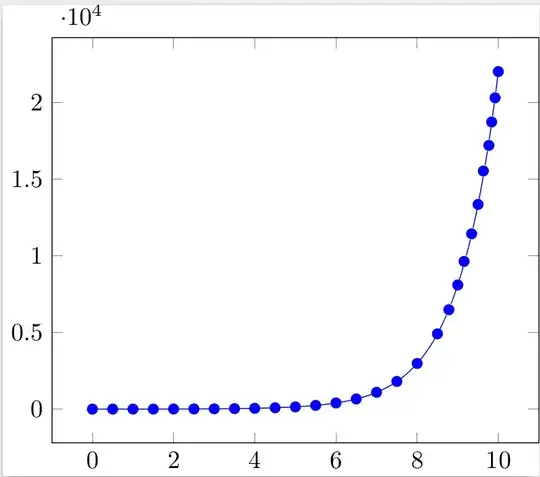
Is it possible to show marks when there is a certain distance along the path has been reached?

Example

With

\documentclass[10pt,tikz]{standalone} 
\usepackage{pgf}
\usepackage{tikz}
\usepackage{pgfplots}
\pgfplotsset{compat=newest}
\begin{document}
\begin{tikzpicture}                                                                                                                                         
\begin{axis}[]                                                                  
\addplot[                                                                       
  blue,                                                                           
  domain=0:10,                                                                    
  samples=201,                                                                    
  mark=*,                                                                         
  mark repeat=10]                                                                               
{exp(x)};                                                                       
\end{axis}
\end{tikzpicture}
\end{document} 

You will obtain
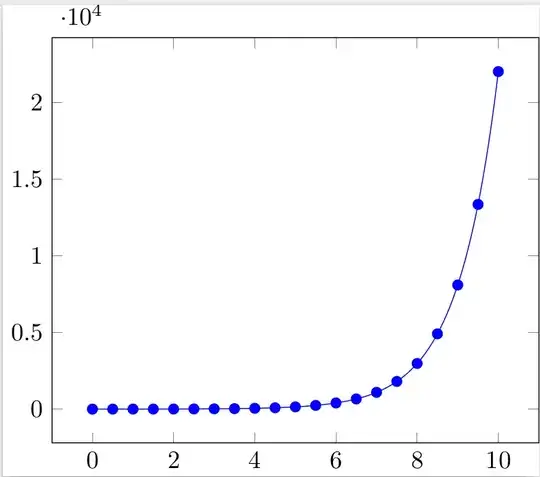
enter image description here

While my prefered output would be

enter image description here

WG-
  • 2,860
  • Unrelated: pgfplots loads tikz, which loads pgf, so loading the latter two explicitly is not necessary. Note that tikz is actually loaded twice, once in the documentclass options, once by \usepackage :-) Related: I presume you mean "distance along the path", since the points are already equally spaced horizontally. If that's the case, you should clarify in your question. – darthbith Feb 05 '15 at 19:29

2 Answers2

5

You can use a decoration.

\documentclass[tikz,border=4mm]{standalone}
\usepackage{pgfplots}
\usetikzlibrary{decorations.markings}
\pgfplotsset{compat=1.11}
\tikzset{mydeco/.style={
        decoration={
            markings,
            mark= between positions 0 and 1 step 5mm with
                {
                \node[circle,inner sep=2pt,fill=blue]{};
            },
        },
        postaction={decorate}
    }
}
\begin{document}
\begin{tikzpicture}
\begin{axis}[]
\addplot[
  blue,
  domain=0:10,
  samples=201,
  mydeco,
  %mark=*,
%  mark repeat=10
  ]
{exp(x)};
\end{axis}
\end{tikzpicture}
\end{document}

enter image description here

Change step 5mm in tikzset as you wish.

  • @Harisch Kumar, is it also possible to show only the markers and not the line plot? – WG- Feb 07 '15 at 15:25
  • 1
    @WG- Put draw=none, after mydeco –  Feb 07 '15 at 15:27
  • The decoration influences the position of the marker in the legend, eg normally the legend entry looks like "---X--- Entry" but with the decoration it becomes a function of the distance hence the marker position isn't centered anymore and may look like "-X---- Entry" or "-X-----X- Entry". Is there a way to get a (ie one) centered marker in the legend? Many thanks for any suggestions. – jlk Mar 08 '15 at 11:13
  • @harryhaller I have added an answer to your question at tikz/pgfplot -- always same distance between marks. Study the code and ask for clarifications if any. –  Mar 08 '15 at 11:56
1

While waiting for the upcoming answers with pgfplots, I couldn't help to do this with MetaPost (inside a LuaLaTeX program). At least it could serve as a basis for discussion about what the OP actually wants, this being not clear yet (at least for me). I opted here for marks separated by the same distance on the curve…

\documentclass{standalone}
\usepackage{unicode-math}
\usepackage{luamplib}
  \mplibsetformat{metafun}
  \mplibtextextlabel{enable}
  \mplibnumbersystem{double}
\begin{document}
\begin{mplibcode}
  % parameters
  u = .5cm; v = 0.0002cm;
  xmin = -1; xmax = 11; ymin = -.25*(10**4); ymax = 2.5*(10**4);
  len = 4bp;
  nmarks = 28; % number of marks
  % Macro creating a function curve
  vardef function_curve(expr xmin, xmax, xsep)(text f_x) =
    save f; vardef f(expr x) = f_x enddef ;
    (xmin, f(xmin))
    for x = xmin+xsep step xsep until xmax+0.9xsep: .. (x, f(x)) endfor
  enddef;
  % Exponential curve
  path expcurve; expcurve = function_curve(0, 10, 0.1)(exp x) xyscaled (u, v);
  % Space between marks
  marksep = arclength expcurve / (nmarks-1);

  beginfig(1);
    % Draw curve and marks
    draw expcurve;
    drawoptions(withpen pencircle scaled 3bp withcolor blue);
    draw point epsilon on expcurve; % First mark on the curve
    for i = 1 upto nmarks-1:
      draw point i*marksep on expcurve; % The other marks
    endfor;
    % Axes and labels
    drawoptions();
    draw ((xmin, ymin) -- (xmax, ymin) -- (xmax, ymax) -- (xmin, ymax) -- cycle) xyscaled (u, v);  
    for i = 0 step 2 until 10:
      draw (u*i, ymin*v) -- (u*i, ymin*v+len);
      draw (u*i, ymax*v) -- (u*i, ymax*v-len);
      label.bot(decimal i, (i*u, ymin*v));
    endfor;  
    for j = 0 step .5*(10**4) until 2*(10**4):
      draw (xmin*u, j*v) -- (xmin*u + len, j*v);
      draw (xmax*u, j*v) -- (xmax*u - len, j*v) ;
      label.lft(decimal (j*(10**-4)), (xmin*u, j*v));
    endfor;
    label.lft("$\times 10^{4}$", (xmin*u, ymax*v));
    setbounds currentpicture to boundingbox currentpicture enlarged 3bp;
  endfig;
\end{mplibcode}
\end{document}

Result:

enter image description here

Franck Pastor
  • 18,756