Or as, Werner simplified it: "How to define a command without backslash in xparse".
Background:
I am trying to set up a macro to define a macro for me (which will also do some other things which are not essential in the MWE below).
The first version below set up the macro by passing in \NumericalToNumber as #1. Note the \ in the name.
\DefineMacro{\NumericalToNumber}{%
    {one}{1}%
    {two}{2}%
    {three}{3}%
    {four}{4}%
}%
This does exactly what I desire.

However to perform the "other things" I need done in \DefineMacro, I need to have the macro name available without the backslash. So, I though it would be easy to change the call to not have \ in the name, and use csuse{} from the etoolbox to generate the name (as opposed to the usual \expandafter\csname...\endcsname):
\DefineMacro{NumericalToNumber}{%
    {one}{1}%
    {two}{2}%
    {three}{3}%
    {four}{4}%
}%
But I can't seem to get this version to work.
I also tried to stick with the first version and adapt the solution from How to remove the trailing escape character in an argument? but that did not work for me. Basically the code needed for the "other things" is already functional so would prefer to get the second version to work.
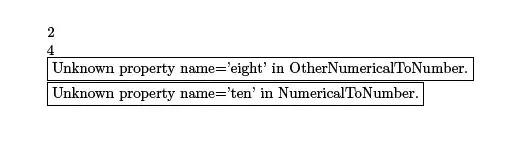
Code: Works: Use \ in \DefineMacro
\documentclass{article}
\usepackage{xparse}
\usepackage{xstring}
\NewDocumentCommand{\DefineMacro}{m m}{%
    % #1 = command name to be defined (WITH backslash).
    % #2 = pairs of {<property name>}{<propery value} (same as what \ItStrEqCase accepts)
    \NewDocumentCommand{#1}{s O{UNKNOWN}}{%
        \IfStrEqCase{##2}{%
            #2%
        }[\fbox{Unknown property name='##2' in \string#1.}]%
    }%
}%
\DefineMacro{\NumericalToNumber}{%
    {one}{1}%
    {two}{2}%
    {three}{3}%
    {four}{4}%
}%
\begin{document}
\NumericalToNumber[two]
\NumericalToNumber[four]
\NumericalToNumber[ten]
\end{document}
Code: Does NOT work without \ in \DefineMacro
\documentclass{article}
\usepackage{etoolbox}
\usepackage{xparse}
\usepackage{xstring}
\NewDocumentCommand{\DefineMacro}{m m}{%
    % #1 = command name to be defined (withOUT backslash).
    % #2 = pairs of {<property name>}{<propery value} (same as what \ItStrEqCase accepts)
    \NewDocumentCommand{\csuse{#1}}{s O{UNKNOWN}}{% <---- Use of \csuse here
        \IfStrEqCase{##2}{%
            #2%
        }[\fbox{Unknown property name='##2' in \string#1.}]%
    }%
}%
\DefineMacro{NumericalToNumber}{% <--- No backslash here in #1.
    {one}{1}%
    {two}{2}%
    {three}{3}%
    {four}{4}%
}%
\begin{document}
\NumericalToNumber[two]
\NumericalToNumber[four]
\NumericalToNumber[ten]
\end{document}



expl3when usingxparse, but to be perfectly honest, I don't fully understand the problem. Feel free to chalk that up to my lack of sleep, though :) The same functionality could easily be implemented using apropstructure. – Sean Allred Feb 07 '15 at 05:38xparse" (noxstring, no options). Maybe? – Werner Feb 07 '15 at 06:03\SSErrorBoxis not really important for the question? – Feb 07 '15 at 06:47\NewDocumentCommandgoes with commands that are 'fixed' rather than 'dynamic', i.e. they might be expected to all be listed individually, and one concept for LaTeX3 in general is 'self-documenting code'. There is an issue with some areas where long lists of similar commands are to be expected, and we still haven;t round the ideal solution. – Joseph Wright Feb 07 '15 at 07:45xparseis thatxparsemakes it really easy to provide a*variant of the macro (not illustrated in this MWE). Otherwise I would have used\newcommand. – Peter Grill Feb 08 '15 at 03:42\). – Werner Feb 08 '15 at 05:04