The acronym environment internally uses the description environment, but the classicthesis package changes the way description item labels are displayed. The scrbook class also makes its own changes.
With just scrbook, the item labels are displayed in bold sans-serif:
\documentclass{scrbook}

\begin{document}

\begin{description}
 \item[ABC] A B C
\end{description}

\end{document}

Adding classicthesis changes the item label to small-caps:
\documentclass{scrbook}

\usepackage{classicthesis}

\begin{document}

\begin{description}
 \item[ABC] A B C
\end{description}

\end{document}

The acronym package additionally sets the item format (within the acronym environment) to use \aclabelfont which defaults to using bold:
\documentclass{scrbook}

\usepackage{classicthesis}
\usepackage{acronym}

\begin{document}

\begin{acronym}
  \acro{ABC}[ABC]{A B C}
\end{acronym}

\begin{description}
\item[\aclabelfont{ABC}] A B C
\end{description}

\end{document}

Now there's a warning message in the transcript:
LaTeX Font Warning: Some font shapes were not available, defaults substituted.
The problem here is that there's no bold small-caps font available, so the bold small-caps has been replaced with just bold lower case.
You can restore scrbook's formatting for the description environment using:
\renewcommand{\descriptionlabel}[1]{\hspace{\labelsep}\descfont #1}
For example:
\documentclass{scrbook}

\usepackage{classicthesis}
\usepackage{acronym}

\renewcommand{\descriptionlabel}[1]{\hspace{\labelsep}\descfont #1}

\begin{document}

\begin{acronym}
  \acro{ABC}[ABC]{A B C}
\end{acronym}

\begin{description}
\item[\aclabelfont{ABC}] A B C
\end{description}

\end{document}
This produces:

 where I would like to see:
 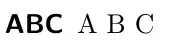 .
.
