4

The description environment allows an optional heading, like \item [<heading>] text, to be used. By default this makes the text <heading> bold.

I'm having the issue that this style of heading text is overriding my \textsc{}.

Why won't the description environment honor my \textsc{}?

Here's a picture:

enter image description here

And a MWE:

\documentclass[12pt]{book}

\begin{document}

This is normal text. \textsc{This is in small caps.}

\begin{description}
\item [\textsc{Why not small caps?}] Why isn't the text at left in small caps?
\end{description}

\end{document}
Johannes_B
  • 24,235
  • 10
  • 93
  • 248
BMS
  • 915

2 Answers2

4

You can fake bold small caps with my \fauxsc{}, first described at Fake small caps with XeTeX/fontspec?. There are three parameters for tuning the fauxsc font

\def\Hscale{.85}\def\Vscale{.72}\def\Cscale{1.10}

which define the horizontal scale on lc letters, the vertical scale on lc letters, and the horizontal scale on uc letters.

\documentclass[12pt]{book}
\usepackage{graphicx}
\newcommand\fauxsc[1]{\fauxschelper#1 \relax\relax}
\def\fauxschelper#1 #2\relax{%
  \fauxschelphelp#1\relax\relax%
  \if\relax#2\relax\else\ \fauxschelper#2\relax\fi%
}
\def\Hscale{.85}\def\Vscale{.72}\def\Cscale{1.10}
\def\fauxschelphelp#1#2\relax{%
  \ifnum`#1>``\ifnum`#1<`\{\scalebox{\Hscale}[\Vscale]{\uppercase{#1}}\else%
    \scalebox{\Cscale}[1]{#1}\fi\else\scalebox{\Cscale}[1]{#1}\fi%
  \ifx\relax#2\relax\else\fauxschelphelp#2\relax\fi}
\begin{document}

This is normal text. \textsc{This is in small caps.}

\begin{description}
\item [\fauxsc{Why not small caps?}] Why isn't the text at left in small caps?
\end{description}

\fauxsc{Why not small caps?} FAUX

\textsc{Why not small caps?} REAL
\end{document}

enter image description here

  • Why not just fake the bold? Just shift and overstrike. – alexis Nov 19 '15 at 13:27
  • @alexis While either approach can be attempted, it is my experience that double-striked characters are much more prone to noticeable flaws than faking small caps via asymmetric stretching. – Steven B. Segletes Nov 19 '15 at 15:14
4

If you want to change the labels in a description to use small caps, the easiest way is to use enumitem:

\documentclass[12pt]{book}
\usepackage{enumitem}

\setlist[description]{font=\normalfont\scshape}

\begin{document}

This is normal text. \textsc{This is in small caps.}

\begin{description}
\item [It's small caps] as you clearly see
\end{description}

\end{document}
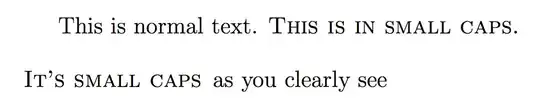
enter image description here

The reason why you don't get small caps is that the standard fonts have no bold small caps, so a substitute is used. Using \item[\textsc{x}] just adds \scshape to the default font, which is boldface. You might do

\item[\normalfont\textsc{x}]

but the best is to change the default font.

egreg
  • 1,121,712