11

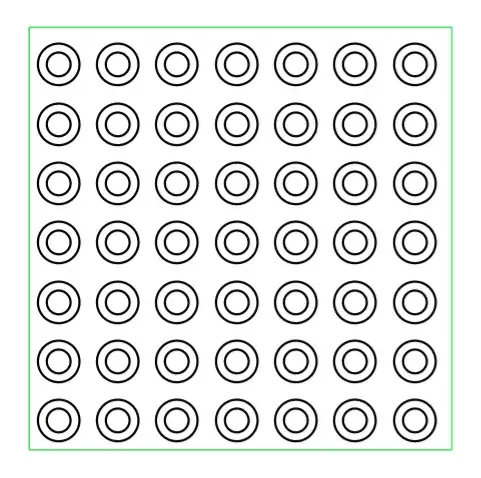
I'm trying to understand \pgfdeclarepatternformonly from page 1064 of the TikZ manual. I'm experimenting with the rings pattern given there as an example. If I compile the example as given, I get the expected result. However, I don't fully understand what the variables are doing. In particular, I don't understand the effect of radius.

\documentclass[tikz]{standalone}
\usetikzlibrary{patterns}
\begin{document}
  % page 1064 of manual
  \pgfdeclarepatternformonly[/tikz/radius,\thickness,\size]{rings}
  {\pgfpoint{-0.5*\size}{-0.5*\size}}
  {\pgfpoint{0.5*\size}{0.5*\size}}
  {\pgfpoint{\size}{\size}}
  {
    \pgfsetlinewidth{\thickness}
    \pgfpathcircle\pgfpointorigin{\pgfkeysvalueof{/tikz/radius}}
    \pgfusepath{stroke}
  }
  \newdimen\thickness
  \tikzset{
    radius/.initial=4pt,
    size/.store in=\size, size=20pt,
    thickness/.code={\thickness=#1},
    thickness=0.75pt
  }

  \begin{tikzpicture}[rings/.style={pattern=rings}]
    \filldraw [draw=blue, rings] (0,0) rectangle +(5,5);
    \filldraw [draw=green, rings, radius=7pt] (0,0) rectangle +(5,5);
  \end{tikzpicture}
\end{document}

Possibly rather simple-mindedly, I expected that changing the radius would alter the size of the circles drawn. However, that appears not the be the case. That is, if I comment the second pattern line, I get precisely the same looking pattern but in blue, rather than a pattern with smaller circles as I would have expected. (If I set opacity=.5 for the second line, I get blue-green circles as the green is superimposed precisely over the blue.)

So what is radius doing exactly?

rings pattern

cfr
  • 198,882
  • @HarishKumar Thanks! Is the example in the manual wrong? Or am I missing something else? – cfr Mar 08 '15 at 23:17
  • 1
    According to manual your example should work. I don't know why we need to change radius/.initial instead of radius. –  Mar 08 '15 at 23:25
  • @HarishKumar Thanks again. Do you want to post an answer? I'd like to wait to see if anybody offers an explanation but I'd be happy to give you an upvote in the meantime. – cfr Mar 08 '15 at 23:41
  • (off topic) In my case, all circles are black... – Symbol 1 Mar 09 '15 at 04:00
  • @Symbol1 How odd. – cfr Mar 09 '15 at 13:13

1 Answers1

10

Keys works fine. The problem is that radius is used to set the radii of ellipses. Therefore radius= is rather an action then a simple assignment. We cannot see the effect of radius=7pt here because it is about x radius and y radius.

There are two ways to fix this. The first one is to use another variable name, for instance /tikz/rings/radius.

\documentclass[tikz,border=10]{standalone}
\usetikzlibrary{patterns}
\begin{document}
  % page 1064 of manual
  \pgfdeclarepatternformonly[/tikz/rings/radius,\thickness,\size]{rings}
  {\pgfpoint{-0.5*\size}{-0.5*\size}}
  {\pgfpoint{0.5*\size}{0.5*\size}}
  {\pgfpoint{\size}{\size}}
  {
    \pgfsetlinewidth{\thickness}
    \pgfpathcircle\pgfpointorigin{\pgfkeysvalueof{/tikz/rings/radius}}
    \pgfusepath{stroke}
  }
  \newdimen\thickness
  \tikzset{
    rings/radius/.initial=4pt,
    size/.store in=\size, size=20pt,
    thickness/.code={\thickness=#1},
    thickness=0.75pt
  }

  \begin{tikzpicture}[rings/.style={pattern=rings}]
    \filldraw [draw=blue, rings] (0,0) rectangle +(5,5);
    \filldraw [draw=green, rings, rings/radius=7pt] (0,0) rectangle +(5,5);
  \end{tikzpicture}

Otherwise it is not hard to rewrite the drawing procedure.

  \pgfdeclarepatternformonly[/tikz/x radius,/tikz/y radius,\thickness,\size]{Rings}
  {\pgfpoint{-0.5*\size}{-0.5*\size}}
  {\pgfpoint{0.5*\size}{0.5*\size}}
  {\pgfpoint{\size}{\size}}
  {
    \pgfsetlinewidth{\thickness}
    \pgfpathellipse\pgfpointorigin
                  {\pgfpoint{\pgfkeysvalueof{/tikz/x radius}}{0pt}}
                  {\pgfpoint{0pt}{\pgfkeysvalueof{/tikz/y radius}}}
    \pgfusepath{stroke}
  }
  \newdimen\thickness
  \tikzset{
    radius=4pt,
    size/.store in=\size, size=20pt,
    thickness/.code={\thickness=#1},
    thickness=0.75pt
  }

  \begin{tikzpicture}[Rings/.style={pattern=Rings}]
    \filldraw [draw=blue,Rings] (0,0) rectangle +(5,5);
    \filldraw [draw=green,Rings,x radius=7pt,y radius=1pt] (0,0) rectangle +(5,5);
  \end{tikzpicture}

About .initial

According to this post, .initial, comparing to .default, is used while the key is supposed to store a value. Since TikZ is not doing type-checking carefully, a radius/.initial=7pt will store the value aside the original function of radius=. At the end we can see that value through \pgfkeysvalueof. But we cannot modify it by radius= becuses the latter is doing its old job.

About the original example

If you look at it very carefully, you will found that radii never change. It seems to work because clipping boxes result in small pieces while thick circles seem large. Nevertheless, one may blame on moon illusion.
(And that makes it a fantastic psychological practice.)

Symbol 1
  • 36,855
  • Thanks. But why does the example in the manual seem to work? That just uses radius=... and that's what I don't understand. – cfr Mar 09 '15 at 13:13
  • 1
    @cfr It never works. But still took me 20min to figure it out. – Symbol 1 Mar 09 '15 at 13:43
  • Thank you so much. I sat and thought about this for a bit to figure out what was going on in the example and I think I almost understand it now ;). So the manual is definitely wrong, and I was not just missing something blindingly obvious! (At least, not something I'd expect to be obvious to me relative to my understanding of TikZ ;).) I'd (+1) this again if I could, but I can at least give you a tick. – cfr Mar 09 '15 at 22:45