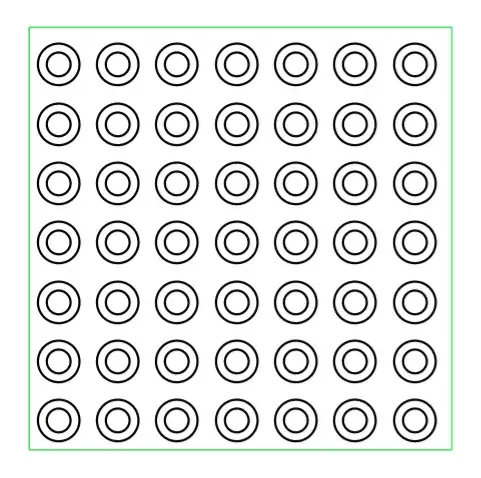
I'm trying to understand \pgfdeclarepatternformonly from page 1064 of the TikZ manual. I'm experimenting with the rings pattern given there as an example. If I compile the example as given, I get the expected result. However, I don't fully understand what the variables are doing. In particular, I don't understand the effect of radius.
\documentclass[tikz]{standalone}
\usetikzlibrary{patterns}
\begin{document}
  % page 1064 of manual
  \pgfdeclarepatternformonly[/tikz/radius,\thickness,\size]{rings}
  {\pgfpoint{-0.5*\size}{-0.5*\size}}
  {\pgfpoint{0.5*\size}{0.5*\size}}
  {\pgfpoint{\size}{\size}}
  {
    \pgfsetlinewidth{\thickness}
    \pgfpathcircle\pgfpointorigin{\pgfkeysvalueof{/tikz/radius}}
    \pgfusepath{stroke}
  }
  \newdimen\thickness
  \tikzset{
    radius/.initial=4pt,
    size/.store in=\size, size=20pt,
    thickness/.code={\thickness=#1},
    thickness=0.75pt
  }

  \begin{tikzpicture}[rings/.style={pattern=rings}]
    \filldraw [draw=blue, rings] (0,0) rectangle +(5,5);
    \filldraw [draw=green, rings, radius=7pt] (0,0) rectangle +(5,5);
  \end{tikzpicture}
\end{document}
Possibly rather simple-mindedly, I expected that changing the radius would alter the size of the circles drawn. However, that appears not the be the case. That is, if I comment the second pattern line, I get precisely the same looking pattern but in blue, rather than a pattern with smaller circles as I would have expected. (If I set opacity=.5 for the second line, I get blue-green circles as the green is superimposed precisely over the blue.)
So what is radius doing exactly?




radius/.initialinstead ofradius. – Mar 08 '15 at 23:25