I'm trying have a line that spans the width of the page after my name and title. Something that looks similar to this:

I am hoping that there's a document class that will allow me to do it easily, however I've been unable to find anything so far.
I'm trying have a line that spans the width of the page after my name and title. Something that looks similar to this:
I am hoping that there's a document class that will allow me to do it easily, however I've been unable to find anything so far.
For a generic title-separating rule you can use

\documentclass{article}
\title{My title \endgraf\rule{\textwidth}{.4pt}}
\author{My author}
\date{\today}
\begin{document}
\maketitle
\end{document}
There's also a patch of \@maketitle possible via etoolbox:
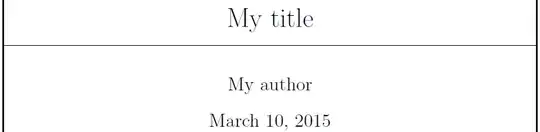
\documentclass{article}
\usepackage{etoolbox}
\makeatletter
\patchcmd{\@maketitle}% <cmd>
  {\vskip 1.5em}% <search>
  {\rule{\textwidth}{.4pt}\par\vskip 1.5em}% <replace>
  {}{}% <success><failure>
\makeatother
\title{My title}
\author{My author}
\date{\today}
\begin{document}
\maketitle
\end{document}
And then there's also just a straight \underline:

\documentclass{article}
\title{\underline{\makebox[\textwidth]{My title}}}
\author{My author}
\date{\today}
\begin{document}
\maketitle
\end{document}
Alternatively, you don't really have to use \maketitle. You can just create your own title that matches the original definition of \@maketitle in article.cls:
\def\@maketitle{%
  \newpage
  \null
  \vskip 2em%
  \begin{center}%
  \let \footnote \thanks
    {\LARGE \@title \par}%
    \vskip 1.5em%
    {\large
      \lineskip .5em%
      \begin{tabular}[t]{c}%
        \@author
      \end{tabular}\par}%
    \vskip 1em%
    {\large \@date}%
  \end{center}%
  \par
  \vskip 1.5em}
\fi
So, for example, perhaps something like:

\documentclass{article}

\begin{document}

% Your title here...
\vspace*{2em}% http://tex.stackexchange.com/q/33370/5764
\begin{center}
  {\LARGE My title \par}
  \hrulefill\par
  \vspace{1.5em}
  {\large My author \par
  \vspace{1em}
  \today \par}
\end{center}
\par
\vspace{1.5em}

\end{document}
...and obviously many more options...

\author{\makebox[\dimexpr\textwidth-2\tabcolsep]{\underline{\makebox[\textwidth]{My author}}}}. The difference between the \title and the \author is that the latter is actually set inside a tabular; so there's \tabcolseps involved.
– Werner
Mar 10 '15 at 19:17

\documentclassare you using? – Werner Mar 10 '15 at 18:14\\\null\hrulefill\null\\? – Bordaigorl Mar 10 '15 at 18:36