Using TexLive 2014 (updated today) on Windows 7 the following code compiles using XeLaTeX and LuaLaTeX:
\documentclass{article}
\usepackage{fontspec}

\setmainfont[
Extension = .otf,
Path=otf/,
UprightFont = {*},
ItalicFont = {*-Italic},
BoldFont = {*-Bold},
BoldItalicFont = {*-Bold-Italic},
UprightFeatures = {%
    SizeFeatures={%
        {Size={-8.9},Font={*-Caption}},
        {Size={8.91-14.9},Font={*}},
        {Size={14.91-22.9},Font={*-Subhead}},
        {Size={22.91-},Font={*-Display}},
    },
},
ItalicFeatures = {%
    SizeFeatures={%
        {Size={-8.9},Font={*-Italic-Caption}},
        {Size={8.91-14.9},Font={*-Italic}},
        {Size={14.91-22.9},Font={*-Italic-Subhead}},
        {Size={22.91-},Font={*-Italic-Display}},
        },
    },
    BoldFeatures = {%
        SizeFeatures={%
            {Size={-8.9},Font={*-Bold-Caption}},
            {Size={8.91-14.9},Font={*-Bold}},
            {Size={14.91-22.9},Font={*-Bold-Subhead}},
            {Size={22.91-},Font={*-Bold-Display}},
        },
    },
    BoldItalicFeatures = {%
        SizeFeatures={%
            {Size={-8.9},Font={*-Bold-Italic-Caption}},
            {Size={8.91-14.9},Font={*-Bold-Italic}},
            {Size={14.91-22.9},Font={*-Bold-Italic-Subhead}},
            {Size={22.91-},Font={*-Bold-Italic-Display}},
        },
    },
]{Garamond-Premier-Pro}

\begin{document}

\section{Embedding Optical Sizes Test}

\tiny
\begin {itemize}
 \item {\rmfamily \upshape Hello World!}
 \item {\rmfamily \upshape \bfseries Hello World!}
 \item {\rmfamily \itshape Hello World!}
 \item {\rmfamily \itshape \bfseries Hello World!}
 \item {\rmfamily \scshape Hello World!}
\end {itemize}

\scriptsize
\begin {itemize}
 \item {\rmfamily \upshape Hello World!}
 \item {\rmfamily \upshape \bfseries Hello World!}
 \item {\rmfamily \itshape Hello World!}
 \item {\rmfamily \itshape \bfseries Hello World!}
 \item {\rmfamily \scshape Hello World!}
\end {itemize}

\small
\begin {itemize}
 \item {\rmfamily \upshape Hello World!}
 \item {\rmfamily \upshape \bfseries Hello World!}
 \item {\rmfamily \itshape Hello World!}
 \item {\rmfamily \itshape \bfseries Hello World!}
 \item {\rmfamily \scshape Hello World!}
\end {itemize}

\normalsize
\begin {itemize}
 \item {\rmfamily \upshape Hello World!}
 \item {\rmfamily \upshape \bfseries Hello World!}
 \item {\rmfamily \itshape Hello World!}
 \item {\rmfamily \itshape \bfseries Hello World!}
 \item {\rmfamily \scshape Hello World!}
\end {itemize}

\large
\begin {itemize}
 \item {\rmfamily \upshape Hello World!}
 \item {\rmfamily \upshape \bfseries Hello World!}
 \item {\rmfamily \itshape Hello World!}
 \item {\rmfamily \itshape \bfseries Hello World!}
 \item {\rmfamily \scshape Hello World!}
\end {itemize}

\Large
\begin {itemize}
 \item {\rmfamily \upshape Hello World!}
 \item {\rmfamily \upshape \bfseries Hello World!}
 \item {\rmfamily \itshape Hello World!}
 \item {\rmfamily \itshape \bfseries Hello World!}
 \item {\rmfamily \scshape Hello World!}
\end {itemize}

\LARGE
\begin {itemize}
 \item {\rmfamily \upshape Hello World!}
 \item {\rmfamily \upshape \bfseries Hello World!}
 \item {\rmfamily \itshape Hello World!}
 \item {\rmfamily \itshape \bfseries Hello World!}
 \item {\rmfamily \scshape Hello World!}
\end {itemize}

\Huge
\begin {itemize}
 \item {\rmfamily \upshape Hello World!}
 \item {\rmfamily \upshape \bfseries Hello World!}
 \item {\rmfamily \itshape Hello World!}
 \item {\rmfamily \itshape \bfseries Hello World!}
 \item {\rmfamily \scshape Hello World!}
\end {itemize}

\end{document}
I use latexmk to compile the above code:
latexmk -outdir=tmp -xelatex <source.tex>
and
latexmk -outdir=tmp -lualatex <source.tex>
Both commands finish successfully. I opened the two pdf files using adobe reader and examined their properties: Each pdf file contains the embedded optical sizes (caption, regular, subhead, ...). If I open the pdf files using adobe acrobat and highlight a letter or a word, the tool column (edit/insert text) shows the highlighted letters' fontname, where the difference gets obvious: The pdf compiled with XeLaTeX shows the correct fontname, including optical sizes. The pdf compiled with LuaLaTeX shows "regular" for all letters.
The pdf resulting from XeLaTeX seems fine. Is it possible that LuaLaTeX just embeds the optical sizes (e.g. updates the pdf-internal font list), but uses only the font's regular size?
Update
The following screenshots should clarify the differences. The first one shows the result using XeLaTeX:
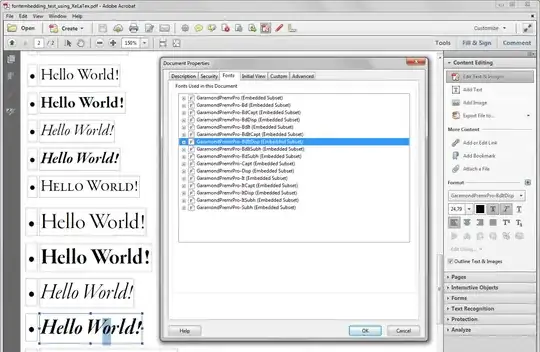
The following shows the result using LuaLaTex:

Having a look on the properties both pdf files seem to contain the same font set (the list of embedded fonts is identical). But if you have a look on the highlighted "o" Acrobat (Standard Ed.) reports for the XeLaTex-PDF the detailed (correct?) font shape and size ("...-BdItDisp"), where Acrobat (Standard Ed.) reports for the LuaLaTeX-PDF only the basic font ("Garamond Premr Pro") - of course the buttons italic and bold are highlighted, but something seems to be wrong with one of the involved components, my setup, or my usage, ...
Note: I cleaned (removed all files) from the luatex-cache (C:\texlive\2014\texmf-var\luatex-cache), before I produced the above screenshots.
12pt, notfontsize=12pt, 2) you have an extra\end{itemize}, and 3) the files names of the fonts are wrong, unless you or Adobe have renamed them. When you make the corrections, I think your question will be more or less reducible to the one at https://tex.stackexchange.com/q/114223/7883 If you want optical sizes, install the fonts (and use the much simpler invocation of\setmainfont{}that’s possible when fonts are installed). – Thérèse Mar 17 '15 at 00:13\setmainfont, and 2) the log confirms that the fonts were loaded from the desired location. Furthermore, since the installed fonts haven't been renamed, deleting the path specification leads to a "font-not-found" error. – Jura Pintar Mar 20 '15 at 15:06\setmainfont{Garamond Premier Pro}results in: "Garamond Premr Pro Capt" (Icon for Bold highlighted) running the same through xelatex Acrobat shows: "Garamond Premr Pro SmBd" (of course icon Bold is not highl.) - yes, it's puzzling. (Do I have to clean caches etc. pp.?) – Mar 20 '15 at 20:01