The code is
\documentclass{article}

\begin{document}
\renewcommand{\theenumi}{\alph{enumi})}
\begin{enumerate}
\item The first item
\item The second item
\end{enumerate}
\end{document}
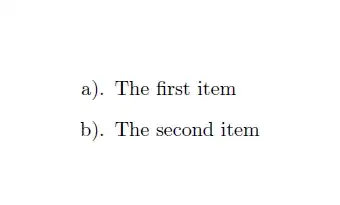
There is a small dot behind a) b). So how to remove it?
The code is
\documentclass{article}
\begin{document}
\renewcommand{\theenumi}{\alph{enumi})}
\begin{enumerate}
\item The first item
\item The second item
\end{enumerate}
\end{document}
There is a small dot behind a) b). So how to remove it?

Use the enumitem package to format lists:
\documentclass{article}
\usepackage{enumitem}
\begin{document}

\begin{enumerate}[label={\alph*)}]
\item The first item
\item The second item
\end{enumerate}
\end{document}
To make all enumerate lists look like this (so you don't have to add the label specification to each one), you can add:
\setlist[enumerate]{label=\alph*)}
which will make all enumerate lists look like this. If you only want this format for a particular level of the list, you can add a level number to the optional argument:
\setlist[enumerate,1]{label=\alph*)}
This will make only the first level have this format.

Two more alternatives. One using basic principles and redefinitions from article.cls:

\documentclass{article}

\renewcommand{\theenumi}{\alph{enumi}}
\renewcommand{\labelenumi}{\theenumi)}

\begin{document}

\begin{enumerate}
  \item The first item
  \item The second item
\end{enumerate}

\end{document}
...and using the older enumerate package:
\documentclass{article}

\usepackage{enumerate}

\begin{document}

\begin{enumerate}[a)]
  \item The first item
  \item The second item
\end{enumerate}

\end{document}
