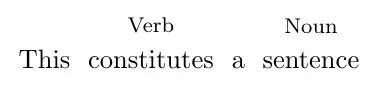
The text effects along path decoration may be useful if you want to go further with braces and arrows or drawing around the text in general. The decoration takes a bit of setting up, but it can be customised in quite useful ways, and ultimately a lot of the work can be tidied up in styles.
\documentclass[tikz,border=5]{standalone}
\usetikzlibrary{decorations.text, decorations.pathreplacing}
\begin{document}
\begin{tikzpicture}
\path [decoration={text effects along path,
  text=The quick brown fox jumps over the lazy dog,
  text effects/.cd,
    path from text, text along path,
    group letters, word count=\w,
    every word/.style={name=word-\w, execute at begin node=\strut}},
  decorate] (0,0);

\foreach \pos [count=\i] in {Det, Adj, Adj, Noun, Verb, Prep, Det, Adj, Noun}
  \node [above=1ex, font=\footnotesize\strut] at (word-\i) {\pos};

\draw [decoration={brace, mirror}, decorate]
   (word-1.south west) -- (word-4.south east)
      node [midway, below] {Noun Phrase};

\draw [decoration={brace, mirror}, decorate]
   (word-7.south west) -- (word-9.south east)
      node [midway, below] {Noun Phrase};
\end{tikzpicture}
\end{document}

And here is one way of tidying things up in styles...
\documentclass[tikz,border=5]{standalone}
\usetikzlibrary{decorations.text, decorations.pathreplacing}
\tikzset{%
  mark text/.style args={"#1" using #2}{
    decoration={text effects along path,
      text={#1},
      text effects/.cd,
        path from text, text along path,
        group letters, word count=\w,
        every word/.style={name=word-\w, execute at begin node=\strut},
        above word/.style args={##1:##2}{word ##1/.style={label=above:{##2}}},
        %
        #2
    },
    decorate,
    insert path={(0,0)}
  }
}
\begin{document}
\tikz\path [mark text={"The quick brown fox jumps over the lazy dog" using
     above word={1:Det},
     above word={5:Verb},
     above word={9:Noun}
   }];
\end{document}