3

I am trying to adapt this example How to iterate over a comma separated list? as my base. Except, rather than display all values, I actually want to iterate through all the values and only return / display the largest one.

The list of numbers I actually want to pass to a custom function will actually be glossaries labels. I have tested it and I can insert \gls{label} into a command like \clist_map_inline:nn { #1 } {\glsentryname{##1} } This works right away to display a list of my expanded values (which are actually numbers) so I am not worried about this part.

I haven't been able to figure out yet:

  1. How can I stop this function from typsetting the text, but rather allow me to iterate through the list update a variable only displaying the final value?

    • For example at the start of the loop I would set a dummy value such as -100000
    • and the comparison would compare ##1 iteratively with the dummy variable.
    • With a function call such as a call to my macro \pickGE included below I would then return and update the value if the value in the list is greater than the dummy.
  2. What approach would be appropriate to setup a dummmy variable that can be updated in this context

  3. How would I finally report this final selected value.
    • I would like to wrap this final value in a \num[scientific-notation = fixed, fixed-exponent = 0, group-digits=false]{} call.

The complete MWE I want to insert

\documentclass{article}
\usepackage{fp}
\usepackage{siunitx}
\usepackage{xparse}
\ExplSyntaxOn

\NewDocumentCommand{\findLargest}{ m }
 {
  \begin{enumerate}
  \clist_map_inline:nn { #1 } { \item \fbox{##1} }
  \end{enumerate}
 }

\ExplSyntaxOff

\newcommand{\pickGE}[2]{%
    \ifboolexpr{test {\ifdimgreater{{#1} pt}{{#2} pt}}}%
    {%
        \FPeval{result}{{#1}}%
    }% true
    {%
        \FPeval{result}{{#2}}%
    }% false
}


\begin{document}

\findLargest{1, 2 ,3 6, 3,1}

\end{document}

Limitations

  • I am committed to using XeLaTeX
  • I may be misremembering but I also have a vague recollection that siunitx had something to do this directly...
  • I am happy to use any other package or approach much like the one employed here (that I wasn't able to make work with my glossaries labels Iterating through comma-separated arguments
  • I am not limited to only comma separated lists but based on the shear volume of questions this looked like a good way to go.
EngBIRD
  • 3,985
  • A quick peruse of the package pgfplotstable http://texdoc.net/texmf-dist/doc/latex/pgfplots/pgfplotstable.pdf showed me that it can input from csv format and can find the max of values inputted. I have not used this package and only spend about 3 minutes looking for a possible tool. – R. Schumacher Apr 11 '15 at 18:56

1 Answers1

6

Use the max function provided by expl3 in the fp module:

\documentclass{article}
\usepackage{xparse}
\ExplSyntaxOn

\NewDocumentCommand{\findLargest}{ om }
 {
  \IfNoValueTF{#1}
   {% separator is a comma, directly use \fp_eval:n { max ( #2 ) }
    \engbird_compute_max:n { #2 }
   }
   {% we need to pass the separator
    \engbird_find_largest:nn { #1 } { #2 }
   }
 }

\seq_new:N \l_engbird_largest_seq
\tl_new:N \l_engbird_largest_tl

\cs_new_protected:Npn \engbird_find_largest:nn #1 #2
 {
  % split the input at the stated separator
  \seq_set_split:Nnn \l_engbird_largest_seq { #1 } { #2 }
  % build a comma separated list
  \tl_set:Nx \l_engbird_largest_tl { \seq_use:Nn \l_engbird_largest_seq {,} }
  % compute the max
  \engbird_compute_max:V \l_engbird_largest_tl
 }
% syntactic sugar
\cs_new:Npn \engbird_compute_max:n #1
 {
  \fp_eval:n { max (#1) }
 }
\cs_generate_variant:Nn \engbird_compute_max:n { V }

\ExplSyntaxOff

\begin{document}

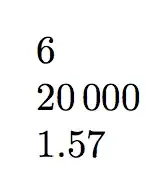
\findLargest{1, 2 ,3, 6, 3,1}

\findLargest[;]{ 1.5 ; sqrt(2) ; pi/2 }

\end{document}

enter image description here

If you want to use \num and you don't need different separators, here's a way, that also allows to override the options passed by default to \num:

\documentclass{article}
\usepackage{xparse}
\usepackage{siunitx}
\ExplSyntaxOn

\NewDocumentCommand{\findLargest}{ O{}m }
 {
  \num[
    scientific-notation = fixed,
    fixed-exponent = 0,
    group-digits=false,
    #1
  ] { \engbird_compute_max:n { #2 } }
 }

\cs_new:Npn \engbird_find_largest:nn #1 #2
 {
  \engbird_compute_max:V \l_engbird_largest_tl
 }
% syntactic sugar
\cs_new:Npn \engbird_compute_max:n #1
 {
  \fp_eval:n { max (#1) }
 }
\cs_generate_variant:Nn \engbird_compute_max:n { V }

\ExplSyntaxOff

\begin{document}

\findLargest{1, 2 ,3, 6, 3,1}

\findLargest[group-digits=true]{10000,20000}

\findLargest[round-mode=places]{ 1.5, sqrt(2), pi/2 }

\end{document}

enter image description here

egreg
  • 1,121,712
  • Thanks this works perfectly. I checked xparse for documentation but didn't find anything about \cs type structure. Where can I go to learn more about this syntax? – EngBIRD Apr 11 '15 at 21:10
  • @EngBIRD You should do texdoc expl3 – egreg Apr 11 '15 at 21:13
  • Awesome, I will look into this. One more small question. When I am programming in a language that doesn't handle scope well, or has limited capabilities to update or redefine the variable in function arguments, I prefer to save to a variable that will be able to be updated and remain accessible without posing scope problems. Eg. in this answer makes continuous reference to #1 and #2. If I were to expand these functions to more dynamically process 1 and 2 and update their values would I be correct in assuming that #1 can't be updated, but could be copied into another defined variable? – EngBIRD Apr 11 '15 at 21:20
  • @EngBIRD I couldn't understand a word, sorry. – egreg Apr 11 '15 at 21:21
  • My preferred approach upon entering a custom function or macro would be to use the current index (i.e element of the string parsed and subsequently iterated through) to another variable, i.e. tmp so that it can be used in decisions prior to the max(#2) evaluation itself. Specifically, I might want to parse the #2 or tmp to determine if it is a valid gls label so that I can accept manually entered numbers as well as numbers retrieved by gls. If a glslabel is found, I would update the variable with the result of glsentryname{tmp} – EngBIRD Apr 11 '15 at 21:29
  • @EngBIRD Sorry, but this is too vague. What has \glsentryname to do with \num? – egreg Apr 11 '15 at 21:48
  • My apologies. I will post this as a distinct and new question, I wasn't able to provide sufficient details in the short comments. Sorry for the confusion but thank you for your consideration. – EngBIRD Apr 11 '15 at 21:50